
Preview





Description
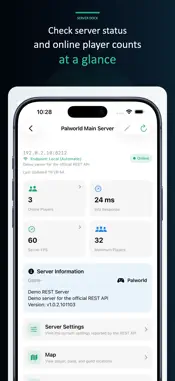
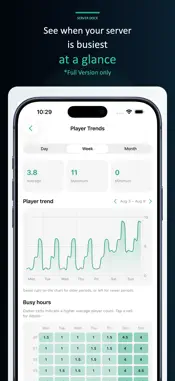
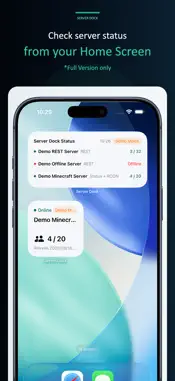
Palworld, Minecraft Java—and even the apocalypse. Server Dock is an unofficial app for monitoring and managing dedicated game servers and their Linux or Windows hosts from iPhone and iPad. Monitor Palworld, Minecraft Java Edition, 7 Days to Die, and SSH hosts—all in one app. You can manage the servers. The zombies, unfortunately, are beyond our control. Supported Connections • Palworld: REST API / RCON • Minecraft Java Edition: Server List Ping / RCON • 7 Days to Die: Telnet / game query • Linux and Windows hosts: SSH Key Features • Availability, response times, player counts, and server details • Player lists, moderation, and ban management • Connection diagnostics • Local and VPN destinations • Multiple servers, favorites, custom ordering, and bulk refresh • Game-based and host-based layouts • Standard and compact display modes • Manual and foreground automatic refresh • Player and server FPS trends • Home Screen widgets with direct refresh • iCloud settings backups • Auto-Lock prevention and a screen saver SSH Host Management Register Linux and Windows machines and monitor CPU, memory, disk usage, uptime, latency, OS information, and resource history. Link game servers to their hosts, organize parent and child hosts, and check which servers will be affected before restarting or shutting down a machine. Monitor and control systemd units and Windows Services, check their status, and view supported logs through SSH. Palworld The REST API provides player information, server settings, metrics, Game Data, and a simplified server map. Record server FPS on-device and view its history. RCON supports player retrieval, messages, world saves, kick, ban, unban, server stop, and custom commands. Game Data features require the server’s Game Data API. Minecraft Java Edition Server List Ping checks availability, version, MOTD, player counts, and response time without a password. Adding RCON enables player lists, world saves, messages, kick, ban, unban, server stop, and custom commands. If the server does not publish player names, only the player count is shown. 7 Days to Die Use Telnet to check the server version, players, in-game time, and the next Blood Moon. Player details can include IDs, IP address, ping, level, statistics, and coordinates. Supported servers can save the world, send messages, manage players and bans, shut down normally, and run Telnet commands. The live console offers raw and summarized logs, search, auto-scroll, pause, automatic reconnection, and command entry. Free Version The free version supports one game server with manual refresh, status monitoring, player information, and supported moderation actions. Full Version The Full Version is a one-time purchase. It unlocks multiple servers, SSH host addition and management, automatic and bulk refresh, widgets, server-wide operations, ban history, Palworld Game Data and maps, player and server FPS trends, iCloud backups, automatic Local/VPN switching, Auto-Lock prevention, and the screen saver. For 7 Days to Die, it also unlocks world status, the player coordinate map, world saves, messages, normal shutdown, and the live console. Before You Begin Server Dock requires supported dedicated servers and SSH hosts that you manage. Features vary by game, connection method, operating system, and server configuration. Automatic refresh runs while Server Dock is visible. Only Minecraft Java Edition is supported. Bedrock Edition, TPS history, and plugin integrations are not supported. Palworld REST API, RCON, and 7 Days to Die Telnet do not encrypt traffic. Never expose management ports directly to the internet. Use a trusted LAN or a properly configured VPN such as WireGuard or Tailscale. Server Dock is unofficial and is not affiliated with or endorsed by Pocketpair, Inc., Microsoft, Mojang Studios, or the teams behind supported games. Games and server software are not included.
What's New
Version 2.0.3 2026-10-24
Server Dock 2.0.3 builds on the major 2.0 update, expanding management beyond game servers to the Linux and Windows hosts that run them. • Add and manage Linux... Technical Analysis
Package Overview Basic metadata
Bundle ID
com.moku3.palservermanager Current Version 2.0.3
Minimum iOS 18.0
Package Size App Store Size
Package Metadata 0 / 0 version records
Detailed binary, privacy manifest, framework, and Info.plist results have not been indexed for this package yet. The verified App Store and archive metadata above remains available.
Known Version Records
0 version records with stored package metadata
Stored metadata does not guarantee a package is currently available to download.
| Details | Version / IDs | Version date | Action |
|---|