
Preview




Description
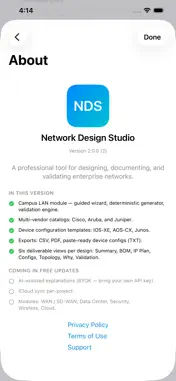
Network Design Studio turns hours of switch-by-switch spreadsheeting and Visio drag-drop into a guided workflow that covers every domain of an enterprise network. Pick a module — Campus, WAN, Data Center, Security, Wireless, or Cloud — answer a short wizard, and the app produces a complete design package you can hand to procurement and to the engineer deploying it. SIX MODULES - Campus LAN — single-site wired/wireless. Single switch, small branch, medium office with HA, or large 3-tier campus. HQ, branch, retail, healthcare, education, warehouse site kinds. - WAN / SD-WAN — multi-site designs. Hub-and-spoke, dual-hub, full-mesh, or hybrid. Classic routing or controller-managed SD-WAN over MPLS, broadband, fiber, LTE, 5G, or Starlink. - Data Center — spine-leaf fabrics with VXLAN/EVPN. Multi-tenant VRFs. Rack elevation diagrams. - Security — zone segmentation and policy. Perimeter, zero-trust, or defense-in-depth. Compliance patterns for PCI-DSS, HIPAA, NIST 800-53, SOC 2, FedRAMP, ISO 27001, CMMC, GDPR. - Wireless — AP planning by density profile. Wi-Fi 6 / 6E / 7. Multi-SSID with 802.1X / PSK / captive portal. - Cloud / Hybrid — on-prem-to-cloud connectivity for AWS, Azure, Google Cloud, Oracle, IBM. Direct VPN, transit gateway, full mesh, or hybrid SD-WAN. EVERY MODULE PRODUCES - Logical topology diagram, color-coded links, pinch-to-zoom. - Bill of Materials with real part numbers and list pricing. Export as CSV. - IP / VLAN plan sized for your user count. - Device configurations in the chosen vendor's CLI — Cisco IOS-XE / NX-OS, Aruba AOS-CX, Juniper Junos, Fortinet, Palo Alto. Paste-ready. - Validation report with severity-tagged findings and remediation. - Design rationale — a "Why" explanation for every engine decision. - Multi-page PDF design document. MODULE-SPECIFIC EXPORTS - Cable Schedule CSV (Campus / DC / WAN) — port hints, fiber type, carrier hand-off specs. - SD-WAN controller policy templates — vManage, EdgeConnect Orchestrator, Mist, FortiManager, Prisma SD-WAN. - Infrastructure-as-Code starters (Cloud) — Terraform, Bicep, Pulumi TypeScript, AWS CDK. OPTIONAL AI (Bring Your Own Key) - Wizard help, Explain, and Critique — all opt-in, all cached in the project file. - 13 supported providers: OpenAI, Anthropic, Google Gemini, Mistral, Cohere, DeepSeek, xAI, Groq, Together AI, Fireworks AI, Perplexity, OpenRouter, plus a custom OpenAI-compatible endpoint adapter (Azure OpenAI, Bedrock, Ollama, LM Studio). The design generator is deterministic — same inputs always produce the same design. AI commentates; the engine still owns every BOM line, every config, every link. CUSTOMIZATION - Custom Device Catalog — add your own switches, routers, APs. Custom entries can override bundled devices to reflect your real distributor pricing. IN-APP REFERENCE - Knowledgebase — networking fundamentals, architectures, technologies, vendors, glossary. Fully offline. - How To Use Network Design Studio — every wizard step diagrammed, every option explained. UNIVERSAL APP One purchase. iPhone, iPad, and Mac — all from the same App Store listing, synced to your Apple ID. All the modules of this app is now offered for a one-time flat fee. PRIVACY Your designs live in your project files, on your device. We do not track you and we do not collect data. If you enable AI features, requests run through your own API key with your chosen provider — we never see or proxy them. NOT A REPLACEMENT FOR YOUR JUDGMENT Network Design Studio is a design aid. Every generated diagram, BOM, and config should be reviewed by a qualified engineer before deployment. Designed for working network engineers and architects.
What's New
Version 3.0.0 2026-05-18
All the modules of this app is now offered for a one-time flat fee. Technical Analysis
Package Overview Basic metadata
Bundle ID
com.networkdesignstudio.nds Current Version 3.0.0
Minimum iOS 17.0
Package Size App Store Size
Package Metadata 1 / 3 version records
Detailed binary, privacy manifest, framework, and Info.plist results have not been indexed for this package yet. The verified App Store and archive metadata above remains available.
Price History (USA store)
4 recorded price change points. These are historical observations, not a guarantee of the current price.
| Recorded at | Price | Currency |
|---|---|---|
| 2.99 | USD | |
| 5.99 | USD | |
| 2.99 | USD | |
| 5.99 | USD |
Developer Information
Known Version Records
1 version record with stored package metadata • 3 known version records
Stored metadata does not guarantee a package is currently available to download.
| Details | Version / IDs | Version date | Action |
|---|---|---|---|
| 7.66 MB | v3.0.0 App Store ID: 885794837Build: 3.0.0 | 2026-05-18 16:06:44 | Paid / Arcade |
| Not archived | App Store ID: 884998509 | Unknown | Paid / Arcade |
| Not archived | App Store ID: 884916979 | Unknown | Paid / Arcade |