
Preview


Description
One tap to focus, and your countdown stays live on the Lock Screen and in the Dynamic Island (on supported iPhones). TIMER • Classic 25-minute Pomodoro. Set your own focus, short break, and long break lengths. A break starts automatically after focus by default. • Count-up mode too: the timer counts up from zero. Tap Done to log the real time; sessions under 1 minute do not count. It shows on the Lock Screen and in the Dynamic Island as well. • Landscape layout. • White noise while you focus. Four sounds: Lake Breeze, Soft Rain, Spring Forest, Pine Wind. TASKS AND TAGS • Make a to-do list, pick the task to focus on, and see how many Pomodoros each task takes. • Pick a tag before you start (defaults: Coding, Study, Writing, Reading, Meeting, or add your own). Stats show where your time goes. GOALS AND REMINDERS • Set a daily goal. The stats page shows today's count and your streak. • A daily reminder. If you have a streak and have not focused by 8 PM, you get a nudge to keep it going. Turn reminders off in Settings. STATS • See focus time for today, this week, and this month, plus a 7-day trend. WIDGETS, SIRI, AND SHORTCUTS • Home Screen and Lock Screen widgets show your timer status. • Works with Siri and Shortcuts. TOMATO COLLECTION • Finish Pomodoros, build streaks, and play through the seasons to collect different tomatoes. 12 in all; the first 3 are free, and the other 9 need Pro. PRO (OPTIONAL) • Unlock all 12 tomatoes on the collection wall. • Long-term stats: monthly hours for the last 12 months, this year's total, your top focus hours, and your longest streak. • No ads, 4 extra themes, and CSV export of your stats. • Choose a monthly or yearly subscription, or a one-time lifetime purchase. Prices follow your App Store region. No free trial. • Subscriptions renew automatically unless you cancel at least 24 hours before the period ends. Payment is charged to your Apple ID when you confirm the purchase, and the renewal is charged within 24 hours before the period ends. Cancel anytime in Settings → your name → Subscriptions. The lifetime purchase never renews. • Open Pro from the top of Settings. Restore Purchases is on the Pro screen. • The free version has ads. The timer, tasks, tags, white noise, and widgets are free to use. Terms of Use: https://www.apple.com/legal/internet-services/itunes/dev/stdeula/ Privacy Policy: https://keeponfirst.com/pomodoro_privacy
What's New
Version 1.0.11 2026-10-26
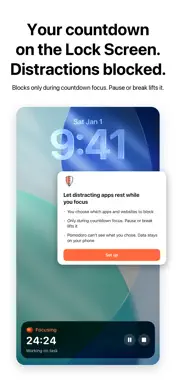
• Focus Blocking: pick the apps and sites that pull you away. They are blocked only during a focus countdown. Pause or take a break, and they open again. Needs ... Technical Analysis
Package Overview Basic metadata
Bundle ID
com.keeponfirst.pomodoro Current Version 1.0.11
Minimum iOS 17.0
Package Size App Store Size
Package Metadata 0 / 6 version records
Detailed binary, privacy manifest, framework, and Info.plist results have not been indexed for this package yet. The verified App Store and archive metadata above remains available.
Developer Information
Known Version Records
0 version records with stored package metadata • 6 known version records
Stored metadata does not guarantee a package is currently available to download.
| Details | Version / IDs | Version date | Action |
|---|---|---|---|
| Not archived | App Store ID: 886964723 | Unknown | Request Version |
| Not archived | App Store ID: 885306857 | Unknown | Request Version |
| Not archived | App Store ID: 881056473 | Unknown | Request Version |
| Not archived | App Store ID: 880936319 | Unknown | Request Version |
| Not archived | App Store ID: 880827486 | Unknown | Request Version |
| Not archived | App Store ID: 880679801 | Unknown | Request Version |