Preview




Description
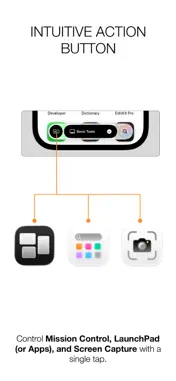
[ Note: This app requires 'Dock Float' for Mac to be installed on your Mac. ] Control 'Dock Float'—the powerful custom launcher for Mac—right at your fingertips. Dock Float Remote transforms your iPhone and iPad into a dedicated wireless macro pad for your Mac. No need to buy expensive external hardware. Simply tap your iPad screen on your desk to launch Mac apps and open essential files or folders instantly. Expand your workstation beyond desktop screen limits into a unified mobile ecosystem. Features ■ All Your Mac Docks in Your Hands Custom Docks created on your Mac sync to your mobile screen in real time. Effortlessly swipe between multiple Docks to find the exact tools you need. ■ One-Touch Instant Launch No complex mouse movements or memorizing keyboard shortcuts required. Just tap an icon on your mobile screen to launch Mac apps or open designated documents and folders immediately. ■ Custom Action Buttons Boost your workflow with dedicated system control 'Action Buttons'. Assign your most frequently used functions to control your Mac intuitively: - Mission Control - Launchpad or Apps (supported on macOS 26 or higher) - Screen Capture ■ Tailored Display Modes Choose between Standard or Large icon modes to best match your device screen size (iPhone/iPad) and personal touch preference. ■ Always-On Macro Keypad (Keep Awake Mode) Enable the 'Keep Your iPhone/iPad Awake' option while connected to power to prevent your screen from turning off. Use it as an always-ready touch control center—just like a high-end hardware macro keypad. Download Dock Float Remote today and supercharge your Mac workflow! (This app operates on the same Wi-Fi or local network as your Mac.) ■ System Requirements - Prerequisite: Requires Dock Float for macOS installed on your Mac. - Network: Mac and iOS devices must be connected to the same Wi-Fi network. - Compatibility: Requires iOS/iPadOS 18.6 or higher.
What's New
Version 1.0.3 2026-10-16
Minor bug fixes and improvements. Technical Analysis
Package Overview Basic metadata
Bundle ID
com.hohoinc.com.DockFloat.iOS Current Version 1.0.3
Minimum iOS 18.6
Package Size App Store Size
Package Metadata 0 / 0 version records
Detailed binary, privacy manifest, framework, and Info.plist results have not been indexed for this package yet. The verified App Store and archive metadata above remains available.
Developer Information
Known Version Records
0 version records with stored package metadata
Stored metadata does not guarantee a package is currently available to download.
| Details | Version / IDs | Version date | Action |
|---|