
Preview




Description
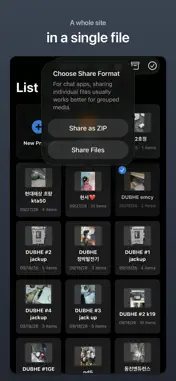
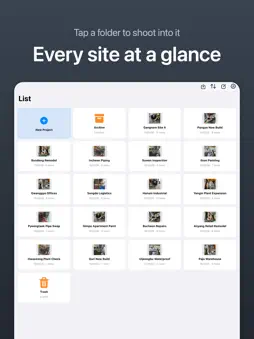
Jobsite photos, filed the moment you take them. ProjectSnap is a camera for people who document construction and maintenance work. Photos are not sorted afterwards — they arrive already sorted. ■ The date and site are burned into the photo Every shot carries the date it was taken and the site it belongs to, written onto the image itself. It survives being forwarded anywhere. Choose date only, site only, both, or off. ■ File names write themselves Photos are saved as site_date_number_photographer. No renaming IMG_1234 one by one at the end of the day. ■ One folder per site Create a folder for each site and every photo goes straight into it. Tap the folder name at the top of the camera to switch sites without closing the camera. ■ Mark the photo itself Stop describing where the defect is — circle it. Draw and add text directly on the photo. The original is never overwritten, and you decide at share time whether the notes go with it. ■ Hand over a whole site at once Send an entire site as a single file. ZIP keeps the folder structure and file names intact, or send loose JPGs when the other side just wants to look. ■ Separate from your photo library Photos live inside the app, so your camera roll does not fill up with work. You can still bring in photos you already took. ■ What a jobsite camera needs • Photo and video — hold the shutter to start recording immediately • Zoom that uses every lens your device has • Press and hold to lock focus and exposure • 4:3, 16:9 and 1:1 framing • Folder lock with a six-digit code or Face ID • Archive and trash • Backup and restore • Shoot from the Lock Screen or Control Centre • iPad support • English, Korean, Japanese, Chinese, Russian Photos are stored on your device. Every feature works without an account.
What's New
Version 2.0.3 2026-11-12
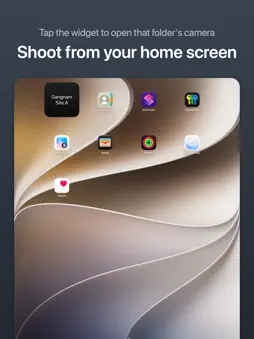
Shoot straight from your home screen, and get two panes when you unfold. • New folder widgets. Put one on the home screen (small) or lock screen (circular or r...Shoot straight from your home screen, and get two panes when you unfold. • New folder widgets. Put one on the home screen (small) or lock screen (circular or rectangular) to see a folder's name; tap it and that folder's camera opens right away. With no folder picked, it follows your top folder (iOS 17 or later) • Entering from the lock-screen camera no longer asks you to unlock the instant it appears. The app opens only when you tap "Open ProjectSnap", and it goes straight to the top folder's camera. Photos taken on the lock screen land in that folder • Unfold iPhone Duo and your folders appear on the left with the camera or album on the right. Tap a folder to shoot, double-tap to open its album, and switching folders mid-shoot doesn't restart the camera. You can turn it off with "Foldable dual-pane layout" in Settings (shown only on foldable devices) • Long-press a folder in Archive to select it, just like on the home screen. Pick several and share, delete or unarchive them in one go • Fixed the folder list looking cramped in narrow windows such as iPad Split View. It now sets the number of columns from the window width • After updating, only the new walkthrough page (widgets) is shown at launch. The full walkthrough is always available in Settings > How to Use Technical Analysis
Package Overview Basic metadata
Bundle ID
com.hayeongwang.projectsnap Current Version 2.0.3
Minimum iOS 17.0
Package Size App Store Size
Package Metadata 0 / 5 version records
Detailed binary, privacy manifest, framework, and Info.plist results have not been indexed for this package yet. The verified App Store and archive metadata above remains available.
Developer Information
Known Version Records
0 version records with stored package metadata • 5 known version records
Stored metadata does not guarantee a package is currently available to download.
| Details | Version / IDs | Version date | Action |
|---|---|---|---|
| Not archived | App Store ID: 888062336 | Unknown | Request Version |
| Not archived | App Store ID: 887955410 | Unknown | Request Version |
| Not archived | App Store ID: 887252194 | Unknown | Request Version |
| Not archived | App Store ID: 886587085 | Unknown | Request Version |
| Not archived | App Store ID: 885781420 | Unknown | Request Version |