
Preview



Description
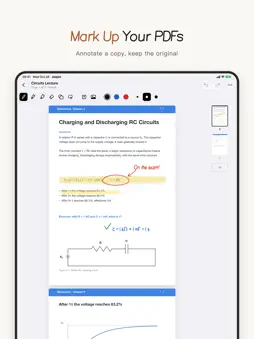
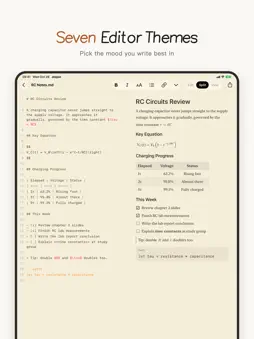
Jeejee is a note-taking and document editor that combines Markdown, LaTeX and handwriting in a single app: Markdown for structured notes, LaTeX for mathematical typesetting and formal reports, and handwriting with Apple Pencil, including annotation directly on lecture PDFs. Documents are stored in the location the user selects. Markdown, LaTeX, HTML, CSV, plain text and PDF remain compatible with other tools that support these formats; handwritten notes are saved as editable .jeejee files. Designed for students, researchers and professionals in science and engineering: class notes, lab reports, theses, derivations and exam preparation. Markdown • Side-by-side editor and preview, synchronized while typing and scrolling • Headings, lists, to-do items, tables, code, quotes and images • Inline and display math • Syntax coloring for code blocks, with optional line wrapping • Function plots that mark zeros, extrema and intersections • Mind maps built from indented lists, viewable in full screen • Heading outline in View mode for long documents • Format bar with common formatting and templates for code, plots and mind maps • Export to PDF or Markdown LaTeX • Built-in typesetting engine that compiles to PDF in the app, offline, with no separate TeX installation • XeLaTeX typesetting with full support for Chinese and Unicode • Automatic recompilation, with error lines clearly indicated • Source and PDF side by side • Export to PDF or LaTeX source Handwriting • Apple Pencil on iPad: pen, pencil, highlighter, eraser, lasso and shape recognition • Three colors and three stroke widths in the toolbar • Blank, ruled, grid and dotted paper in white or black, with multipage notes and page thumbnails • Strokes that continue across page boundaries • Text boxes, images with cropping, and function graphs • Copy, cut and paste for text, images and strokes; up to 100 undo steps • Annotation copies of PDFs, leaving the original unchanged • On iPad, the toolbar can move into the title bar for more writing space • Export as .jeejee files, PDF or page images; save page images to Photos on iPhone and iPad Files • Markdown, LaTeX, HTML, CSV, plain text and handwritten notes; HTML with live preview, CSS and JavaScript • Code files such as .js, .css, .py and .json with syntax coloring • Local, iCloud and System Folder storage, including external folders supported by the system and file providers • List, card and icon views; icons display document content • A preview pane on iPad and Mac shows document content and file details • Select multiple files to share, copy or delete; drag files to Recently Deleted to delete them • Recents, Favorites, drag and drop, and Recently Deleted • Configurable file types for the New menu Designed for iPhone, iPad and Mac • Resizable, docked sidebar on iPad, with a full-screen editor for open documents • Multiple windows, a native sidebar and keyboard shortcuts on Mac • Seven editor themes with Dark Mode • Built-in illustrated user guide Pricing Jeejee is free, with no advertising and no account required. Optional tips in Settings > Support Jeejee do not unlock features and support ongoing development. Privacy • Jeejee does not track users. • Document contents and file names stay in the selected storage location and are not sent to the developer. • Crash reports and usage statistics are collected to improve the app. They exclude document contents and file names, and are not linked to the user's identity. • Tips are processed by Apple; Jeejee does not receive payment information.
What's New
Version 26.10.30 2026-10-31
New • PowerPoint presentations (.pptx): open them and annotate a copy by hand on iPhone, iPad and Mac • Search file contents: text, PDF text and handwriting, in... Technical Analysis
Package Overview Basic metadata
Bundle ID
com.huangyouci.jeejee Current Version 26.10.30
Minimum iOS 17.0
Package Size App Store Size
Package Metadata 0 / 0 version records
Detailed binary, privacy manifest, framework, and Info.plist results have not been indexed for this package yet. The verified App Store and archive metadata above remains available.
Developer Information
Known Version Records
0 version records with stored package metadata
Stored metadata does not guarantee a package is currently available to download.
| Details | Version / IDs | Version date | Action |
|---|