
Preview




Description
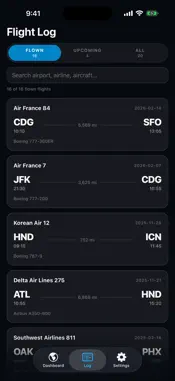
Devil's Chariot analyzes a Flighty CSV export. It imports your flight history and breaks it down into rankings, charts and maps, on the device, with no account and no network connection. The focus is on derived statistics rather than the log itself: itineraries reconstructed from connecting legs, alliance share over time, hub and terminal rankings, aircraft body types, cabin class including budget carriers, red-eyes, and travel pacing. SEGMENTS AND ITINERARIES Both are counted. A segment is one operated leg. An itinerary is a complete journey from origin to final destination, reconstructed by joining legs across layovers of up to eight hours. SFO to DEN to LGA is two segments and one itinerary. Segments and itineraries are ranked separately, and direct and connecting itineraries are listed on their own as well. FLIGHTS OR MILES Every ranked panel switches between the two. Airlines, aircraft, routes, cabin classes and alliances can each be sorted by how often you flew them or by how far. BREAKDOWNS • Alliances: Star Alliance, SkyTeam, Oneworld and unaligned carriers, with each alliance's share plotted year over year • Connection hubs, ranked by layovers rather than departures • Terminals, ranked by visits • Aircraft by body type: wide-body, narrow-body and regional, each expanding to the individual models • Cabin class, counting budget-economy carriers separately from full-service economy • Red-eyes, ranked as their own route list • US states you have landed in, ranked by how many airports in each • Year-to-date pacing, compared against previous years • Flight frenzy: the rolling window in which you flew the most • Flights by year, and cumulative totals over time MAP Routes draw on a rotating globe. Drag to spin, pinch to zoom. Upcoming flights render in green alongside flights already taken. FILTERS Switch between Past, Upcoming and All, or select a single year. Every panel and the globe re-scope together, so all figures describe the same set of flights. OFFLINE AND PRIVATE The app makes no network connections. There is no account, no sign-up and no analytics. The airport dictionary, map geometry and all calculations are bundled in the app, so every screen works without a connection. Flight data is stored on the device only. Deleting the flights in Settings, or deleting the app, removes it entirely. IMPORTING Export a CSV from Flighty: Settings → Account Data → Export your Flights. Flighty emails you the file; save it to Files and import it in the app. Any CSV with the same column headers will import. Try with Sample Data loads a complete example logbook if you want to see the app before importing your own. Devil's Chariot is an independent app. It is not affiliated with, endorsed by, or connected to Flighty.
What's New
Version 1.2 2026-10-20
NEW AIRLINES AND NEW AIRPORTS Two new panels show the airlines and airports you flew for the first time, year by year. Pick a year to see each one and the fligh... Technical Analysis
Package Overview Basic metadata
Bundle ID
com.moochbot.devilschariot Current Version 1.2
Minimum iOS 16.4
Package Size App Store Size
Package Metadata 0 / 0 version records
Detailed binary, privacy manifest, framework, and Info.plist results have not been indexed for this package yet. The verified App Store and archive metadata above remains available.
Known Version Records
0 version records with stored package metadata
Stored metadata does not guarantee a package is currently available to download.
| Details | Version / IDs | Version date | Action |
|---|