Preview






Description
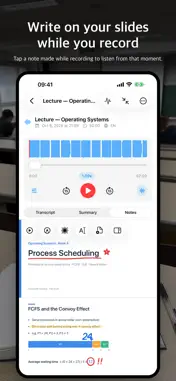
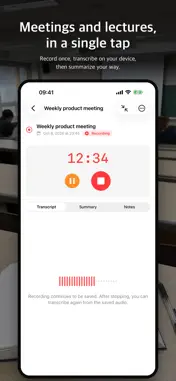
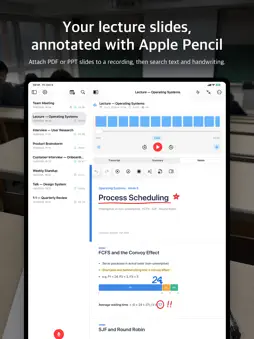
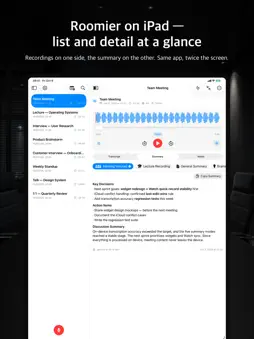
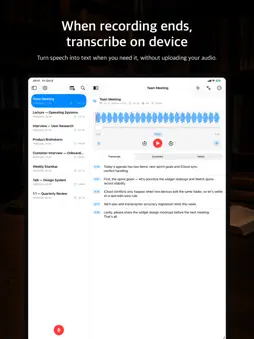
Record, draw, keep the meaning. Nogmi is a note-taking app that lets you record meetings, lectures, and interviews, write directly on your slides, and follow through with transcription, summaries, and review. Recording and transcription happen on your device by default. For summaries, in addition to the default Apple Private Cloud Compute, you can switch to on-device AI (Gemma 4 or Apple Intelligence) to keep summaries on your device too. ■ Notes that go with your recording Attach PDF, PPT, or PPTX slides to a recording, then write on them with Apple Pencil or your finger, or type. Tap anything you wrote while recording to listen from that exact moment. · Pen, pencil, highlighter, eraser, lasso, and laser pointer · Draw a line and hold to snap it into a clean line, circle, or rectangle · Paste copied images directly from other apps · Share selected pages as PDF or image · Select and copy text from the original PDF · Search document text and handwriting together On Mac, you can write on your notes with a mouse, trackpad, or drawing tablet. ■ Study mode Turn your recordings and notes into multiple-choice questions and flashcards for review. Use memorization tape to cover key sections while you study. ■ Start with a single tap Start recording without any setup. The transcript appears live while you record, and when you stop, the full transcript and summary follow. Continue an existing recording, and trim or revert each added take separately. ■ On-device transcription in 100 languages Gemma 4 and WhisperKit transcribe on your device. Spoken languages are detected automatically, and transcription keeps working even when offline. Speaker diarization (beta) and noise reduction make multi-speaker recordings clearer and easier to read. ■ Five AI summary modes for your goals · Meeting minutes — remarks, decisions, and action items · Lecture — sections by topic, key concepts, and examples · General — overview, key points, and details · Brainstorming — ideas listed and grouped · Interview — Q&A pairs and insights You can also create your own custom summary format. ■ Choose your engine Choose your summary engine among Private Cloud Compute, Gemma 4, and Apple Intelligence — or transcribe and summarize using your own custom server. Nogmi never switches your chosen engine automatically. If it is unavailable, the app explains why and offers alternatives. ■ Smart playback Automatically skip long silences and applause (beta), with skipped sections shown right on the waveform. Adjust playback speed up to 3x. ■ Organize with gallery and folders Group recordings into folders and find them fast in gallery view with note cover previews. Folders sync cleanly to matching directories in iCloud Drive. ■ Standard files, protected data Audio, subtitles, and text are saved as standard files (m4a, srt, txt, pdf) that open in other apps. Metadata, summaries, notes, and study data are protected in Nogmi’s secure file format. ■ On every device Pick up where you left off across iPhone, iPad, Mac, and Apple Watch via iCloud. Record quickly from Apple Watch, and track transfers to your iPhone right from the transfer list. ■ No subscription, no account Use Nogmi without subscriptions or accounts. The developer collects no data.
What's New
Version 2.3.3 2026-11-19
• Fixed an issue where Apple Watch recordings could get stuck in 'Transferring' instead of syncing to iPhone. • Added back the transfer progress percentage (%) ...• Fixed an issue where Apple Watch recordings could get stuck in 'Transferring' instead of syncing to iPhone. • Added back the transfer progress percentage (%) on Apple Watch. • Added a Transfers screen on Apple Watch to monitor transfer status and progress for each recording. • Improved app launch stability. Technical Analysis
Package Overview Basic metadata
Bundle ID
dev.okdohyuk.nogmi Current Version 2.3.3
Minimum iOS 18.0
Package Size App Store Size
Package Metadata 1 / 6 version records
Detailed binary, privacy manifest, framework, and Info.plist results have not been indexed for this package yet. The verified App Store and archive metadata above remains available.
Known Version Records
1 version record with stored package metadata • 6 known version records
Stored metadata does not guarantee a package is currently available to download.
| Details | Version / IDs | Version date | Action |
|---|---|---|---|
| 73.59 MB | v1.6.4 App Store ID: 887319413Build: 1.6.4 | 2026-09-02 21:40:22 | Paid / Arcade |
| Not archived | App Store ID: 886827696 | Unknown | Paid / Arcade |
| Not archived | App Store ID: 886766836 | Unknown | Paid / Arcade |
| Not archived | App Store ID: 886682088 | Unknown | Paid / Arcade |
| Not archived | App Store ID: 886611205 | Unknown | Paid / Arcade |
| Not archived | App Store ID: 886361379 | Unknown | Paid / Arcade |