
Preview







Description
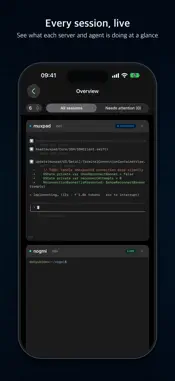
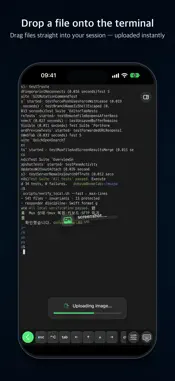
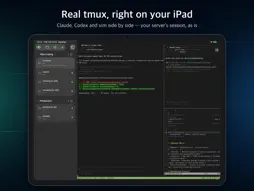
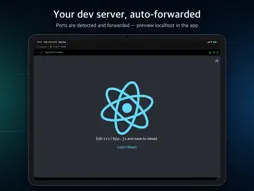
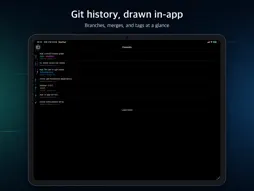
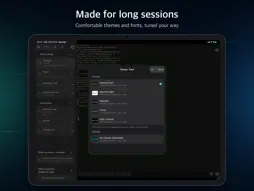
MuxPad is a native terminal for iPad, iPhone and Mac that attaches straight to the tmux sessions on your server. Watch the AI coding agents working there from anywhere, and answer the moment they need you. Close the app, lose Wi-Fi, switch devices — your work keeps running inside tmux on the server. Builds, vim and coding agents don't stop just because your connection did. ■ New in 1.7 — never keep an agent waiting · A Waiting for input section and ⌘J take you straight to sessions blocked on a permission or question · One-tap Allow and Deny in Overview, sent only after MuxPad re-checks the same permission dialog is on screen · Return always on the key bar, ↑↓ up front, ⌃C set apart in red, and approval tiles for Claude and Codex · Agent states shown by shape, not just color; delete confirmations; larger touch targets and tooltips ■ Built for AI coding agents See the status of Claude, Codex, Gemini, Copilot and more running in your sessions — right in the sidebar, with no server setup. Resume a finished Claude session with one tap, select lines in a Git diff to send a precise request with file and line numbers, and on Mac, answer waiting agents from the menu bar. ■ Sessions that survive disconnects When the connection drops, MuxPad reconnects in the background and puts you back where you were. Start on iPad, continue on iPhone. If tmux is missing or too old on the server, MuxPad tells you why. ■ Your server's screen, exactly Server output is rendered as-is, so the tmux status bar, pane borders, htop and vim look just like a desktop terminal. Switch, split, zoom and close windows and panes without typing commands, or attach to sessions already running on the host. ■ Full hardware keyboard Control characters, Option as Meta, Esc, arrows, Home/End, F1–F24, your tmux prefix and copy-mode keys all reach the server exactly. ⌘P quick open, ⌘J next waiting session, mux cycling and custom shortcuts — all listed in the Mac menu bar's Mux menu. On the software keyboard, the key bar puts every terminal key one tap away. ■ Dual-pane SFTP file manager Set each pane to local or any remote host and drag and drop between them. Remote-to-remote transfers, multi-select, downloads, and a transfer queue with progress, resume and conflict handling. Upload photos and files and get the remote path pasted for you. ■ Developer tools built in · Git: changed files and diffs with previous/next file, stage, commit, push, branches and worktrees (force push defaults to --force-with-lease) · Open remote files in nvim or vim in a tmux split · Port forwarding and in-app dev server preview · Overview: every session as a live preview on one screen, with a command bar on each card ■ On every device · Designed iPad-first, with iPhone support · iPhone Duo: unfold for a sidebar + terminal split, fold to keep the same session on the cover display · Mac: multiple windows with per-window session protection, and Finder drops onto a remote session upload automatically · Live Activity: see your connected sessions on the Lock Screen and in the Dynamic Island ■ Sync and security Hosts, users, sessions, groups and quick commands sync through your own iCloud. Passwords and private keys never go to CloudKit — they stay in the end-to-end encrypted iCloud Keychain, optionally behind Face ID/Touch ID. known_hosts fingerprint verification, ed25519/RSA key and password auth, and jump hosts (ProxyJump) are supported, and server programs can't write to your clipboard without permission. ■ Also · Each session's theme styles the whole app; preset and custom themes, Nerd Fonts · English and Korean ■ Important — your server needs tmux tmux must be installed on the host you connect to (detected automatically); if it isn't, MuxPad shows how to install it. No local shell is provided. Buy once. No subscription, no in-app purchases. MuxPad collects no data. There are no ad, analytics or tracking SDKs, and your server credentials and activity are never sent to the developer.
What's New
Version 1.7.0 2026-11-21
- Approve agents from the Lock Screen: turn on "Relay approvals from this Mac" and approval requests arrive on your iPhone, iPad, and Apple Watch through iCloud...- Approve agents from the Lock Screen: turn on "Relay approvals from this Mac" and approval requests arrive on your iPhone, iPad, and Apple Watch through iCloud. Long-press to answer 1, 2, 3, or Esc (Face ID required; nothing is sent if the screen changed) - Mac: keeps running after you close every window, and can open at login, even hidden - Open the waiting agent, Overview, or your last session from Control Center, Shortcuts, Spotlight, and Siri - Warnings before approving risky commands (recursive deletes, force pushes, piped install scripts, and more), plus approval and Git diff summaries on Apple Intelligence devices - Jump straight to agents waiting for input: a new sidebar section and ⌘J - One-tap approvals in Overview send only after re-checking the same permission dialog is on screen - Return is always on the key bar, ⌃C sits apart, Claude/Codex palettes gain approval tiles, and the keyboard button tops the iPhone Duo side bar - Clearer buttons across iPhone, iPad, iPhone Duo, and Mac: delete confirmations, larger touch targets, tooltips Technical Analysis
Package Overview Basic metadata
Bundle ID
com.okdohyuk.muxpad Current Version 1.7.0
Minimum iOS 17.0
Package Size App Store Size
Package Metadata 0 / 0 version records
Detailed binary, privacy manifest, framework, and Info.plist results have not been indexed for this package yet. The verified App Store and archive metadata above remains available.
Price History (USA store)
2 recorded price change points. These are historical observations, not a guarantee of the current price.
| Recorded at | Price | Currency |
|---|---|---|
| 5.99 | USD | |
| 4.99 | USD |
Developer Information
Known Version Records
0 version records with stored package metadata
Stored metadata does not guarantee a package is currently available to download.
| Details | Version / IDs | Version date | Action |
|---|