
Preview


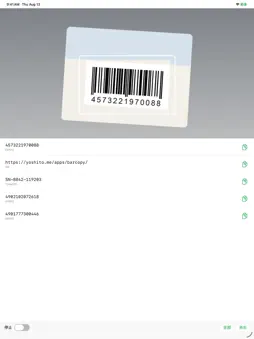


Description
BarCopy does one thing: it reads barcodes and QR codes, and lets you copy what they say. A product's EAN code, a tracking number on a slip, a URL inside a QR code. When all you want is to paste it somewhere else, squinting at small digits and typing them in — then checking them again — is time you never get back. ■ Just point it There is no shutter button. Hold a code up to the camera and it is read automatically and added to the list below. No focusing, no lining it up inside a frame. ■ Scan as many as you like No need to reopen the app between codes. Point at the next one and the values stack up in the order you read them — useful when you are working through a shelf or a box of parts. ■ Tap to copy Tap a row to put it on the clipboard. Long-press instead, and you can select and copy just part of the value. ■ Copy them all at once "全部" (Copy all) puts every scanned value on the clipboard, one per line, ready to paste into a spreadsheet or a note. ■ Pause when you need to Flip the "停止" (Pause) toggle while you look back through the list. The camera preview blurs, so you can see at a glance that nothing is being scanned, and nothing unexpected sneaks into the list. ■ Your history stays Scanned values survive closing the app, so you can come back and copy them later. Swipe a row to the left to delete it, or clear everything at once. ■ Barcodes and QR codes Supports EAN/JAN, UPC, Code 128, Code 39, ITF, PDF417, Aztec, Data Matrix, QR and more. The symbology is shown under each value. ■ Everything stays on your device Scanned values are stored on your iPhone and never sent anywhere. No account, no network, no ads, no tracking. It works offline. Good for: - Copying product barcode numbers into an inventory sheet - Noting down serial numbers from equipment or shipping labels - Copying the URL inside a QR code without opening it - Reading a batch of codes and pasting them all into a spreadsheet Note: the app's interface is in Japanese.
Technical Analysis
Package Overview Basic metadata
Bundle ID
one.yoshito.BarCopy Current Version 1.0
Minimum iOS 26.0
Package Size App Store Size
Package Metadata 0 / 0 version records
Detailed binary, privacy manifest, framework, and Info.plist results have not been indexed for this package yet. The verified App Store and archive metadata above remains available.
Developer Information
Known Version Records
0 version records with stored package metadata
Stored metadata does not guarantee a package is currently available to download.
| Details | Version / IDs | Version date | Action |
|---|