
Preview




Description
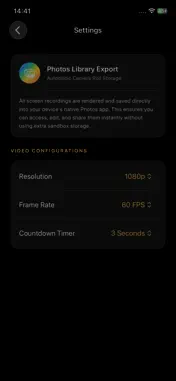
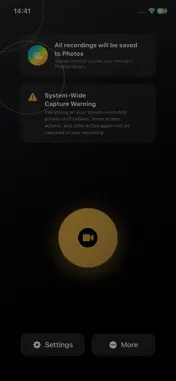
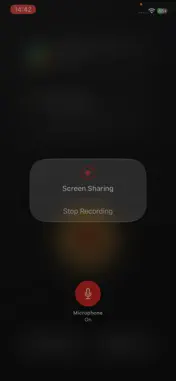
Record everything on your screen in high definition with just one tap! Whether you want to capture epic gaming moments, create clear step-by-step video tutorials, record online lectures, or save important video calls, our app makes it effortless and fast. PRIVACY FIRST DESIGN We value your privacy above all else. Unlike other screen recorders, this app operates with zero external servers. -100% On-Device Processing: Your screen recordings are processed entirely on your iPhone/iPad. -Direct-to-Photos Saving: Recorded videos are exported straight to your iOS Photos Library. -No Data Harvesting: We do not collect, store, transmit, or have access to any of your recordings. What happens on your screen stays on your device. KEY FEATURES: -One-Tap Recording: Quick-start system screen recording. -Custom Settings: Choose your preferred frame rate (FPS) and resolution settings. -Crystal Clear Audio: Record system sound and microphone audio simultaneously. -No Watermarks: Keep your videos clean and professional. -Premium Dark Theme: Sleek, modern interface designed to save battery and look stunning. HOW TO USE (INSTRUCTIONS): 1. Grant Permissions: When you first open the app, ensure you grant Microphone, Camera, and Photo Library access. 2. Configure Settings: Tap the Settings menu to adjust your desired video resolution and frame rate. 3. Start Recording: Tap the large gold Record button on the dashboard. 4. Output:all recordings are daved to Photos the system popup menu and tap "Start Broadcast". A 3-second countdown will begin. 5. Record Your Screen: Navigate to any app or game you wish to record. 6. Stop Recording: Tap the Red Clock Bubble in the top-left status bar of your iPhone and select Stop. Your video is instantly saved to your local Photos library!
Technical Analysis
Package Overview Basic metadata
Bundle ID
com.hdmx.screenrecorder Current Version 1.0
Minimum iOS 17.6
Package Size App Store Size
Package Metadata 0 / 0 version records
Detailed binary, privacy manifest, framework, and Info.plist results have not been indexed for this package yet. The verified App Store and archive metadata above remains available.
Developer Information
Known Version Records
0 version records with stored package metadata
Stored metadata does not guarantee a package is currently available to download.
| Details | Version / IDs | Version date | Action |
|---|