
Preview




Description
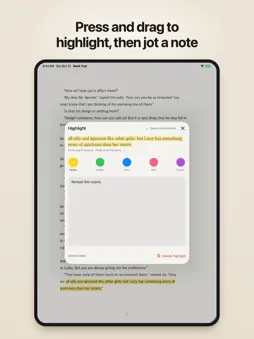
Read hands-free: double-tap your Apple Pencil, or press a Bluetooth remote or foot pedal, and Book Pad turns the page without you touching your iPad. Book Pad opens the EPUB and PDF files you already own. Highlight as you read, and every highlight from every book ends up in one place. Book Pad needs no account. TURN PAGES WITH APPLE PENCIL • Double-tap Apple Pencil (2nd generation) or Apple Pencil Pro to go to the next page. You can set it to go back instead. • On Apple Pencil Pro, you can also set squeeze to turn pages. • Book Pad follows the gestures you set in the app, even when the system double-tap setting is Ignore. • Pick how pages turn: slide, fade, or no animation. OTHER WAYS TO TURN THE PAGE • Use the arrow keys, Page Up and Page Down, or Space. Bluetooth page-turners that send key presses work too. • Tap the left or right side of the screen. • In Settings > Page Turning > Remotes & Gestures, choose which input goes forward or back. Try a gesture or key there and the book on screen shows what it will do. • The screen stays on while you read. You can turn this off in Settings. YOUR FILES ARE YOUR LIBRARY • Book Pad's folder in the Files app is your library, and each subfolder becomes a shelf. • Put a book on more shelves without moving the file. • Import many books at once from Files, or send them from another app with the share sheet. • Move or rename a book and your reading position and highlights stay with it. • If a file goes missing, Book Pad keeps its highlights. If you clear them, Recently Deleted holds them for 30 days. HIGHLIGHT WITHOUT A MENU • Press on a word, drag across the passage, and lift. The highlight appears right away. • Choose from five colors and add a note to any highlight. • Highlighting works in EPUBs and in PDFs with selectable text, including PDFs that block copying. EVERY HIGHLIGHT IN ONE PLACE • Search the text of all your highlights and notes at once. • Filter by book or color, or show only highlights with notes. • Group highlights by book or color, and sort them by newest, oldest, or position in the book. • Tap a highlight to jump back to that spot in the book. EXPORT AND TAKE THEM WITH YOU • Export one book or your whole collection as Markdown, then save it to Files or share it. • Next to each book, Book Pad keeps a small .notes.json file. Copy it along with the book to another iPad running Book Pad and your highlights come too. READ YOUR WAY • Light, sepia, and dark themes, or your own background and text colors. • Set the font, text size, bold text, margins, justification, and line spacing. With Book Pad Pro, also set paragraph, character, and word spacing. • Add your own .ttf or .otf fonts in Settings > My Fonts. • Read EPUBs page by page or as one continuous scroll. • In landscape, read two pages side by side, or switch to one page at a time. • Table of contents, search inside the book, and footnotes that open right on the page. • Opens fixed-layout EPUBs too. • PDFs get an outline, text search, page jumps, and zoom. PRIVACY AND ADS • No sign-up. Book Pad has no server, and your books, highlights and notes stay on your iPad. • The free version shows a small ad at the bottom of the Library tab and, now and then after you import or export, a full-screen ad. There are no ads while you read. Book Pad Pro, a one-time in-app purchase, removes the ads. • Ads come from Google AdMob. You choose whether to allow tracking, and declining gives non-personalized ads. Book Pad works the same either way. GOOD TO KNOW • Book Pad opens your own files. It doesn't sell books. • DRM-protected books and password-protected PDFs can't be opened. • Deleting the app also deletes the Book Pad folder on your iPad, so keep a copy of your books somewhere else. • Requires iPadOS 18 or later.
What's New
Version 1.1 2026-11-02
Book Pad Pro is here: a one-time purchase that removes ads and unlocks fine typography (letter, word and paragraph spacing). If you installed version 1.0, fine ... Technical Analysis
Package Overview Basic metadata
Bundle ID
io.awaik.bookpad Current Version 1.1
Minimum iOS 18.0
Package Size App Store Size
Package Metadata 0 / 0 version records
Detailed binary, privacy manifest, framework, and Info.plist results have not been indexed for this package yet. The verified App Store and archive metadata above remains available.
Developer Information
Known Version Records
0 version records with stored package metadata
Stored metadata does not guarantee a package is currently available to download.
| Details | Version / IDs | Version date | Action |
|---|