Preview


Description
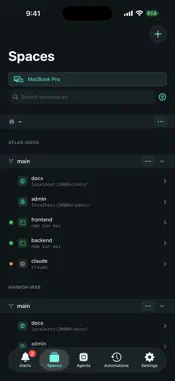
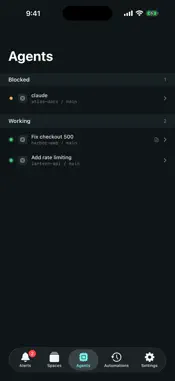
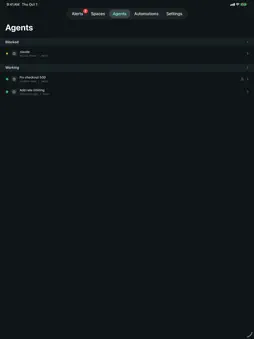
Spaces is a client for the terminals and coding agents running on your own Mac and Linux machines. Start an agent at your desk, then check on it and answer it from your iPhone or iPad. Pair by scanning a QR code. The app connects directly to each machine over an encrypted, certificate-pinned connection that only your devices can read. There is no account, no cloud relay, and no server of ours in between. It works on your local network, and anywhere your machines are reachable over your own VPN, such as Tailscale. CODING AGENTS • See every running agent on every paired machine in one list: blocked, done, or working • The Alerts tab collects agents waiting on you, finished agents, exited processes, and failed automation runs • Open an agent's live terminal from its alert and reply • Read each agent's brief: its status, its questions for you, and its remaining tasks ORCHESTRATION • Give one agent the job, and it spawns and directs other agents, each in its own workspace, on any paired machine • Mix and match agents: a Claude Code orchestrator can direct Codex and opencode agents, or the other way around • Run the whole thing from your phone: prompt the orchestrator, and answer it or any of its agents when they need you • Follow every agent's status, brief, and live terminal as the work moves LIVE TERMINALS • Attach to any running terminal with full-fidelity rendering • Type, run commands, and scroll back through history • Select text with a long press, adjust it with the handles, and copy • Tap a link in a terminal to see where it goes, then open it • Compose a longer message, attach an image, and send it in one go • Sessions run on your machine, so nothing stops when you put your phone away or lose signal REMOTE MACHINES • Pair several Macs and Linux machines and switch between them • A Linux machine pairs with your phone directly, with no Mac in between • Agents and alerts from every paired machine appear together • A machine that goes offline keeps its rows, so you can still see what was running AUTOMATIONS • Automations you set up on your Mac run a coding agent with a prompt, or a shell script, on demand or on a schedule • Start a run from your phone, watch its terminal live, or cancel it • Failed and timed-out runs appear in Alerts WORKSPACES • Create a workspace on a new branch, and start, stop, or restart its processes • Open a workspace's web services in the app's own browser • After a machine restarts, bring its agents back from your phone Works with Claude Code, Codex, and opencode. DEMO MODE Tour the app with sample workspaces, agents, alerts, and terminals without pairing a machine. PRIVATE BY DESIGN No accounts, no analytics, no tracking. Terminal data flows only between your own devices. Full policy: usespaces.dev/privacy REQUIREMENTS Spaces for iOS needs Spaces running on your own Mac or Linux machine. Get it at usespaces.dev. PRICING $29.99/year after a 7-day free trial. Spaces for Mac and Linux is free. The subscription renews automatically unless canceled at least 24 hours before the end of the period; manage or cancel in Settings. Privacy Policy: https://usespaces.dev/privacy Terms of Use (EULA): https://www.apple.com/legal/internet-services/itunes/dev/stdeula/
What's New
Version 0.23.0 2026-10-13
• Select and copy text in terminals. Long-press a word, drag the handles to adjust it, then copy. Each device keeps its own selection, so it never changes what ... Technical Analysis
Package Overview Basic metadata
Bundle ID
dev.usespaces.spacesmobile Current Version 0.23.0
Minimum iOS 17.0
Package Size App Store Size
Package Metadata 0 / 0 version records
Detailed binary, privacy manifest, framework, and Info.plist results have not been indexed for this package yet. The verified App Store and archive metadata above remains available.
Developer Information
Known Version Records
0 version records with stored package metadata
Stored metadata does not guarantee a package is currently available to download.
| Details | Version / IDs | Version date | Action |
|---|