
Preview




Description
YoctoPlay makes it easy to start playing one important video quickly. YoctoPlay makes it easy to deliver one particular already-existing video to a family or friend's Apple TV. Do you find it challenging to explain to someone how to find a particular video? Maybe even an unlisted video which could never be found using search tools. YoctoPlay is designed to be as simple as possible for the owner of an Apple TV to receive a video link, and have that video link remembered forever. Once the video link is remembered by YoctoPlay, launching YoctoPlay will immediately start playing the desired video. Because YoctoPlay is designed to be as simple as possible... just run the app and your video will start playing... to change the desired video YoctoPlay can be uninstalled then reinstalled. YoctoPlay does not remember a list of favourite videos, YoctoPlay only remembers one single video and is designed to play that single video as quickly as possible. YoctoPlay also includes tools which use your TV as a dynamic light source for helping illuminate a video capture. Many white strobes. Random strobes. Moving spots of illumination. Perhaps the most specific use-case is "Cycle Corners" a white square which flashes clockwise top-right, bottom-right, bottom-left, top-left. The cycle repeats every second. Turn off the lights, use your TV to illuminate an object (placed close to the TV) and pull the delta from the 4 images the cycle produces. You'll see an object's edges. (Such extract-the-delta is not part of YoctoPlay, "Cycle Corners" is just a utility to provide the lighting to facilitate such an image capture.) Terms of Use and Privacy Policy: https://yoctoplay.com/info.php EULA: https://www.apple.com/legal/internet-services/itunes/dev/stdeula/
What's New
Version 1.15 2025-08-09
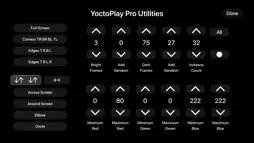
All free features are maintained, but a "Pro" tier is added, allowing greater control over strobe and lighting effects. "Pro" allows the lighting utilities to b... Technical Analysis
Package Overview Basic metadata
Bundle ID
com.yoctoPlay.YoctoPlay Current Version 1.15
Minimum iOS 18.4
Package Size App Store Size
Package Metadata 0 / 2 version records
Detailed binary, privacy manifest, framework, and Info.plist results have not been indexed for this package yet. The verified App Store and archive metadata above remains available.
Developer Information
Known Version Records
0 version records with stored package metadata • 2 known version records
Stored metadata does not guarantee a package is currently available to download.
| Details | Version / IDs | Version date | Action |
|---|---|---|---|
| Not archived | App Store ID: 876913728 | Unknown | Request Version |
| Not archived | App Store ID: 874368073 | Unknown | Request Version |