
Preview


Description
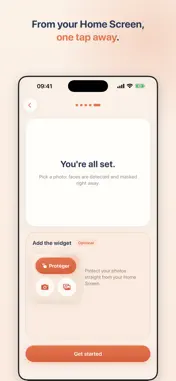
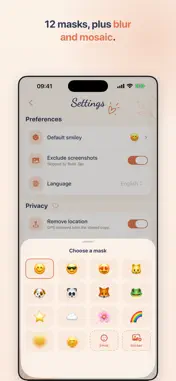
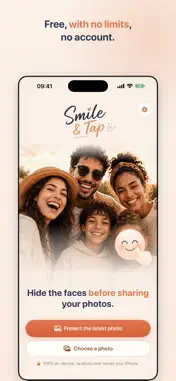
Hide the faces in a photo before you share it. Pick a photo: Smile & Tap finds the faces and drops a smiley on each one, right away. Reveal the ones you want, move or resize the masks with a finger, then share. Your original is never modified. EVERYTHING IS FREE No photo limit, no account, no ads. The twelve masks, blur and mosaic are all included. 100% ON YOUR IPHONE Face detection and rendering happen on the device. No photo is ever uploaded, anywhere. No server, no account, no tracking. Location data is stripped from the shared copy. FOUR WAYS TO OPEN THE APP • The Home Screen widget: your latest photo, the camera or your library, one tap away. • The iOS 18 control, for Control Center, the Lock Screen or the Action button. • Back Tap on the back of your iPhone, if you set it up. • The app itself. A CAMERA THAT LEAVES NO TRACE Shoot from inside the app: the photo goes straight to the editor with faces masked. It is never saved to your library. Only the masked copy can be, if you decide so. DIRECT SHARING Instagram Story, Messages, Mail, or any app through the iOS share sheet. SUPPORTING THE APP Smile & Tap is free and stays free. A single purchase, no subscription, unlocks creating your own masks (any emoji, or a cut-out image of your own) beyond the first one, and supports an app with no ads and no accounts. Family Sharing included. Designed and built in France.
What's New
Version 1.3.0 2026-10-04
Easier mask picking, and more reliable shortcuts. • Your default mask now shows at the top of the app, next to Settings: one tap to change it. • The mask picke...Easier mask picking, and more reliable shortcuts. • Your default mask now shows at the top of the app, next to Settings: one tap to change it. • The mask picker is now organized in two tabs, Emojis and Stickers, and everything fits on screen. • An emoji palette lets you create a mask in one tap. An emoji you already have is simply reused, with no duplicate. • Tapping a mask now selects it too, so you can change its emoji without moving it first. • The resize handle stays within reach, even against the edge of the photo or on a close-up face. • Fixed: after saving, the widget or Back Tap reopened the copy instead of your latest photo. • Fixed: the widget now opens your latest photo, even when another one was already open in the editor. Technical Analysis
Package Overview Basic metadata
Bundle ID
fr.yoanncroizer.smileandtap Current Version 1.3.0
Minimum iOS 18.0
Package Size App Store Size
Package Metadata 0 / 0 version records
Detailed binary, privacy manifest, framework, and Info.plist results have not been indexed for this package yet. The verified App Store and archive metadata above remains available.
Developer Information
Known Version Records
0 version records with stored package metadata
Stored metadata does not guarantee a package is currently available to download.
| Details | Version / IDs | Version date | Action |
|---|