Preview



Description
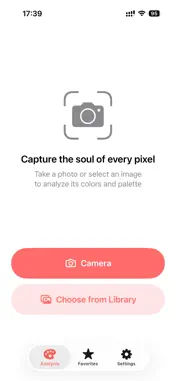
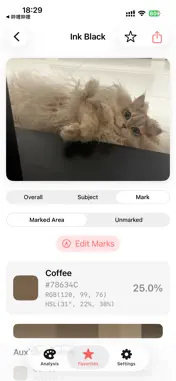
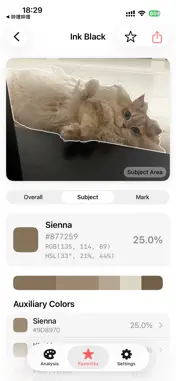
ColorScanner is a professional image color analysis tool that helps designers, photographers, and creators quickly extract and manage colors from any image. Key Features: [Smart Color Extraction] - Precise dominant color extraction using median-cut algorithm - Customizable analysis precision (8/12/16 colors) - Color proportion and distribution charts [Smart Subject Analysis] - Runs entirely on-device using iOS system intelligence only - Smart recognition of image subjects & regional representative colors - Visual color segmentation mask for deep understanding of color structure - No internet required, no third-party AI services called [Freehand Mark Analysis] - Paint freely on any area of the image with your finger or Apple Pencil - Three brush sizes (8/16/28pt) for precise marks or broad coverage - One-tap toggle between marked/unmarked regions for instant color comparison - Undo/redo and bitmap eraser for precise adjustment - Marks and results auto-saved with favorites — revisit and edit anytime - Gentle warning when marked area is too small for reliable results [Professional Color Values] - HEX, RGB, HSL color formats supported - One-tap copy for seamless design workflow - Intuitive color naming in multiple languages [Favorites & Management] - Save analysis results to favorites - Browse historical analysis records - Share analysis result images [Thoughtful Design] - Light/Dark/System appearance modes - Localized in Chinese (Simplified/Traditional), English, Japanese - Full VoiceOver accessibility support - 100% on-device processing — no internet required, your privacy is protected Perfect for: - UI/UX designers seeking color references - Photographers analyzing color composition - Illustrators extracting palettes from inspiration - Developers getting precise color values - Anyone passionate about colors
What's New
Version 1.1.0 2026-06-15
Introducing the Mark tab — paint freely, compare precisely! - [Freehand Mark Analysis] Paint on any area of the image with your finger or Apple Pencil, and ins...Introducing the Mark tab — paint freely, compare precisely! - [Freehand Mark Analysis] Paint on any area of the image with your finger or Apple Pencil, and instantly compare colors inside vs. outside the marked region - Three brush sizes (Fine/Medium/Thick) for precise picking or broad marking - Full-screen annotation editor with undo/redo, eraser, and clear - Marks auto-saved with favorites — revisit and re-edit anytime - Double-tap the image for full-screen pinch-to-zoom up to 4× - Expanded image display area shows your photo in full, no cropping Technical Analysis
Package Overview Basic metadata
Bundle ID
com.azoic.ColorScanner Current Version 1.1.0
Minimum iOS 18.0
Package Size App Store Size
Package Metadata 0 / 2 version records
Detailed binary, privacy manifest, framework, and Info.plist results have not been indexed for this package yet. The verified App Store and archive metadata above remains available.
Developer Information
Known Version Records
0 version records with stored package metadata • 2 known version records
Stored metadata does not guarantee a package is currently available to download.
| Details | Version / IDs | Version date | Action |
|---|---|---|---|
| Not archived | App Store ID: 886602382 | Unknown | Paid / Arcade |
| Not archived | App Store ID: 885746128 | Unknown | Paid / Arcade |