
Preview




Description
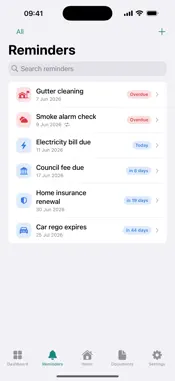
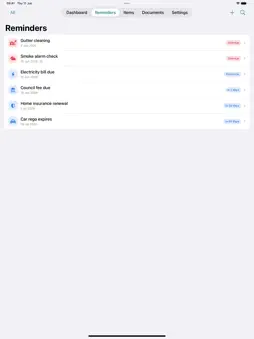
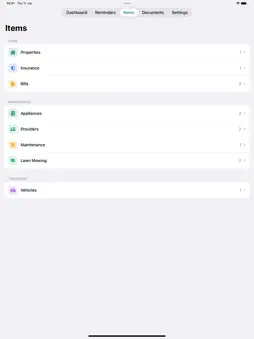
Keep your home records, documents and due dates together. Home Manager helps you organise properties, track household costs and remember bills, renewals, warranties and vehicle registration. SCAN DETAILS, SAVE TYPING • Bills: scan a photo, take a picture or import a PDF. Review the provider, account number, amount due, due date, billing period and usage before saving. Keep the original attached to the bill and find it again in Documents. • Vehicle registration: import vehicle, plate, insurer and expiry details from a photo or PDF. • Appliances: read labels, receipts and warranties to fill in brand, model, serial number, purchase details and warranty dates. • You choose which fields to use. Existing values stay in place unless you select them for replacement, and every field stays editable. Basic text recognition works without Apple Intelligence. ORGANISE EACH PROPERTY Keep records for your home and other properties, then switch between them to see relevant reminders, items and documents. Copy a property's address when you need it. • Bills: track electricity, water, gas, internet and council bills, mark them paid and see what's due. • Insurance: store policies, premiums and renewal dates. • Appliances: keep purchase and warranty details, photos and manuals together. • Maintenance: log repairs, costs, providers and follow-ups, plus lawn mowing history. • Providers: keep trusted tradies and their contact details handy. • Vehicles: track registration, insurance and service dates. • Documents: import and preview PDFs and images of manuals, receipts, policies and bills. REMINDERS ON YOUR TERMS Choose when to be reminded: on the due date, days or weeks ahead, or at a custom time. Set a default for new reminders, including those created from bills, renewals and warranties. Capture bills and reminders with Siri and Shortcuts, or ask Siri what's due. MADE FOR BOTH IPHONE DUO DISPLAYS See reminders beside your household summary on the inner display, and browse a reminder list alongside its details. The compact outer display keeps key counts and reminder lists within reach. Layouts adapt as you fold and unfold. GET HELP FROM APPLE INTELLIGENCE • Ask Your Home: ask about saved household records and follow links to the source records. • Property Briefing: see overdue tasks and upcoming bills, reminders and warranties. • Smart Quick Add: turn a sentence into a reminder draft you can review and edit. • Manual Assistant: ask questions about PDF and image documents, follow page references and draft reminders from supported care tasks. YOUR RECORDS, ACROSS YOUR DEVICES Sync through your private iCloud across iPhone and iPad. There's no app account to create, no ads and no third-party tracking. Turn on the optional app lock to require device authentication when opening or returning to Home Manager. Core record keeping, reminders and text scanning work offline; iCloud sync resumes when you're online. Requires iOS 18 or later. On-device AI requires iOS 26 or later, a compatible device and Apple Intelligence enabled. Optional Private Cloud Compute document analysis requires iOS 27, internet access and service availability. When enabled, selected document images and text are sent to Apple for analysis. If AI is unavailable, text scanning and manual entry remain available. Always review suggested details before saving.
What's New
Version 1.2.0 2026-10-22
Scan a bill, review its details and keep the original with your records. Plus, new layouts for both iPhone Duo displays. NEW • Bill scanning: import a photo or... Technical Analysis
Package Overview Basic metadata
Bundle ID
app.noot.homemanager Current Version 1.2.0
Minimum iOS 18.0
Package Size App Store Size
Package Metadata 1 / 1 version records
Detailed binary, privacy manifest, framework, and Info.plist results have not been indexed for this package yet. The verified App Store and archive metadata above remains available.
Developer Information
Known Version Records
1 version record with stored package metadata
Stored metadata does not guarantee a package is currently available to download.
| Details | Version / IDs | Version date | Action |
|---|---|---|---|
| 2.23 MB | v1.0 App Store ID: 886760342Build: 1.0 | 2026-06-16 21:50:35 | Paid / Arcade |