
Preview








Description
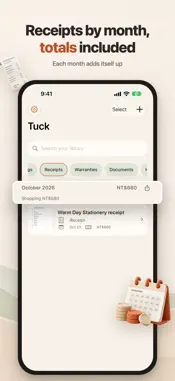
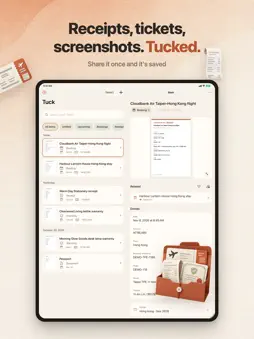
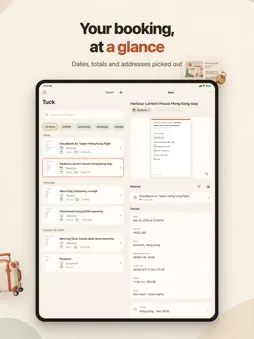
Screenshots piling up? Tuck's AI reads every screenshot and file you save: bookings, receipts and warranties, and the restaurants, recipes and things to buy you screenshot. It files each one and finds it again from a few words. Reading happens on your device, with Apple Intelligence where available; Advanced reading by Claude is optional. Share something to Tuck and it's saved right away. Add photos, scan a document, import a file or paste a link or text. Tuck reads it on your device, recognizes bookings, tickets, receipts, orders, warranties and documents, and picks out useful details such as dates, amounts and addresses. Your originals are kept too. Search for a shop name or a few words you remember. Open the original, copy a detail or confirm a reminder for an important date. • Swipe through the screenshots in Photos: right to tuck, left to delete, up to keep, then clear them in one go • Japan tax-free refunds: Tuck finds your tax-free receipts, lets you tick each before you fly, shows customs a large Japanese list and, if any are unticked, reminds you the night before you leave • New screenshots are tucked automatically when you open Tuck (optional), then cleared from Photos in one tap • Places, recipes and things to buy go into their own folders; open a place in Maps • Save your latest screenshot from Control Center or the Action Button • A Sunday reminder to tidy the week's screenshots • Save images, PDFs, links and text; add several photos at once • Search titles, text in images and extracted details, including through iPhone system search • Find items by place, folder, amount, date or booking code; the closest matches come first • Browse Upcoming, Receipts and Warranties • Receipts are grouped by month with a monthly total • Warranties show when they end and remind you a month before • Trip folders list flights, stays and confirmation codes by day, and flag an ID that expires soon • Ask in search, such as "How much did the Hong Kong trip cost?", and see the answer with the items it comes from • Monthly spending by category; export a month or any receipts you pick to CSV and PDF for expense claims, then mark them claimed • Expiry, renewal and return-by dates are found, with a suggested reminder to confirm • Save Apple Wallet passes; add them to Wallet, or add bookings and tickets to Calendar • Shortcuts: Ask Tuck, Next trip, Expiring soon, Export receipts, Save to Tuck, Find items, Open item, Move to folder, Create folder, Remind me, Spending • Optional iCloud sync across your devices • Taiwan e-invoice QR codes fill in the invoice number, date and total • Filter by type; edit an item's name, type, date, amount or warranty length • Saving the same file twice keeps just one copy • Sort items into folders, up to two levels; Tuck suggests folders and you decide. Rename, merge or delete them, and move or delete several items at once • Zoom into originals, view PDFs and copy dates, amounts or addresses • Set a local reminder with a date and message ready to confirm • On iPad and an unfolded iPhone Duo, your library and the open item sit side by side No account or login needed. Tuck shows a single banner among your library items and no full-screen ads. A one-time purchase removes it. Advanced reading: one a day is free. Tuck Pro is an optional auto-renewing subscription (monthly or yearly) with 10 advanced readings a day, up to 50 a week, and no ads. Tuck Max, also monthly or yearly, gives 50 a day, up to 250 a week. Payment is charged to your Apple Account; it renews unless cancelled at least 24 hours before the period ends, and you can manage or cancel it in your Apple Account settings. In China mainland, Tuck offers no AI features (on-device or advanced reading) and no Tuck Max; Tuck Pro there sorts your whole photo library with no ads. Terms of Use: https://easonwumac.github.io/tuck/terms.html Privacy Policy: https://easonwumac.github.io/tuck/privacy.html
What's New
Version 3.5.0 2026-11-22
Tuck 3.5: straighten crooked photos. Took a receipt or page at an angle? Tap the corner button on the photo: Tuck finds the page's corners, lets you drag and tu...Tuck 3.5: straighten crooked photos. Took a receipt or page at an angle? Tap the corner button on the photo: Tuck finds the page's corners, lets you drag and turn them, and makes the print clearer in one tap. Cards are easier to tell apart: bookings look like tickets, receipts like register receipts, and warranties show how long they have left. Thumbnails zoom in on a screenshot's most important line. The top of your library counts down the days to your next trip or deadline within a month, and each month of receipts gets a ring of where the money went. Technical Analysis
Package Overview Basic metadata
Bundle ID
com.easonwu.tuck Current Version 3.5.0
Minimum iOS 18.0
Package Size App Store Size
Package Metadata 0 / 0 version records
Detailed binary, privacy manifest, framework, and Info.plist results have not been indexed for this package yet. The verified App Store and archive metadata above remains available.
Developer Information
Known Version Records
0 version records with stored package metadata
Stored metadata does not guarantee a package is currently available to download.
| Details | Version / IDs | Version date | Action |
|---|