
Preview


Description
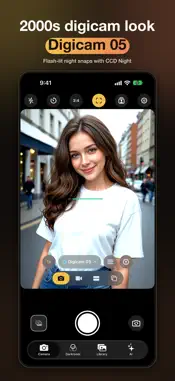
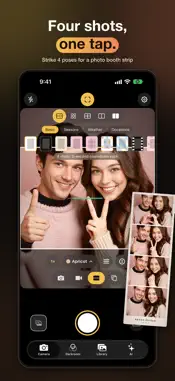
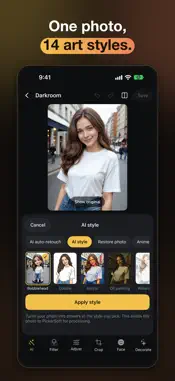
Photo Picker turns every shot into film the moment you take it. See the film look live in the viewfinder as you shoot photos and videos, and on trips, gather everyone's shots into one album automatically. Stop sending trip photos one by one Start a trip group in Gallery and invite friends with a QR code, a link or a 6-character invite code. Turn on auto-upload and the photos and videos you take with Photo Picker are added to the shared group album automatically, with original-quality files available to download. Friends without the app can join and post from a web browser. Tap the place button to name the group after where you are and today's date. Your reaction and the view, together Dual mode uses the front and back cameras. Photos are taken front and back in turn and combined into one shot, and on supported devices you can record dual video that captures both at once. Shoot once, get portrait and landscape Turn on Portrait + landscape and one video recording is saved as two files: a 9:16 vertical cut for Reels and Shorts and a 16:9 horizontal cut. A composition guide while you shoot When you shoot photos with the phone upright, 12 composition templates (portrait, full body, selfie, couple, kids, food, product, pets, landscape, architecture, street and more) guide your framing and tilt on screen. 37 films, right in the viewfinder Warm Apricot, crisp Silver, Amber 64, Blue Hour, Cinema 83, the punchy 2000s digicam look of Digicam 05 and flash-lit CCD Night. See the color before you press the shutter. Add grain, dust, light leaks, frames and date stamps, and if you turn it on in Settings, dress up a photo right after capture with frame and date templates. A photobooth strip in one tap Pose to the countdown four times and get a 4-cut strip. Finish it in the Darkroom Give any photo the same films, then fine-tune with curves, HSL, split toning, halation, light leaks, dust, double exposure, crop, text, stickers and frames. Retouch skin, blur the background, match the colors of another photo and compare before and after. Save a look as a recipe to apply to many photos at once, or shoot with that recipe straight from the camera. Erase unwanted objects with the eraser, build collages and share your styles by QR code or link. Edit videos too Trim, change speed, rotate, crop to 9:16, 1:1 or 4:5, mute the sound, and give your clips the same films and finishing effects. One more step with AI AI restore revives old or blurry photos. One-tap AI auto retouch tidies up a face naturally. AI styles repaint a photo as acrylic, felt, tarot and more, and AI anime conversion redraws it in anime, retro anime or cartoon style. You can report any AI result with the flag button. Photos and videos are saved to the Photos library on your iPhone. Some films and features are available with a Photo Picker PRO subscription. Saving shots with some films and using the AI tools send the photo or video to our server for processing; regular edits are processed on your device. Files you post to a trip group are stored on the group server. No sign-up needed; the only ads are optional rewarded ads you choose to watch for extra AI credits. Subscription info: Photo Picker PRO is an auto-renewing subscription (weekly, monthly, or yearly; the yearly plan starts with a 3-day free trial). Payment is charged to your Apple Account at confirmation of purchase. It renews automatically unless cancelled at least 24 hours before the end of the current period. Manage or cancel in your App Store account settings. Terms of Use (EULA): https://www.apple.com/legal/internet-services/itunes/dev/stdeula/ Privacy Policy: https://www.pickersoft.com/privacy_photopicker.html
What's New
Version 2.2.0 2026-11-12
RestorePicker is now Photo Picker. • Film camera: see film looks live while you shoot photos and video • Full photo editor and a video editor • AI tools: restor...RestorePicker is now Photo Picker. • Film camera: see film looks live while you shoot photos and video • Full photo editor and a video editor • AI tools: restore, auto retouch, art styles and anime • Travel group albums that gather everyone's shots Existing subscribers keep PRO. Technical Analysis
Package Overview Basic metadata
Bundle ID
com.picker.restorepicker Current Version 2.2.0
Minimum iOS 17.0
Package Size App Store Size
Package Metadata 0 / 0 version records
Detailed binary, privacy manifest, framework, and Info.plist results have not been indexed for this package yet. The verified App Store and archive metadata above remains available.
Developer Information
Known Version Records
0 version records with stored package metadata
Stored metadata does not guarantee a package is currently available to download.
| Details | Version / IDs | Version date | Action |
|---|