Preview






Description
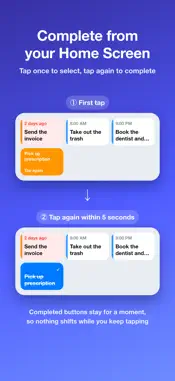
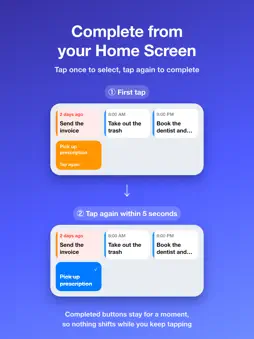
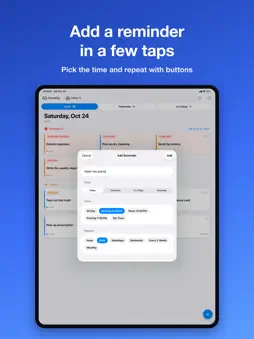
PanelRemind takes just the reminders due today and the ones that are overdue from the built-in Reminders app, and shows them as big panels. Tap a panel to complete it. No more opening lists and hunting for tiny checkboxes. It's made for people with a handful of reminders a day who want to see them at a glance. ■ The fewer reminders, the bigger the panels One reminder fills the whole width. Two get large panels stacked on top of each other. As the count grows, the panels get smaller and line up in two columns. Reminders with a time show it in large type, and turn orange once the time has passed. ■ Move everything overdue to today Overdue reminders get their own section that shows how many days late each one is. "Move All to Today" moves all of them to today at once. ■ Tap to complete, with Undo After you complete a reminder, Undo appears at the bottom of the screen, so a mistaken tap is easy to take back. Reminders completed in a row can be undone together. Long-press a panel to move it to tomorrow, choose a date, view its notes, or open it in Reminders. ■ Add a reminder with a few buttons Tap "+" at the bottom right to add a reminder. Choose the day (Today, Tomorrow, In 2 Days, Someday), the time (All Day, Morning, Noon, Evening, or a set time), and the repeat (Daily, Weekdays, Weekends, Every 2 Weeks, Monthly) with buttons. You can choose the list, too. Set what time Morning, Noon, and Evening mean for you in Settings. ■ See tomorrow and the day after Tabs for Today, Tomorrow, and In 2 Days show how many reminders each day has, and you can swipe between them. To keep you from clearing future reminders by mistake, those are completed from the long-press menu. ■ Bring "Someday" reminders into today Reminders without a due date are collected in the Someday list. Tap "Do Today" to set the due date to today and add it to today's panels. ■ Complete from the Home Screen widget The first tap on a widget button selects it, and a second tap within 5 seconds completes it. An accidental tap while taking your phone out of your pocket won't complete anything. ■ Uses the Reminders app you already have PanelRemind reads and writes your built-in Reminders directly. No new account or data transfer is needed, and reminders added with Siri or on your other devices show up right away. Choose which lists to show with the filter button at the top right. Works on iPad too, with more panels side by side on the larger screen. ■ Add from Shortcuts and other apps A URL scheme opens the add screen with the title, date, time, and repeat already filled in. Just check it and tap Add. Example: panelreminder://add?title=Buy%20milk&date=tomorrow&time=evening Use today, tomorrow, someday, or a date like 2026-12-01 for the date; morning, noon, evening, or a time like 18:30 for the time; and daily, weekdays, weekends, biweekly, or monthly for the repeat. * Subtasks are shown as separate reminders. * Full access to Reminders is required. Your data is never sent anywhere.
What's New
Version 1.0.8 2026-11-06
- Fixed an issue where rescheduling to morning, noon, or evening could run twice - Fixed misaligned alarms when rescheduling an all-day reminder to a specific t... Technical Analysis
Package Overview Basic metadata
Bundle ID
YAAS2026.PanelRemind Current Version 1.0.8
Minimum iOS 17.0
Package Size App Store Size
Package Metadata 0 / 0 version records
Detailed binary, privacy manifest, framework, and Info.plist results have not been indexed for this package yet. The verified App Store and archive metadata above remains available.
Developer Information
Known Version Records
0 version records with stored package metadata
Stored metadata does not guarantee a package is currently available to download.
| Details | Version / IDs | Version date | Action |
|---|