
Preview




Description
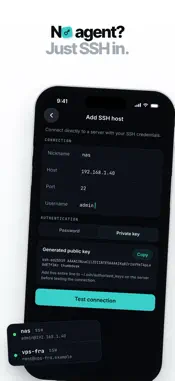
Reach every computer you own from your iPhone or iPad: terminals, the full screen, files, projects and live stats. Pair a machine by scanning a QR code, or connect to any SSH server with nothing to install. PocketShell is now Thumbdesk. Same app, same account, same hosts, with a new name. Install the lightweight Thumbdesk agent on a Mac, Windows or Linux machine, scan the QR code, and you're connected. No SSH keys to copy, no ports to forward, no VPN to set up. Connections go directly between your phone and your machine over encrypted peer-to-peer links whenever the network allows. Built for developers, on-call engineers, homelab users and self-hosters who need safe access to machines they own, from anywhere. SCREEN SHARING - See and control your Mac, Windows or Linux desktop - Trackpad-style gestures, pinch to zoom and direct touch - Soft keyboard with modifier keys and platform shortcuts - Pick a display and quality, and hear the computer's sound - Clipboard sync between phone and computer TERMINAL - Real terminal sessions with a mobile-friendly key bar - Sessions resume where you left off, even after switching networks - Snap a photo, crop it and drop it straight into the terminal - Works with tmux and long-running jobs SSH HOSTS, NOTHING TO INSTALL - Add any server you can reach over SSH: VPS, Raspberry Pi, NAS - Terminal, SFTP files, stats and projects without installing anything on the server - Host keys are verified before your credentials are sent FILES AND PROJECTS - Browse, preview, upload and download files - Transfers resume after a dropped connection and keep going in the background - Upload from any app with the share sheet - Open projects with a code editor, search, and Git status, diffs, staging and commits - Preview local dev servers in the built-in browser CODING AGENTS - Browse and resume Claude Code, Codex and Grok sessions running on your machines - See which agents are working with a Live Activity and widgets - Get notified when an agent finishes MONITORING - Live CPU, memory, disk, network and process stats for every host - Alerts for the disks and thresholds you care about - Stats history charts HOW IT WORKS 1. Install the Thumbdesk agent on your computer with one command, or add an SSH server 2. Scan the QR code to pair your phone 3. Open terminals, the screen, files, projects and stats from anywhere FREE - Up to 2 hosts - Terminals, files, projects, monitoring and dev previews - Screen sharing in 2-minute sessions - 2 alert rules and your latest 10 agent sessions THUMBDESK PRO - Up to 10 hosts - Unlimited screen sharing - Unlimited alert rules - Full agent session history - Stats history charts - Files over 5 MB - Direct host-to-host file transfers SECURITY Thumbdesk uses device-bound pairing, Ed25519 keys, biometric unlock and trusted-device approval. Terminal contents are never stored on our servers. Terminal I/O, files, screen video and stats flow directly between your phone and your machine whenever the network allows. Thumbdesk is for accessing machines you own or are authorized to operate. Privacy Policy: https://thumbdesk.com/privacy Terms of Use (EULA): https://www.apple.com/legal/internet-services/itunes/dev/stdeula/
What's New
Version 2.0.0 2026-11-01
PocketShell is now Thumbdesk. Same app, same account, same hosts, new name, plus the biggest update yet. • Screen sharing: see and control your Mac, Windows or... Technical Analysis
Package Overview Basic metadata
Bundle ID
app.pocketshell.mobile Current Version 2.0.0
Minimum iOS 16.4
Package Size App Store Size
Package Metadata 0 / 0 version records
Detailed binary, privacy manifest, framework, and Info.plist results have not been indexed for this package yet. The verified App Store and archive metadata above remains available.
Developer Information
Known Version Records
0 version records with stored package metadata
Stored metadata does not guarantee a package is currently available to download.
| Details | Version / IDs | Version date | Action |
|---|