
Preview




Description
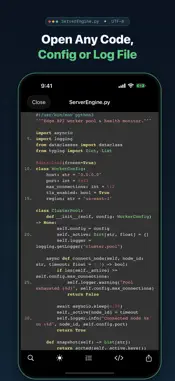
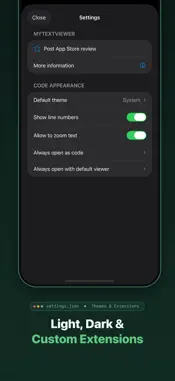
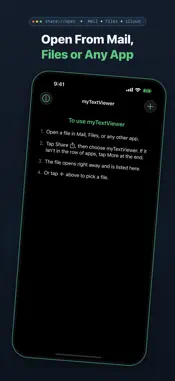
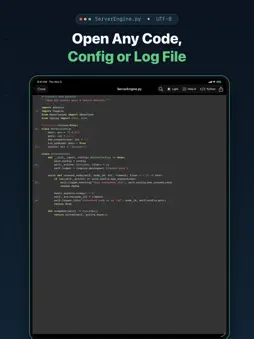
Open any text, source code, config, or log file on your iPhone or iPad in seconds — even when iOS Mail or the Files app says the format is unsupported. Whether someone just emailed you a server .log, a .yaml deployment config, a .cfg or .ini file, or a Python/JSON script, myTextViewer opens it cleanly with offline syntax highlighting, line numbers, and instant in-file search. No accounts. No cloud uploads. And zero ads while you are reading a file. WHY DEVELOPERS, SYSADMINS & POWER USERS KEEP IT INSTALLED • Opens Anything Text-Based — Unknown or non-standard file extensions (.log, .cfg, .conf, .diag, .env, .ini, .dat, .sql, .md, .toml, and more) open directly as readable text instead of hitting an "unsupported file" dead end. • 100% Offline Syntax Highlighting — Automatic syntax coloring for Python, JSON, YAML, XML, HTML, CSS, JavaScript, TypeScript, Swift, C/C++, C#, Java, Ruby, Shell scripts, SQL, and more. Use the toolbar menu (‹/›) to switch languages or view as Plain Text, remembered automatically per file extension. • Formatted View for JSON, Markdown & HTML — One tap pretty-prints minified JSON (keys and numbers kept exactly as written), renders Markdown documents, and shows HTML attachments as a page with scripts turned off. The raw text is always one tap away. • Log & YAML Highlighting — ERROR, WARN, INFO, and timestamps stand out in .log files, and YAML configs get proper coloring. Binary .plist files open as readable XML. • Fast In-File Search — Jump straight to the error or config key you need with live match counting ("3 of 12") and next/previous navigation. • Your File Library on the Home Screen — Every file you open is saved to your searchable home screen library so you can reopen it anytime with a single tap, or tap "+" to import files directly from the Files app. • Comfortable Reading Anywhere — Switch between Light, Dark, and System appearance in place without losing your scroll position. Toggle line numbers and pinch-to-zoom with a tap. • Smart Encoding & Large File Support — Cleanly reads UTF-8, UTF-16, BOM-prefixed logs, Windows-1252, and multi-megabyte log files without garbled characters or freezes. • 100% On-Device Privacy — Your files never leave your device. Decoding, syntax highlighting, and search run entirely locally on your iPhone or iPad. Rendered HTML and Markdown load no remote images until you tap Load, so tracking pixels stay silent. TWO EASY WAYS TO OPEN A FILE 1. From Mail, Files, Slack, or Messages: Tap Share on any attachment or file and choose myTextViewer. It opens right away and stays in your library for next time. 2. Directly Inside myTextViewer: Tap "+" in the top-right corner of the home screen to pick and open any file from your device or iCloud Drive. Terms of Use: https://www.apple.com/legal/internet-services/itunes/dev/stdeula/
What's New
Version 3.1 2026-11-13
• Formatted View: Tap the new toolbar button to pretty-print minified JSON (keys and numbers kept exactly as written), render Markdown documents, or show HTML a...• Formatted View: Tap the new toolbar button to pretty-print minified JSON (keys and numbers kept exactly as written), render Markdown documents, or show HTML attachments as a page. The raw text is always one tap away, and your choice is remembered per file type. • Safe HTML & Markdown: Scripts in HTML files never run, and remote images stay blocked until you tap Load, so tracking pixels stay silent. Links open in Safari. • Log Highlighting: ERROR, WARN, INFO, DEBUG, and timestamps now stand out in .log files. • YAML & Plist: YAML configs get proper syntax coloring, and binary .plist files open as readable XML. • JSON in Text Files: A .txt attachment that contains JSON can be pretty-printed too. • Toolbar for Every Screen Size: On smaller iPhones or with larger text sizes, extra controls move into a "More" menu so nothing gets cut off. • New Home Screen File Library: Your imported files now live right on the home screen for instant one-tap reopening, filename search, and direct "+" importing. • 100% Offline Syntax Highlighting: Faster, chunked rendering for large files with a new toolbar menu (‹/›) to pick the language or Plain Text per file extension. • System Appearance Support: Choose Light, Dark, or System default theme, and toggle themes or line numbers in place without losing your scroll position. • Smarter Text Encoding: Automatic detection for UTF-16 and BOM-encoded log and config files. • Improved In-File Search & Copy: Accurate multi-match highlighting and clean plain-text copying. Technical Analysis
Package Overview Basic metadata
Bundle ID
net.kalsky.myTextViewer Current Version 3.1
Minimum iOS 18.0
Package Size App Store Size
Package Metadata 0 / 7 version records
3.8 / 5.0 (146 ratings)
Detailed binary, privacy manifest, framework, and Info.plist results have not been indexed for this package yet. The verified App Store and archive metadata above remains available.
Developer Information
Known Version Records
0 version records with stored package metadata • 7 known version records
Stored metadata does not guarantee a package is currently available to download.
| Details | Version / IDs | Version date | Action |
|---|---|---|---|
| Not archived | App Store ID: 881800583 | Unknown | Request Version |
| Not archived | App Store ID: 881617270 | Unknown | Request Version |
| Not archived | App Store ID: 878246212 | Unknown | Request Version |
| Not archived | App Store ID: 855483274 | Unknown | Request Version |
| Not archived | App Store ID: 841812801 | Unknown | Request Version |
| Not archived | App Store ID: 841812800 | Unknown | Request Version |
| Not archived | App Store ID: 823345720 | Unknown | Request Version |