Preview




Description
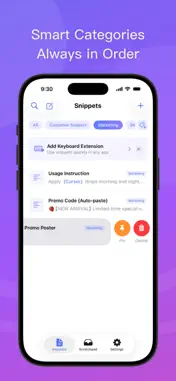
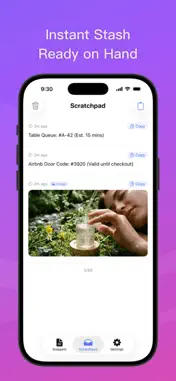
Type less. Express more. Stay ahead with every reply. Sniplet is a fast-input keyboard tool designed for efficient communication, putting your frequent texts, images, and temporary notes directly into your system keyboard. Whether for daily chats, customer service, or team collaboration, tap to insert instantly without repeatedly copying and pasting. [ Get Started in 4 Simple Steps ] 1. Add your frequent texts or images in the app 2. Enable Sniplet keyboard in System Settings 3. Long-press the globe icon in any input field to switch to Sniplet 4. Tap the snippet you need to automatically insert or send [ Instant Capture on the Fly ] Save content the moment you see it without opening the app. Capture text and images effortlessly through multiple system-level shortcuts: · Save via the iOS Share Sheet · Link with Shortcuts to stash instantly with Back Tap · Quick save from your clipboard · One-tap stash inside the keyboard [ Smart Templates ] Make a single template adapt to multiple communication scenarios. Supports dynamic calculation and auto-filling: · Current date and time · Current day of the week and lunar calendar · Customizable option pickers · Latest clipboard content · Auto cursor positioning (cursor jumps straight to your fill-in blank) For example: "Hello! Your order is scheduled to ship on [Current Date]. Thank you for your patience." The current date is filled in automatically upon insertion—no manual edits needed. [ Seamless Interaction ] Built for speed and tailored to your typing habits: · Flexible post-insert actions: Automatically add spaces, line breaks, or switch back to your original keyboard to reduce extra taps · Custom keyboard height: Perfectly adapt to large screens and different devices to view more content at a glance · Single/multi-column layout: Switch freely between compact multi-column and clear single-column views · Long-press quick menu: Long-press any snippet in the keyboard to pin, preview full text and large images, copy to clipboard, or jump to edit [ Two Dedicated Spaces: Snippets & Scratchpad ] Sniplet clearly separates your content into two independent spaces, keeping long-term assets and short-term scraps neatly organized: · Permanent Snippets (Long-term Storage) Built for high-frequency replies, product details, business info, saved addresses, and reference images. Organize with tags and flexible sorting to build a reusable knowledge base. · Quick Scratchpad (Use & Done) Designed for ephemeral info you need right now but might not need later—such as 2FA verification codes, gate access codes, temporary screenshots, and links. Bring them up anytime, paste, and clear—keeping your permanent list spotless. [ Privacy & Security ] Sniplet is built on a serverless architecture with local sandbox storage. We never record, collect, or upload any of your keystrokes or personal data. iCloud Sync only runs when explicitly enabled, syncing securely across your personal devices via Apple's official private cloud. Full Access permission is requested solely to read the clipboard and quickly manage data (pinning, adding, etc.) from within the keyboard. Everything runs 100% offline for complete peace of mind. Type less. Switch less. Type less. Express more.
What's New
Version 3.1.0 2026-10-23
[ Edit more smoothly. Capture more efficiently. ] 1. Editing Improvements: Fixed incorrect content when editing snippets; 2. iPad Improvements: Improved input s...[ Edit more smoothly. Capture more efficiently. ] 1. Editing Improvements: Fixed incorrect content when editing snippets; 2. iPad Improvements: Improved input switching and support for different screen sizes and split view; 3. Save Images to Scratchpad: Save images directly to Scratchpad from the system share sheet; 4. iCloud Sync Improvements: Improved multi-device data merging to reduce overwritten or restored content; 5. Web Updates: Added Scratchpad management and dynamic variables. Technical Analysis
Package Overview Basic metadata
Bundle ID
com.raylabs.sniplet Current Version 3.1.0
Minimum iOS 18.0
Package Size App Store Size
Package Metadata 1 / 8 version records
Detailed binary, privacy manifest, framework, and Info.plist results have not been indexed for this package yet. The verified App Store and archive metadata above remains available.
Known Version Records
1 version record with stored package metadata • 8 known version records
Stored metadata does not guarantee a package is currently available to download.
| Details | Version / IDs | Version date | Action |
|---|---|---|---|
| 10.18 MB | v3.0.0 App Store ID: 887265421Build: 3.0.0 | 2026-09-18 07:31:44 | Get Version |
| Not archived | App Store ID: 886864706 | Unknown | Request Version |
| Not archived | App Store ID: 886129865 | Unknown | Request Version |
| Not archived | App Store ID: 883736628 | Unknown | Request Version |
| Not archived | App Store ID: 883500603 | Unknown | Request Version |
| Not archived | App Store ID: 882928818 | Unknown | Request Version |
| Not archived | App Store ID: 882229644 | Unknown | Request Version |
| Not archived | App Store ID: 881477573 | Unknown | Request Version |