Preview




Description
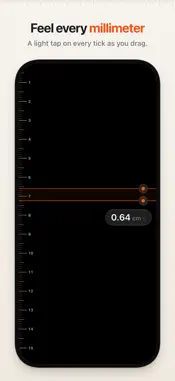
Lineal turns your iPhone or iPad into a ruler that’s as precise as its display allows. Two markers, one distance, nothing else. It measures anything that fits on your display. Lineal identifies your exact model and the display it’s running on, uses that panel’s physical pixel density, and snaps every tick and both markers to the pixel grid. The distance between the markers is shown with two decimals, in centimeters or inches. MADE FOR MEASURING • Drag a marker, or drag anywhere: the nearest marker follows your finger, so your finger never covers the line. • Drag both markers at once, one finger on each. • Fine-tune with one finger: while dragging, slide sideways to slow the marker to half, a quarter, or a tenth of its speed. • Feel the scale: a light tap on every millimeter or 1/16 inch, a firmer one on every whole centimeter or inch, and a stop at the edge of the screen. • On iPad with Apple Pencil Pro, you feel every tick in the pencil. • On iPad with a keyboard, the arrow keys move a marker by one pixel, Shift-arrow by one tick, and Space switches markers. • Works in portrait and landscape. The markers stay in place when you rotate, fold iPhone Duo, or resize an iPad window. • The screen stays awake while you measure. CALIBRATED FOR YOUR DISPLAY • A built-in table holds the pixel density of every supported iPhone and iPad. • Lineal calculates pixels per point for each axis, so scaled displays and Display Zoom stay exact. • Published pixel densities are rounded, so a small uncertainty remains: about ±0.1% on iPhone, up to ±0.2% on iPad. • On iPhone Duo, both the outer and the inner display are calibrated. The inner display measures when it’s fully unfolded. • On a model Lineal doesn’t know yet, it uses the pixel density of a matching known display; if there is none, it estimates the pixel density and the reading shows ≈. • Lineal measures on the built-in display only, not on an external display. ONE SETTING • Centimeters or inches. Tap the reading to choose. PRIVATE BY DESIGN • No ads, no account, no tracking. Lineal collects no data. • No network access, no camera, no AR, no LiDAR. FOR EVERYONE • VoiceOver: the markers are adjustable and speak the distance. • Dynamic Type, Reduce Motion, and Increase Contrast. • Light and dark appearance. • In English, German, French, Spanish, and Portuguese (Brazil and Portugal).
Technical Analysis
Package Overview Basic metadata
Bundle ID
com.yansoisson.lineal Current Version 1.0
Minimum iOS 26.0
Package Size App Store Size
Package Metadata 0 / 0 version records
Detailed binary, privacy manifest, framework, and Info.plist results have not been indexed for this package yet. The verified App Store and archive metadata above remains available.
Developer Information
Known Version Records
0 version records with stored package metadata
Stored metadata does not guarantee a package is currently available to download.
| Details | Version / IDs | Version date | Action |
|---|