Preview





Description
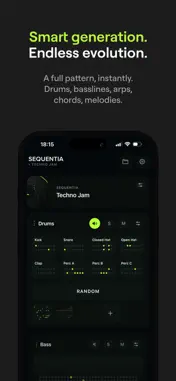
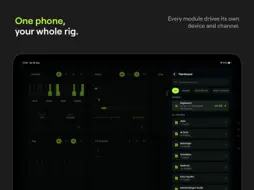
Sequentia is a generative MIDI sequencer for synths, drum machines and modular. Add a module and it writes its own part: drums, basslines, arps, chords, melodies. Press Random and a full pattern is playing. Turn on Mutate and it keeps evolving while it runs. The pattern libraries are written for techno and acid, and the generative modules go further out than that. Seven finished demo tracks come with the app. WHAT WRITES THE PARTS Drums, eight lanes, with the swing each genre actually has. Tops, cymbals, shakers and claves over the kit, on one fader. Bass, sixteen styles from techno to dub to EBM. Acid, 303 lines that really slide. Chords and Arp, in your key, following each other. Stabs, from skank to rave. Piano, drawn by hand or written for you. Euclid, three rings at different lengths, drifting apart and landing together bars later. Rain, notes falling from a drizzle to a downpour. Bounce, physics balls playing your key off the walls. Sampler, your own loop, warped to the tempo and the key. Mod, LFOs that sweep your synth's knobs on their own. Vinyl, a record that turns while the rack plays. Mixer, to solo, mute and balance live. ONE STUDIO, YOUR WHOLE RIG Every module picks its own MIDI device and channel, so each machine gets its own part. MIDI over USB-C, Bluetooth or network. MIDI Clock in and out keeps the gear in time. In any DAW the app is a MIDI source you can record straight onto a track. Leave the app and the music keeps playing, with the controls on your Lock Screen. MODULATE AND CONTROL YOUR HARDWARE Pick your machine from the library and its control map loads, ready to turn: over a hundred and thirty synths, grooveboxes and drum machines, every map read out of its own manual. Put an LFO on any of those knobs and it sweeps in time with the pattern. Arm the red R, turn a knob by hand, and the move becomes a loop locked to the bar. CC coming in works too, so a controller fires Random, Mutate, mutes and the transport. LIVE JAM Every module keeps pattern slots. Fill them as you go and switch on the bar, like clips. Live Performer is one pad for the whole rack: move a finger and every module answers at once with more density, new variations or a break. Fills, swing and humanize are a tap each, while everything runs. SCENES, AND A SET YOU CAN PLAY Save a section as a scene, put the scenes in order, and the timeline plays the set. Or switch scenes by hand while it runs. A project holds several racks, each with its own key and tempo, so a breakdown can sit lower and slower than the drop. ONE PROGRESSION, EVERYTHING FOLLOWS Write the chords once. The basslines, arps and stabs follow the changes. NO HARDWARE YET Every module plays through the app's own synth, free, so a whole track works with nothing attached. Load your own samples into the Sampler, or build a drum kit out of them. EVERYTHING IN ONE PROJECT Notes, patterns, scenes, samples, routing and arrangement live in one project that saves itself. Take the whole thing out in one step: the rack as MIDI, or every scene as its own folder, named so the session opens in your DAW making sense. Samples come with it if you want them. ON IPHONE AND IPAD One app for both. On the tablet the rack becomes a grid of cards you page through, three across on a 13 inch. Menus come in from the right and leave the instrument where it is. Open a module and it steps into the middle of the screen with its settings beside it. Landscape, for a stand and two hands. Turn iCloud on and the same projects, presets and samples are on both devices, in a Sequentia folder you can see in Files. Off until you switch it on. Sequentia is free, and so is the built in sound, Live Performer and CC Control. Sequentia Pro adds pattern slots, scenes, several racks, every drum style, your own libraries, unlimited projects and MIDI export. Terms of Use (EULA): https://www.apple.com/legal/internet-services/itunes/dev/stdeula/ Privacy Policy: https://www.sequentia.studio/privacy
What's New
Version 4.3 2026-10-19
Sequentia 4.3 Listen: your controller on any control Menu, Listen, then Learn. Tap a control, move a knob on your controller, and it is learned. Knobs, faders,... Technical Analysis
Package Overview Basic metadata
Bundle ID
com.yahorkamarou.midigen Current Version 4.3
Minimum iOS 17.0
Package Size App Store Size
Package Metadata 0 / 0 version records
Detailed binary, privacy manifest, framework, and Info.plist results have not been indexed for this package yet. The verified App Store and archive metadata above remains available.
Developer Information
Known Version Records
0 version records with stored package metadata
Stored metadata does not guarantee a package is currently available to download.
| Details | Version / IDs | Version date | Action |
|---|