
Preview




Description
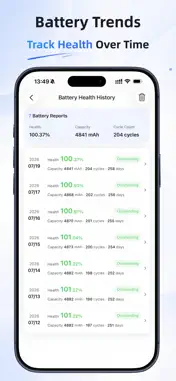
FoxPeek is a device configuration analysis and testing utility designed for iOS users. Import a sysdiagnose or Analytics file to organize and review device information, generate clear configuration or battery analysis reports, and use Toolbox to test the display, storage, and memory of the device you are currently using. Whether you want to learn more about your device, review information about its display, battery, cameras, storage, and memory, or check its display and performance, FoxPeek turns complex diagnostic data into clear and accessible results. 1. Device Configuration Analysis Import a supported diagnostic file to view the device model, iOS version, storage capacity, memory information, storage information, and other configuration details. 2. Component Information Review key information about the display, battery, cameras, storage, memory, and other components, organized into easy-to-read categories. 3. Battery Health Analysis Import an Analytics file to review battery information such as cycle count, battery capacity, and battery health, helping you better understand the battery’s current condition. 4. Toolbox All tests and benchmarks in Toolbox are performed on the device you are currently using: - Display Test: Use different solid-color screens to help identify dead pixels, bright pixels, and display irregularities - Storage Benchmark: Measure the device’s sequential storage read and write speeds - Memory Benchmark: Measure the device’s memory read, write, and copy speeds 5. Local Reports Generate device configuration and battery analysis reports, and save them to your history for convenient viewing, comparison, and management. 6. Clear, Organized Results FoxPeek organizes complex diagnostic information into an easy-to-understand interface, reducing the time required to search through raw files. The interface is optimized for both iPhone and iPad, including landscape use. FoxPeek is useful if you want to: - Learn more about your iOS device’s configuration - Review information about the display, battery, cameras, storage, and memory - Check battery cycle count, capacity, and health - Test the display of the device you are currently using - Measure the device’s storage and memory performance - Organize device information into a clear report - Find key information in sysdiagnose or Analytics files more easily FoxPeek takes your privacy and data security seriously. Imported sysdiagnose and Analytics files, along with generated reports, are processed and stored locally on your device by default. Toolbox tests and benchmarks are also performed on the current device. Unless you choose to share content, send feedback, or use a feature that requires network access, FoxPeek does not upload the original diagnostic files or locally stored reports. Configuration analysis, device testing, and benchmark results provided by FoxPeek are for reference only. Results may vary depending on the iOS version, device model, file contents, data completeness, device temperature, and current operating conditions. FoxPeek is not an official Apple tool, and its results do not represent an official Apple diagnostic assessment.
What's New
Version 1.4.1 2026-10-25
What’s New: - Added support for iPhone Duo, with improved layouts and navigation on both the inner and outer displays. Technical Analysis
Package Overview Basic metadata
Bundle ID
com.lian.foxtanji Current Version 1.4.1
Minimum iOS 16.0
Package Size App Store Size
Package Metadata 1 / 9 version records
Detailed binary, privacy manifest, framework, and Info.plist results have not been indexed for this package yet. The verified App Store and archive metadata above remains available.
Known Version Records
1 version record with stored package metadata • 9 known version records
Stored metadata does not guarantee a package is currently available to download.
| Details | Version / IDs | Version date | Action |
|---|---|---|---|
| 13.99 MB | v1.3.6 App Store ID: 891617535Build: 1360 | Unknown | Get Version |
| Not archived | App Store ID: 891008662 | Unknown | Request Version |
| Not archived | App Store ID: 890402544 | Unknown | Request Version |
| Not archived | App Store ID: 889440179 | Unknown | Request Version |
| Not archived | App Store ID: 889050897 | Unknown | Request Version |
| Not archived | App Store ID: 888798930 | Unknown | Request Version |
| Not archived | App Store ID: 888522385 | Unknown | Request Version |
| Not archived | App Store ID: 888372012 | Unknown | Request Version |
| Not archived | App Store ID: 887768280 | Unknown | Request Version |