
Preview



Description
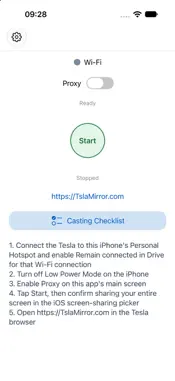
One-week free trial. TslaMirror is an app designed to mirror your iPhone/iPad apps to your Tesla’s built-in browser. - Supported apps include Waze, Google Maps, Apple Maps, YouTube, TikTok, Plex, and more. - DRM-protected apps, including but not limited to Netflix, Apple TV, YouTube TV, Amazon Prime Video, and Hulu, are not supported. Some DRM-protected apps may block video mirroring, resulting in a black screen in the Tesla browser. Instructions for the Tesla built-in browser: 1. If possible, update your Tesla’s infotainment system to the most recent version. 2. Make sure the vehicle is PARKED (0 mph / 0 km/h). 3. Connect your Tesla to your iPhone Personal Hotspot (cellular data required). MCU2 or MCU3 hardware is required: available on Model 3 and Model Y, Cybertruck, Model S built after March 2018, Model X built after March 2018, or vehicles upgraded from MCU1 to MCU2/3. 4. Ensure the iPhone is not in Low Power Mode. Launch the TslaMirror app and toggle on “Proxy.” 5. Tap “Start,” then select “Start Broadcast” to begin screen broadcast. 6. In your Tesla’s built-in browser, go to https://TslaMirror.com 7. Lossless audio playback is supported in the browser. 8. Keep your iPhone unlocked; due to Screen Broadcast API limitations, locking the screen stops casting and requires restarting the broadcast. Key Features 1. No additional internet traffic is used for mirroring; traffic stays on the iPhone’s Personal Hotspot. However, while the Tesla is connected to the hotspot, the vehicle may use your cellular data for its own internet access. 2. Private: the screencast is only available to devices connected to the iPhone Personal Hotspot Wi-Fi network. 3. A 5 GHz Personal Hotspot (supported from the iPhone 12 series) is highly recommended. Do not enable “Maximize Compatibility” on iPhone 12 models; enabling it forces a 2.4 GHz hotspot. 4. H.264/H.265 mirroring recommendations: - MCU3 (AMD Ryzen): H.265 mode with 720p@60 fps recommended, as 1080p requires higher bandwidth. MCU3 supports up to 1080p@60fps (H.264 and H.265). - For Tesla in-car system software version 2025.38.11 and later, H.265 mirroring is now recommended for both MCU2 and MCU3. - MCU2 (Intel Atom): H.264 mode with 540p@30fps recommended only for very old Tesla in-car system. FAQ 1. This is not CarPlay. 2. iOS apps that use the AVPlayer framework (e.g., Apple Music, Netflix) are not supported. 3. Netflix is not supported. Privacy/Security Notice: This app does not collect usage statistics, personal information, or analytics. On iOS 13 and later, it uses Location Services only to read the Wi-Fi network name (SSID). Location data is never stored or collected. No information is stored by us. Disclaimer: This software and documentation are not affiliated with or endorsed by Tesla, Inc. Use at your own risk. We do not guarantee proper functioning. Some features require specific vehicle options (e.g., MCU2 or newer). The app uses interfaces similar to those used by official Tesla apps, but you are responsible for any changes to your car resulting from use. Use requires the vehicle’s built-in browser. We are not liable for any damages to you, your car, or any other property in conjunction with the use of this app. Warning and Legal Disclaimer: Use only while PARKED (0 mph / 0 km/h). Local laws may restrict the use of a built-in web browser in a vehicle. Terms of Use (EULA): https://teslamirror.com/terms Privacy Policy: https://teslamirror.com/privacy
What's New
Version 9.89 2026-11-20
9.88: - iPhone Duo and iOS 27.1 support 9.83: - 32-bit and 48 kHz lossless audio for iOS 27. Better audio quality for iOS 27. - Improved iOS 27 support. 9.75:...9.88: - iPhone Duo and iOS 27.1 support 9.83: - 32-bit and 48 kHz lossless audio for iOS 27. Better audio quality for iOS 27. - Improved iOS 27 support. 9.75: - Added appearance options: choose Light, Dark, or Automatic to follow your system settings. Changes take effect immediately. - Added a casting checklist. - Purchase and subscription options are now in Settings, where you can also restore previous purchases. 9.74: - Added Software and Hardware decoder selection for H.264 and H.265. Use the controls in the upper-right corner of the Tesla browser streaming page. - Hardware decoding is generally recommended for smoother playback and better efficiency. If the browser does not support it or the video does not display correctly, try Software decoding. - If Software decoding is not smooth, try lowering the resolution and frame rate in the TslaMirror app settings. 9.64: - Performance improvements. - For Tesla in-car system software version 2025.38.11 and later, H.265 mirroring is now recommended for both MCU2 and MCU3. 9.25: - Added H.265 mirroring mode for improved video quality. - H.265 playback is supported on all MCU3 vehicles, and on MCU2 vehicles running Tesla software 2025.38.11 or later. - To switch modes, tap the Settings button in the top-right corner → “Mirroring mode”. - H.264 remains the default. On MCU3 (and supported MCU2 vehicles), H.265 is recommended. - On MCU3, H.265 enables smooth playback at 1080p@60 fps. - Resolution and frame-rate settings for the H.265/H.264 modes depend on your vehicle’s performance. For older Tesla models, use lower settings; for newer models, increase them gradually to suit your needs. 8.07: Siri Shortcuts support: Start Mirroring, Stop Mirroring, Start Proxy, Stop Proxy. 7.00: After careful investigation, it appears that the recent Tesla 2025.8.4 software update may have inadvertently impacted support for H.264 video streaming. - The updated H.264 mode is now compatible with Tesla’s 2025.8.4 software. - Due to limitations introduced in Tesla 2025.8.4, video playback performance in the new H.264 mode may be somewhat reduced compared with previous versions. - To achieve optimal streaming performance, consider lowering your “Resolution” and “Frames per second” settings. You can adjust these by tapping the Settings button in the top-left corner of the app. - To ensure the Tesla browser uses the latest version of a webpage, clear the vehicle’s browser data (as you would on a computer or phone) via Controls > Service > Clear Browser Data. Thank you for your understanding and patience. 6.00: - Starting with version 6.00, the audio transmission method has been completely updated and is no longer compatible with version 4.00. Tesla software versions 2024.45.32.1 and later no longer support the old method. - The new audio transmission method is comparable to Bluetooth audio and supports lossless audio. - Lossless audio specs: 44.1 kHz, stereo, 16-bit (CD quality). This is typically much better than Bluetooth or low-bitrate streaming audio. - These specs reflect the highest recording quality supported by iPhone. For best results, use music apps configured for lossless or higher-quality audio. - Lossless audio transmission is available only in H.264 mode, which includes a “Lossless Audio” option enabled by default that controls audio transmission to the browser. - Audio transmission depends on DRM restrictions set by third-party apps. If a third-party app allows screen recording and its audio is DRM-free, it can be transmitted normally. - To play audio in the browser, initial manual interaction is required (tap the audio button in the top-left corner). The button hides automatically after 30 seconds and reappears when the screen is touched. - For optimal transmission performance, we recommend using a 5G or 4G cellular signal along with a 5 GHz iPhone Wi-Fi hotspot (cellular signal and Wi-Fi frequency are separate parameters). Technical Analysis
Package Overview Basic metadata
Bundle ID
com.hustmobile.screencastfortesla Current Version 9.89
Minimum iOS 16.0
Package Size App Store Size
Package Metadata 0 / 103 version records
Detailed binary, privacy manifest, framework, and Info.plist results have not been indexed for this package yet. The verified App Store and archive metadata above remains available.
Developer Information
Known Version Records
0 version records with stored package metadata • 103 known version records
Stored metadata does not guarantee a package is currently available to download.
| Details | Version / IDs | Version date | Action |
|---|---|---|---|
| Not archived | App Store ID: 876023897 | Unknown | Request Version |
| Not archived | App Store ID: 875994428 | Unknown | Request Version |
| Not archived | App Store ID: 875787109 | Unknown | Request Version |
| Not archived | App Store ID: 875411267 | Unknown | Request Version |
| Not archived | App Store ID: 875313560 | Unknown | Request Version |
| Not archived | App Store ID: 875063003 | Unknown | Request Version |
| Not archived | App Store ID: 874666905 | Unknown | Request Version |
| Not archived | App Store ID: 874444618 | Unknown | Request Version |
| Not archived | App Store ID: 874067208 | Unknown | Request Version |
| Not archived | App Store ID: 873741515 | Unknown | Request Version |
| Not archived | App Store ID: 873681628 | Unknown | Request Version |
| Not archived | App Store ID: 873618098 | Unknown | Request Version |
| Not archived | App Store ID: 873455867 | Unknown | Request Version |
| Not archived | App Store ID: 873320043 | Unknown | Request Version |
| Not archived | App Store ID: 871629854 | Unknown | Request Version |
| Not archived | App Store ID: 871437014 | Unknown | Request Version |
| Not archived | App Store ID: 871319957 | Unknown | Request Version |
| Not archived | App Store ID: 871252851 | Unknown | Request Version |
| Not archived | App Store ID: 870040128 | Unknown | Request Version |
| Not archived | App Store ID: 869424050 | Unknown | Request Version |
| Not archived | App Store ID: 869224592 | Unknown | Request Version |
| Not archived | App Store ID: 869136838 | Unknown | Request Version |
| Not archived | App Store ID: 868859969 | Unknown | Request Version |
| Not archived | App Store ID: 868803294 | Unknown | Request Version |
| Not archived | App Store ID: 868030685 | Unknown | Request Version |
| Not archived | App Store ID: 867891500 | Unknown | Request Version |
| Not archived | App Store ID: 867623088 | Unknown | Request Version |
| Not archived | App Store ID: 867134088 | Unknown | Request Version |
| Not archived | App Store ID: 867018096 | Unknown | Request Version |
| Not archived | App Store ID: 864464965 | Unknown | Request Version |
| Not archived | App Store ID: 862666371 | Unknown | Request Version |
| Not archived | App Store ID: 861668073 | Unknown | Request Version |
| Not archived | App Store ID: 861241884 | Unknown | Request Version |
| Not archived | App Store ID: 861187187 | Unknown | Request Version |
| Not archived | App Store ID: 861162815 | Unknown | Request Version |
| Not archived | App Store ID: 860751399 | Unknown | Request Version |
| Not archived | App Store ID: 858437981 | Unknown | Request Version |
| Not archived | App Store ID: 858243451 | Unknown | Request Version |
| Not archived | App Store ID: 858124875 | Unknown | Request Version |
| Not archived | App Store ID: 857964753 | Unknown | Request Version |