
Preview



Description
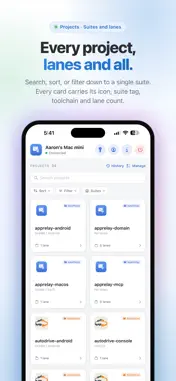
Stop walking back to your desk to kick off a build. Ship from the couch. AppRelay Remote is the mobile companion to AppRelay Server for desktop — a remote control that commands your Mac or PC to build, run, test, and ship your app projects. The Mac does the work; your phone drives it. Pair once over your local Wi-Fi and your whole AppRelay workspace comes with you: every project, every lane, every release channel, right on your iPhone or iPad. WHAT YOU CAN DO • Trigger builds, runs, and test suites on your Mac with a tap • Cut a release — ship a lane to its distribution channel without touching your desk • Watch live, streaming log output as each build runs, with a Stop button when you need it • Browse every project as a card: toolchain, lanes, version, and source-control status at a glance • Edit the full project configuration — general settings, lanes, servers, toolchains, test suites — and save it back to your Mac • Bump or set version and build numbers • Edit .env / dotenv files on disk, remotely • Manage your Mac's AppRelay license: activate a key, check status, or move the seat BUILT FOR iPHONE AND iPAD On iPhone you get a fast, single-column flow. On iPad you get the same two-column sidebar-and-detail layout as the Mac app — it even re-skins live when you change the desktop theme. SECURE BY DESIGN • Discovers Macs on your network automatically over Bonjour • Pair with a one-time token shown on your Mac — each device gets its own credential • All traffic runs over TLS, pinned to your Mac on first connection • Your Mac stays in control: block or disconnect any device at any time • Secrets never leave your Mac — the phone sees credential labels only, never their values REQUIRES THE MAC APP AppRelay Remote needs AppRelay for macOS running on the same network. Get it at apprelay.io/download. Free to pair; Pro features are managed on the Mac. AppRelay Remote needs the desktop app, which is **not** on the Mac App Store — it ships directly from the website (Sparkle-updated, notarized DMG). **Download:** https://apprelay.io/download **Requirement:** macOS 13 (Ventura) or later. **Enable the server:** open AppRelay → **Relay Monitor** → **Start**. This starts a local HTTPS server, advertises it over Bonjour (`_apprelay._tcp`), and shows the address + a pairing token. **Pair:** on the same Wi-Fi, open AppRelay Remote, pick the Mac under "Discovered Macs" (or enter host/port manually), and enter the pairing token. **Security:** self-signed TLS pinned trust-on-first-use; each device gets its own token; the Mac can block/disconnect any device from Relay Monitor.
What's New
Version 1.1 2026-07-24
Run History: see the last 50 builds, tests, and ships from every project on your computer — outcome, lane, start time, and progress, with phone-triggered runs m... Technical Analysis
Package Overview Basic metadata
Bundle ID
io.apprelay.mobile Current Version 1.1
Minimum iOS 26.5
Package Size App Store Size
Package Metadata 0 / 0 version records
Detailed binary, privacy manifest, framework, and Info.plist results have not been indexed for this package yet. The verified App Store and archive metadata above remains available.
Developer Information
Known Version Records
0 version records with stored package metadata
Stored metadata does not guarantee a package is currently available to download.
| Details | Version / IDs | Version date | Action |
|---|