Preview



Description
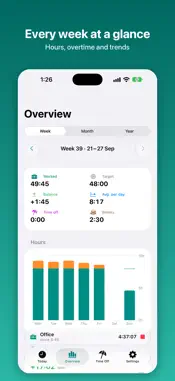
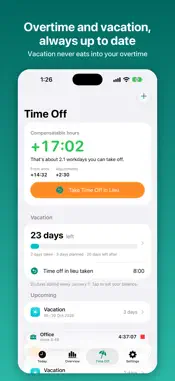
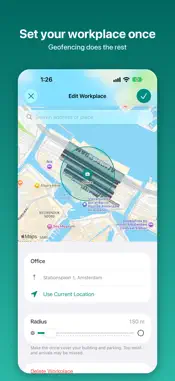
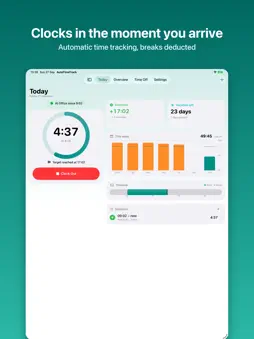
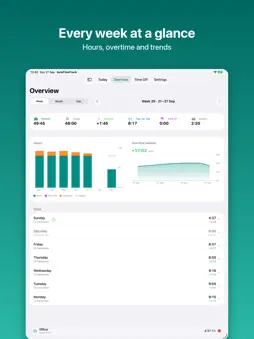
Stop guessing how many hours you've worked. AutoTimeTrack clocks you in when you arrive at work and clocks you out when you leave, so your timesheet fills itself. AUTOMATIC, THANKS TO GEOFENCING • Set your workplace once. Arrive and the timer starts, leave and it stops. • Popping out for coffee? Short trips are joined into one session. • Driving past the office on a Sunday? Short visits are ignored. • Forgot your phone? Add or edit any session in seconds. KNOW YOUR OVERTIME • See today's progress in a live ring, with the exact time you'll hit your target. • Your overtime balance is always one glance away, in hours and in days off. • Get a heads-up when you reach your daily or weekly limit. BREAKS, DONE RIGHT • Set recurring breaks like lunch from 12:00 to 12:30. • Only the part you're actually at work is deducted. Nothing counts twice. YOUR SCHEDULE, YOUR RULES • Set weekly hours and spread them evenly, or set hours per day. • Weekends and other days off have no target; work on those days is pure overtime. • Adjust a single day: skip breaks, or lower the target when you leave early by agreement. TIME OFF THAT DOESN'T COST YOU • Vacation, public holidays, sick days and special leave keep your overtime intact. • Take time off in lieu to use your overtime on purpose. • Track your vacation balance in days or hours, starting from what's on your payslip. • Record overtime paid out or carried over. CLEAR ANALYTICS • Week, month and year charts with target lines and overtime highlighted. • An overtime trend line. • Tap any day to see and edit every session. • Export to CSV for your employer or spreadsheet. ALWAYS AT HAND • Home and Lock Screen widgets. • Live Activity and Dynamic Island while you work. • A Control Center toggle and Siri: "Clock in with AutoTimeTrack". ON EVERY DEVICE • Apple Watch app with complications: see your hours and clock in or out from your wrist. • iPad and Mac apps to review and edit your hours on a big screen. • Everything syncs through your private iCloud, so nothing is lost when you replace your phone. PRIVATE BY DESIGN Your hours stay on your devices and in your own private iCloud, and your location never leaves your iPhone. No account, no tracking, no ads. SUBSCRIPTION Try AutoTimeTrack free for 2 weeks. Then choose monthly, yearly, or a one-time lifetime purchase. Payment is charged to your Apple Account. Subscriptions renew automatically unless cancelled at least 24 hours before the end of the period. Manage them in your Apple Account settings. Terms of Use: https://www.apple.com/legal/internet-services/itunes/dev/stdeula/ Privacy Policy: https://woutvanos.nl/autotimetrack/en/privacy/
What's New
Version 1.1 2026-11-11
• New calendars: browse your worked hours month by month in Overview, and plan time off in Time Off by tapping a first and last day. • Swipe left or right in Ov...• New calendars: browse your worked hours month by month in Overview, and plan time off in Time Off by tapping a first and last day. • Swipe left or right in Overview to move between weeks, months and years. The period you're looking at now stays at the top while you scroll. • While you're clocked in, the Overtime card shows what your balance would be if you clocked out right now. • Vacation planned for next year now comes out of next year's allowance, not this year's balance. • Fixed a crash that could happen when tapping a notification. Technical Analysis
Package Overview Basic metadata
Bundle ID
com.wirewave.autotimetrack Current Version 1.1
Minimum iOS 27.0
Package Size App Store Size
Package Metadata 0 / 0 version records
Detailed binary, privacy manifest, framework, and Info.plist results have not been indexed for this package yet. The verified App Store and archive metadata above remains available.
Developer Information
Known Version Records
0 version records with stored package metadata
Stored metadata does not guarantee a package is currently available to download.
| Details | Version / IDs | Version date | Action |
|---|