
Preview





Description
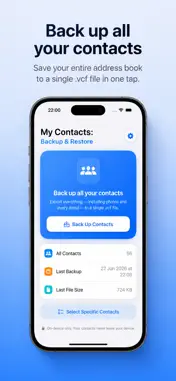
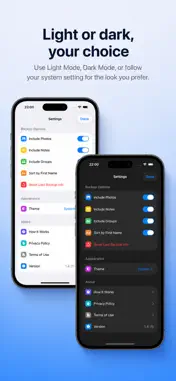
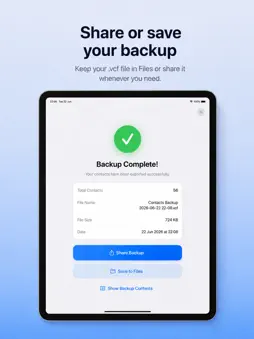
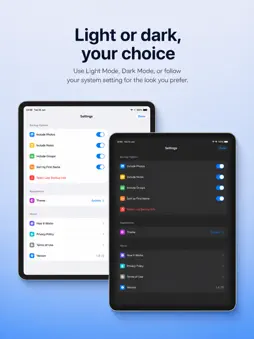
Contacts Backup keeps your address book safe. With one tap, it saves all of your contacts into a single standard .vcf (vCard) file — names, phone numbers, emails, companies, notes, and even contact photos. Everything happens on your device. Your contacts are never uploaded to any server, and there is no account to create. What's on your phone stays on your phone. WHY YOU'LL LIKE IT • One-tap backup — Save your entire address book in seconds. • Includes everything — Photos and every contact detail are kept, not just names and numbers. • Standard .vcf file — Works with iPhone, iPad, Mac, iCloud, and almost any other app or service. • Pick and choose — Back up all of your contacts, or select only the ones you want. • See what's inside — Open your backup file to review the saved contacts before you share it, and remove any you don't need. • Share anywhere — Send your backup by AirDrop, email, or messages, or save it straight to the Files app. • Private by design — No sign-up, no tracking, no cloud. Just a clean, simple backup. • Light & Dark themes — Choose the look you prefer, or follow your system setting. HOW IT WORKS 1. Open the app and tap "Back Up Contacts." 2. Your contacts are saved into a single .vcf file. 3. Share the file or save it to Files to keep it somewhere safe. To restore later, just open the .vcf file on any device and your contacts are added back. PERFECT FOR • Switching to a new phone. • Keeping a safe copy before you clean up or delete contacts. • Moving contacts between iPhone, iPad and computers. • Anyone who wants a private, offline backup they fully control. Your contacts matter. Back them up the simple way.
What's New
Version 1.4 2026-06-25
+ Brand new design Technical Analysis
Package Overview Basic metadata
Bundle ID
net.world-software.Contact-Backup Current Version 1.4
Minimum iOS 17.0
Package Size App Store Size
Package Metadata 2 / 6 version records
Detailed binary, privacy manifest, framework, and Info.plist results have not been indexed for this package yet. The verified App Store and archive metadata above remains available.
Known Version Records
2 version records with stored package metadata • 6 known version records
Stored metadata does not guarantee a package is currently available to download.
| Details | Version / IDs | Version date | Action |
|---|---|---|---|
 1.4 MB | v1.4 App Store ID: 837136597Build: 1.4 | 2026-06-25 22:48:21 | Get Version |
| 2.28 MB | v1.3 App Store ID: 837136596Build: 1.3 | 2020-07-30 08:42:08 | Get Version |
| Not archived | App Store ID: 739112730 | Unknown | Request Version |
| Not archived | App Store ID: 668062664 | Unknown | Request Version |
| Not archived | App Store ID: 616642899 | Unknown | Request Version |
| Not archived | App Store ID: 80852984 | Unknown | Request Version |