
Preview




Description
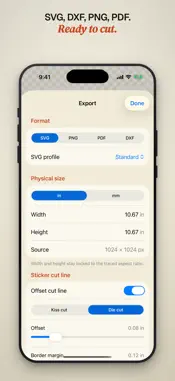
Bring an image. Leave with a cut-ready vector. Cutline traces photos, sketches, logos, and paintings into clean vector pieces on iPhone and iPad. Tune the trace live, fix anything piece by piece, and export files your cutting machine understands. PAY ONCE, KEEP IT FOREVER Cutline is free for 7 days with every feature unlocked. After that, one purchase keeps it forever. No subscription, no watermark, no export limits. PRIVATE BY DESIGN Tracing happens entirely on your device. Your images are never uploaded, and there are no accounts to create. It all works offline: trace at the kitchen table, at the craft fair, or in the truck. ADJUST THE TRACE • Trace styles built for logos and clip art, watercolors, pencil sketches, and photos • A Colors slider that combines similar colors instead of muddying them • Pin the colors that matter so they never get merged away • Remove the background or flatten shading with one tap • Crop, straighten, brightness, and contrast before you trace FIX ANYTHING, EASILY • Tap any piece on the canvas to recolor, restack, lock, or delete it • Round up every speck under cutting size in one tap • Draw, add shapes, or erase to touch up what the trace missed • Hand-trace over the original when you want full control EXPORT READY TO CUT • SVG, DXF, PNG, and PDF • Layered pieces that stack like vinyl, or a flat single layer • Sticker cut lines: kiss cut or die cut, with adjustable offset • Set the physical size in inches or millimeters before you export Cutline exports standard SVG and DXF files compatible with Cricut Design Space, Silhouette Studio, Glowforge, and other cutting software. You can also share an image straight into Cutline from Photos, Safari, or any other app.
What's New
Version 1.1 2026-09-06
Cut check Before you export, Cutline looks over the exact geometry that will ship, at the size you set, and tells you what it finds. Pieces too small for a bla...Cut check Before you export, Cutline looks over the exact geometry that will ship, at the size you set, and tells you what it finds. Pieces too small for a blade to cut. Hair-thin slivers that tear when you weed them. Islands that fall free because nothing joins them. Duplicate cuts. Every finding offers a way out, including the output size where the problem clears. Centerline tracing On the two line-art styles you can now trace one line down the middle of each stroke instead of an outline around it. That is what a pen, foil quill, engraving tip or scoring stylus needs. Give one of those an outline and it draws every letter twice, hollow. Send to Pick where the file is going and Cutline sets the format, profile and units together. Cricut Design Space, Silhouette Studio, Glowforge, LightBurn, xTool and RDWorks each get what they expect. Laser software reads a fill as engrave and a stroke as cut, so the laser choice writes hairline strokes with no fills, grouped by color. Cut preview Flip the canvas to what the machine sees. Outlines only, no fills, with the cut line if you have one. It is drawn from the export itself, so what you see is what will cut. Fixes Erasing could leave behind pieces with no shape. They were invisible, they inflated your piece count, and they could break an export. Any project affected repairs itself when you open it. Technical Analysis
Package Overview Basic metadata
Bundle ID
com.workingmodelcc.vectorsnap Current Version 1.1
Minimum iOS 17.0
Package Size App Store Size
Package Metadata 0 / 0 version records
Detailed binary, privacy manifest, framework, and Info.plist results have not been indexed for this package yet. The verified App Store and archive metadata above remains available.
Developer Information
Known Version Records
0 version records with stored package metadata
Stored metadata does not guarantee a package is currently available to download.
| Details | Version / IDs | Version date | Action |
|---|