
Preview





Description
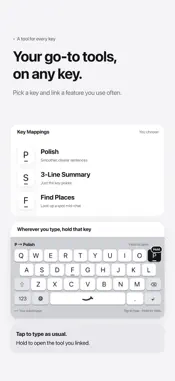
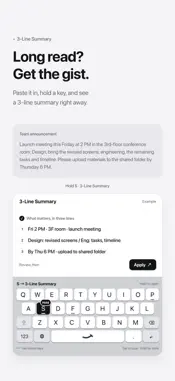
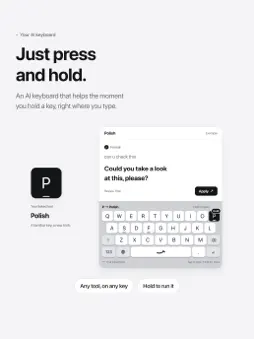
Your own AI keyboard, one long-press away. typik links the tools you use most to the keys you already type on. Tap to type as usual; long-press to run the action you assigned. The result lands right in the text field you're working in, so you can keep writing. ■ Polish Smooth out your sentences while keeping what you meant. Pick the tone and strength that fit the moment. ■ Persona Rewrite To your boss, a friend, or a customer — rewrite in the voice that suits who you're talking to. Save your own personas with example sentences. ■ 3-Line Summary Turn a long message you've selected or copied into three short lines. ■ Find Places Type something like "pasta near Seoul Station" and run it. See Kakao Map results inside the keyboard, then insert the place's name, address, and map link. Place search covers places in South Korea. Your device location is never used. ■ Everyday tools Quick Text for phrases you use often, a calculator, text converters, and clipboard history — all handled on your device. ■ Make it yours Assign an action to any key, choose your languages, and pick a keyboard skin. AI actions need an internet connection and have daily usage limits. Check your usage in the app, and optionally watch a rewarded ad or invite friends for bonus tokens. Please review AI results before you use them. typik never sends your everyday keystrokes to a server. Only when you run an AI action are the target text and your chosen options or persona sent for processing. Quick Text and your full clipboard history are never uploaded automatically. You can see the last text sent in the app's Settings. To use typik on iPhone or iPad, go to Settings > General > Keyboard > Keyboards > Add New Keyboard and turn on typik. AI actions need "Allow Full Access" for typik. Basic typing and on-device tools work without the AI server.
What's New
Version 0.1.3 2026-10-04
You can now send bug reports and suggestions from Settings > Send Feedback. No sign-in is needed, and a reply email address is optional. Technical Analysis
Package Overview Basic metadata
Bundle ID
com.roome.typik Current Version 0.1.3
Minimum iOS 17.0
Package Size App Store Size
Package Metadata 0 / 0 version records
Detailed binary, privacy manifest, framework, and Info.plist results have not been indexed for this package yet. The verified App Store and archive metadata above remains available.
Developer Information
Known Version Records
0 version records with stored package metadata
Stored metadata does not guarantee a package is currently available to download.
| Details | Version / IDs | Version date | Action |
|---|