Preview






Description
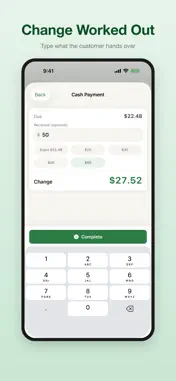
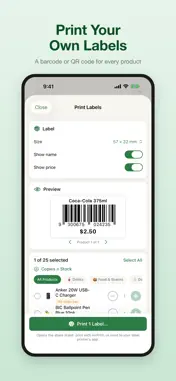
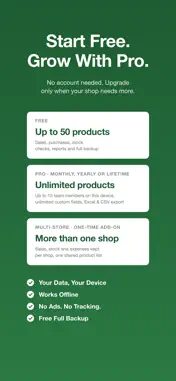
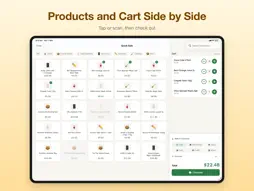
StockEasy is a simple inventory and POS app for small shops, cafés and market stalls — and it works fully offline. Scan barcodes with your iPhone camera, ring up sales in a few taps, and get a heads-up before something runs out. No account, no internet connection and no extra hardware. Your shop's data stays on your device. KEY FEATURES: -- Point of Sale -- Create sales orders with barcode scanning. Support for cash, WeChat Pay, Alipay, bank card, credit, and mixed payments. Print or share PDF receipts. -- Inventory Management -- Add products with photos, barcodes, and categories. Give a product the names you actually call it by, so searching or asking finds it either way. Track stock levels in real time with low-stock alerts. Perform stock checks and adjustments; every change is kept in the stock movement history. -- Purchase Orders -- Record supplier purchases, track payables, and manage supplier contacts. View purchase history and trends. -- Customer & Supplier Management -- Maintain customer and supplier profiles. Track receivables and payables with aging reports. Record payments and view transaction history. -- Reports & Analytics -- Sales reports, profit reports, purchase reports, and inventory reports. View rankings for top-selling products, most profitable items, top customers, and slow-moving stock. Export to Excel or CSV (Pro) — in Excel, barcodes and order numbers stay text, so none loses a leading zero. -- Quick Query -- Ask in your own words -- "stock", "this month's sales", "who owes me" -- and StockEasy reads the answer straight out of your own records. It is a keyword lookup over your own data, not a chatbot: no model, no server, nothing sent anywhere. Free, no upgrade needed. -- Tax, Wherever You Are -- Set your own rates and StockEasy itemizes them on receipts and PDFs, with your tax number and the document heading your country expects. Prices can include tax (Australia, New Zealand, the UK, the EU, Japan, China) or have it added at the register (the United States, Canada). A per-rate report shows what you collected, returns already taken off. Starting points for eight regions, all of them editable. -- More Than One Shop -- Multi-Store is a separate one-time purchase, not part of Pro. Each shop keeps its own sales, purchases, stock movements, stock checks, income and expenses, while products, customers, suppliers, receivables and payables stay shared. All shops live on this device. Switch from the home screen. -- Roles and Staff PINs -- On the shop's device, staff pick their name and enter a PIN; Owner, Manager and Staff each see what their role allows. PINs stay on this device. StockEasy does not sync between devices. -- Privacy First -- No sign-up, no data collection, no third-party analytics, no ads. StockEasy has no servers and never sends your shop data anywhere -- it works with the network switched off. Voice input (Mandarin) uses Apple's on-device speech recognition. Because nothing syncs, the backup file is your copy: it is free, holds all your records, and you can export it any time. -- Free vs Pro -- The free version runs a shop end to end: checkout, purchases, stock checks, multiple warehouses, member cards, reports, quick query, voice input (Mandarin), and backup files. Pro adds four things -- unlimited products (free: 50), up to 15 team members on this device (free: one besides you), unlimited custom fields (free: 3), and export (Excel/CSV, profit report PDF). Pro is available monthly, yearly, or as a one-time lifetime purchase. A note on tax: StockEasy prints what you configure — your rates, itemized and labeled, with your registration number. Whether that satisfies your tax office is your call; we do not claim compliance with any country's rules. Tax on your own purchases is not tracked, so a return that also claims credits will need those from elsewhere. In English and Simplified Chinese. Terms of Use: https://www.apple.com/legal/internet-services/itunes/dev/stdeula/
What's New
Version 1.4.8 2026-11-08
What's new in 1.4.8 • Special Orders: take an order and a deposit now, and hand it over later. In Sales, switch to Special Orders and tap + to add one: the cus... Technical Analysis
Package Overview Basic metadata
Bundle ID
com.williamshi.stockeasy Current Version 1.4.8
Minimum iOS 17.0
Package Size App Store Size
Package Metadata 0 / 2 version records
Detailed binary, privacy manifest, framework, and Info.plist results have not been indexed for this package yet. The verified App Store and archive metadata above remains available.
Developer Information
Known Version Records
0 version records with stored package metadata • 2 known version records
Stored metadata does not guarantee a package is currently available to download.
| Details | Version / IDs | Version date | Action |
|---|---|---|---|
| Not archived | App Store ID: 885616004 | Unknown | Request Version |
| Not archived | App Store ID: 884226702 | Unknown | Request Version |