
Preview


Description
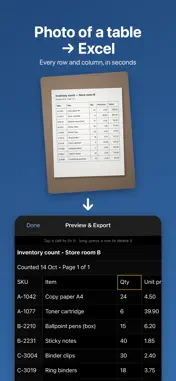
Turn a photo, screenshot or PDF of a table into an Excel spreadsheet, on your iPhone or iPad, in seconds. Snap a printed table, open a bank statement or invoice PDF, or pick a screenshot. QuickScan finds the rows and columns, shows you the result, and exports a clean Excel (.xlsx) or CSV file that opens in Excel, Numbers and Google Sheets. HOW IT WORKS • Scan with the camera, choose photos and screenshots, or open PDFs from the Files app: several pages at once. • Check the result. Cells QuickScan is unsure about are highlighted. Tap any cell to fix it, long-press a row to delete it. • Export to Excel or CSV and share it: Files, Mail, Numbers, Google Sheets. BANK STATEMENTS CHECK THEMSELVES • If a statement has a running balance, QuickScan checks every balance against the amounts. Cells that don't add up are outlined in red, so you know exactly what to look at. • A statement over several pages, or screenshots taken while scrolling, can become one table: repeated page headers and overlapping rows are left out. GOOD AT • PDF statements and invoices downloaded from your bank or supplier • Screenshots of spreadsheets and web tables • Printed tables, price lists, timetables and statements • Tables with lines: the lines are used to find every row and column • Commas or points as decimal separators PRIVATE BY DESIGN Your photos and PDFs are read on your iPhone or iPad. Nothing is uploaded, there is no account and no tracking. That matters for bank statements, payslips, invoices and anything else you'd rather not upload. FAIR PRICING Try it on your own tables: 3 exports are free, at full quality and without a watermark. After that, one purchase unlocks unlimited exports. No subscription. LIMITS, HONESTLY Handwriting is often misread. Password-protected PDFs can't be opened (take a screenshot of the page instead), and up to 10 pages are read at a time. If a table comes out wrong, send it to us from Settings → Contact. Every email gets an answer.
What's New
Version 1.4 2026-11-08
Bank statements now check themselves. • If a statement has a running balance, QuickScan checks every balance against the amounts and outlines the cells that do...Bank statements now check themselves. • If a statement has a running balance, QuickScan checks every balance against the amounts and outlines the cells that don't add up in red. • Pages or screenshots with the same columns can become one table: tap "Combine into one table". Repeated page headers and overlapping rows are left out. • Still read on your device. Nothing is uploaded. Technical Analysis
Package Overview Basic metadata
Bundle ID
com.wiktortendera.QuickScan Current Version 1.4
Minimum iOS 17.2
Package Size App Store Size
Package Metadata 0 / 2 version records
Detailed binary, privacy manifest, framework, and Info.plist results have not been indexed for this package yet. The verified App Store and archive metadata above remains available.
Developer Information
Known Version Records
0 version records with stored package metadata • 2 known version records
Stored metadata does not guarantee a package is currently available to download.
| Details | Version / IDs | Version date | Action |
|---|---|---|---|
| Not archived | App Store ID: 881398730 | Unknown | Request Version |
| Not archived | App Store ID: 881067075 | Unknown | Request Version |