
Preview




Description
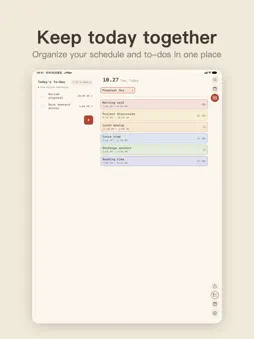
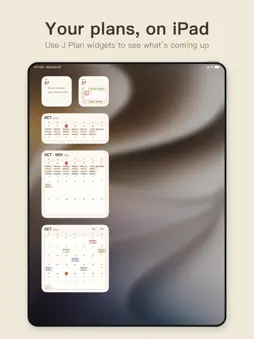
There are only 24 hours in a day. See your time clearly, then plan it. J Plan lays out your entire day on a 10-minute grid, so you can instantly see what’s scheduled and where you still have room. Adding plans is just as simple: tap or drag directly on the timeline to put things exactly where they fit. Whether it’s work, classes, workouts, shifts, business trips, or everyday plans, J Plan helps you organize your time with less effort and more clarity. 【Plan Your Day on a Time Grid】 ・Full 24-hour timeline in 10-minute intervals ・Tap an empty slot to quickly add an event ・Press and drag to select the exact time you want ・Press and hold an event to move it ・Drag the edges to adjust the start or end time ・Prevents overlapping events to reduce scheduling conflicts ・Organize events with custom categories and colors 【Set Repeating Events Once】 Meetings, classes, workouts, shifts — no need to create the same event again and again. ・Repeat weekly, monthly, or yearly ・Edit only this occurrence ・Or update this and all future events 【Tasks and Events, Together】 Some things need a specific time. Others just need to get done today. ・Assign tasks to a specific date ・Link tasks to events so their time moves together ・Completed tasks are automatically moved to the Completed list ・Haptic feedback when you check off a task Keep your schedule and to-dos in one place, so you can see both where you need to be and what still needs to get done. 【Plan the Whole Month at a Glance】 The monthly calendar is ideal for shifts, days off, travel, business trips, and other all-day plans. ・View all-day events across the entire month ・Create custom Quick Add labels for one-tap entry ・Select multiple dates and add the same all-day event at once ・Select and delete multiple all-day events in batches ・Press and drag an all-day event to move or copy it to another date ・Share the entire month as an image Plan shifts, time off, and trips without repeating the same steps day by day. 【Works with Your System Calendar and Reminders】 Keep using the calendar you already have. ・View system calendar events inside J Plan ・View system reminders ・Mark reminders as completed directly in J Plan ・Event notifications ・Today’s Schedule widget ・Today’s Tasks widget ・Calendar widget ・Share your day as an image Your calendar and reminders are accessed only after you grant permission. 【Make J Plan Yours】 ・5 theme colors ・Light and Dark appearance ・Designed for iPhone and iPad ・Traditional Chinese, Simplified Chinese, English, Japanese, and Korean 【Your Schedule Stays on Your Device】 No account required. J Plan stores its data on your device. One less account to create, one less thing to worry about. See your time clearly. Plan it better. Plan your day with J Plan.
What's New
Version 1.31.0 2026-10-31
New Features & Improvements • Arrange all-day events in your own order for each day. Open a day in the calendar, then touch and hold to drag J Plan and System ... Technical Analysis
Package Overview Basic metadata
Bundle ID
com.jplan.app Current Version 1.31.0
Minimum iOS 17.0
Package Size App Store Size
Package Metadata 0 / 0 version records
Detailed binary, privacy manifest, framework, and Info.plist results have not been indexed for this package yet. The verified App Store and archive metadata above remains available.
Developer Information
Known Version Records
0 version records with stored package metadata
Stored metadata does not guarantee a package is currently available to download.
| Details | Version / IDs | Version date | Action |
|---|