Preview




Description
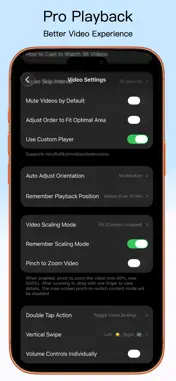
Play, sync, and compare up to 36 videos with Split Screen Player. Arrange views, annotate details, and export split-screen videos to share. Use it for: ⊙ Comparing sports, dance, fitness, and lesson videos. ⊙ Reviewing edits, takes, camera angles, and reference clips. ⊙ Creating comparisons, tutorials, reactions, and shorts. ⊙ Viewing streams, web pages, PDFs, photos, and local videos together. ⊙ Learning languages and revisiting lessons with bilingual subtitles. ⊙ Practicing with a live camera view beside a reference video. ⊙ Annotating movements and comparing joint angles for training reviews. ⊙ Showing travel, family, and event galleries on a TV or projector. Highlights Playback & Flexible Layouts ⊙ Choose from 144 layouts for portrait, landscape, and foldable screens. Resize panes, create and share layouts, or use Smart Layout to fit your videos. ⊙ Focus Playback keeps one video large while you browse others. Tap to switch and let audio follow the main view. ⊙ Sort, shuffle, or repeat playlists. Browse frame previews and tap a frame to play from that moment. ⊙ Drag videos to rearrange them; use floating, speed, and global controls. Lightweight playback previews; original sources for export. Sync & Motion Analysis ⊙ Align action moments with Sync Points, Sync Lock, and multiple Sync Groups. Set playback ranges and loop key movements. ⊙ Step frame by frame with millisecond time. Compare using overlays, opacity, A/B blinking, or a swipe divider. ⊙ Draw arrows, lines, and shapes; measure angles and distances. Set annotation duration and slow or pause near annotations. ⊙ Show body skeletons and compare joint angles and curves in two local videos. Sync movements or align manually, then export review videos and joint data. Automatic Subtitles & Translation ⊙ Generate original, translated, or bilingual subtitles for complete local videos. Recognition and translation run on your device. ⊙ Customize styles, search text, and tap subtitles to seek. Generate subtitles for playlist videos one at a time. Requires iOS 26 or later and a supported device. Language downloads may be needed on first use. Export & Share ⊙ Turn your split screen into one video for comparisons, lessons, or multi-angle presentations, with optional annotations. ⊙ Set each clip's range, speed, crop, zoom, and rotation. Add music, choose audio sources, adjust volume, and apply fades. ⊙ Set aspect ratio, resolution, frame rate, background, borders, and watermark. Galleries & Viewing Modes ⊙ Combine photos and videos in a Dynamic Gallery with templates, frames, crops, and captions. Enjoy slideshows, themed transitions, and adjustable Media Looks. ⊙ Scroll horizontally or vertically in Waterfall, or let neighboring Counterflow tracks scroll in opposite directions. ⊙ Mirror horizontally or vertically, display multiple copies, or pair normal and mirrored views of one video. More Media, One Screen ⊙ Play MP4, MOV, MKV, AVI, WebM, local audio files, and audio folders. Browse images, PDFs, and web pages in split screen. ⊙ Open detected web videos in panes or playlists, play HLS/M3U8/RTSP streams, or connect your own IPTV / Xtream Codes service to find channels. ⊙ Place live camera views beside reference videos. Supported devices can use multiple lenses with focus, exposure, and zoom controls. ⊙ Use split-screen output or device mirroring on a TV or projector, including subtitles, annotations, and body skeletons. ⊙ Bookmark media, layouts, framing, and sync settings. Customize the bottom toolbar for quick access. Free & Premium Features Download free and try basic features; selected advanced features offer trials. Premium has weekly, monthly, annual, or one-time unlock options. Cancel subscriptions anytime. See the app for trial allowances and benefits. Need help? Email us: [email protected] User Agreement: https://splitscreenplayer.com/terms/ Privacy Policy: https://splitscreenplayer.com/privacy/
What's New
Version 1.0.30 2026-10-12
• Introducing Focus Playback: watch the current video in a large view while browsing others in a thumbnail list. Tap to switch, and optionally let audio follow ... Technical Analysis
Package Overview Basic metadata
Bundle ID
com.nightonke.NVideo Current Version 1.0.30
Minimum iOS 15.0
Package Size App Store Size
Package Metadata 2 / 30 version records
Detailed binary, privacy manifest, framework, and Info.plist results have not been indexed for this package yet. The verified App Store and archive metadata above remains available.
Developer Information
Known Version Records
2 version records with stored package metadata • 30 known version records
Stored metadata does not guarantee a package is currently available to download.
| Details | Version / IDs | Version date | Action |
|---|---|---|---|
| Not archived | v1.0.29 App Store ID: 891412849Build: 1.0.29 | 2026-09-17 03:23:49 | Request Version |
| 57.1 MB | v1.0.29 App Store ID: 890531328Build: 1.0.29 | 2026-09-17 03:23:49 | Get Version |
| 57.79 MB | v1.0.28 App Store ID: 889561921Build: 1.0.28 | 2026-08-31 03:08:34 | Get Version |
| Not archived | v1.0.26 App Store ID: 889193296Build: 1.0.26 | 2026-08-03 07:05:57 | Request Version |
| Not archived | v1.0.25 App Store ID: 888862899Build: 1.0.25 | 2026-07-27 02:53:24 | Request Version |
| Not archived | v1.0.24 App Store ID: 888570011Build: 1.0.24 | 2026-07-21 02:31:19 | Request Version |
| Not archived | v1.0.23 App Store ID: 888461850Build: 1.0.23 | 2026-07-18 07:41:24 | Request Version |
| Not archived | v1.0.22 App Store ID: 888184125Build: 1.0.22 | 2026-07-13 02:34:17 | Request Version |
| Not archived | v1.0.21 App Store ID: 887490794Build: 1.0.21 | 2026-06-27 04:03:27 | Request Version |
| Not archived | v1.0.20 App Store ID: 887390669Build: 1.0.20 | 2026-06-25 05:28:54 | Request Version |
| Not archived | v1.0.19 App Store ID: 887197304Build: 1.0.19 | 2026-06-20 03:14:46 | Request Version |
| Not archived | v1.0.18 App Store ID: 886732882Build: 1.0.18 | 2026-06-10 03:55:36 | Request Version |
| Not archived | v1.0.17 App Store ID: 886536068Build: 1.0.17 | 2026-06-05 02:20:29 | Request Version |
| Not archived | v1.0.16 App Store ID: 886343571Build: 1.0.16 | 2026-06-01 04:06:12 | Request Version |
| Not archived | v1.0.15 App Store ID: 885844479Build: 1.0.15 | 2026-05-20 18:20:13 | Request Version |
| Not archived | v1.0.14 App Store ID: 885311677Build: 1.0.14 | 2026-05-14 10:15:03 | Request Version |
| Not archived | v1.0.13 App Store ID: 884859018Build: 1.0.13 | 2026-05-06 01:43:56 | Request Version |
| Not archived | v1.0.12 App Store ID: 884635670Build: 1.0.12 | 2026-04-19 01:19:00 | Request Version |
| Not archived | v1.0.11 App Store ID: 884426276Build: 1.0.11 | 2026-04-13 02:10:45 | Request Version |
| Not archived | v1.0.10 App Store ID: 884326424Build: 1.0.10 | 2026-04-10 02:27:15 | Request Version |
| Not archived | v1.0.9 App Store ID: 883979118Build: 1.0.9 | 2026-04-09 00:56:44 | Request Version |
| Not archived | v1.0.8 App Store ID: 883926369Build: 1.0.8 | 2026-03-31 04:29:01 | Request Version |
| Not archived | v1.0.7 App Store ID: 883715201Build: 1.0.7 | 2026-03-25 01:23:07 | Request Version |
| Not archived | v1.0.6 App Store ID: 883634067Build: 1.0.6 | 2026-03-23 01:35:21 | Request Version |
| Not archived | v1.0.5 App Store ID: 883395473Build: 1.0.5 | 2026-03-19 13:52:53 | Request Version |
| Not archived | App Store ID: 883142666 | Unknown | Request Version |
| Not archived | App Store ID: 882896159 | Unknown | Request Version |
| Not archived | App Store ID: 882812421 | Unknown | Request Version |
| Not archived | App Store ID: 882628000 | Unknown | Request Version |
| Not archived | App Store ID: 881844386 | Unknown | Request Version |