
Preview




Description
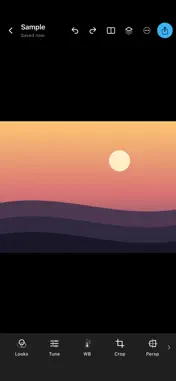
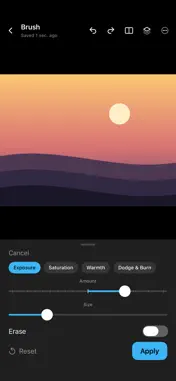
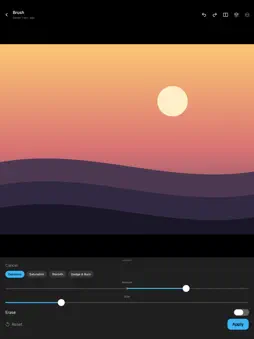
SoEdit is a fast, gesture-driven photo editor for iPhone and iPad. Every adjustment is non-destructive: your original photo is never overwritten, and each edit stays a live, editable layer you can revisit, reorder, or remove long after you made it. EDIT BY FEEL Swipe up or down to pick a parameter and left or right to adjust it. Values appear as you move, so you can work by eye instead of hunting through menus. GLOBAL ADJUSTMENTS Exposure, contrast, saturation, highlights, shadows, warmth, and tint — plus a live histogram and a one-tap Auto enhance when you just want a sensible starting point. PRECISE TONE CONTROL Shape luminance and individual RGB channels with an interactive tone curve. LOCAL REFINEMENT Selective adjustments target a specific color and brightness range, so a change lands on the sky and leaves the skin alone. Brush in exposure, saturation, or dodge and burn by hand. Clean up small blemishes with the healing tool. COMPOSITION Crop to a free or fixed aspect ratio, straighten with a fine-grained angle control, and correct converging lines with four-corner perspective. FINISHING Looks give you a whole graded starting point with an adjustable intensity. Add vignette, grain, and detail or structure to taste. SEE WHAT CHANGED Hold to flash the original, or drag a before/after divider across the frame to compare precisely where it matters. REUSE YOUR WORK Save a set of global adjustments as a named Recipe and apply it to another photo. Copy edits from one image and paste them onto the next. EXPORT WITH CONFIDENCE Choose your format and quality, keep your original metadata, and share or save wherever you need it. Everything happens on your device. SoEdit has no account, no subscription, and no analytics — your photos never leave your iPhone or iPad.
What's New
Version 0.12.5 2026-10-18
SoEdit is now a universal editor across iPhone, iPad, iPhone Duo, and Mac (via Mac Catalyst): - Universal continuity across iPhone, iPad, iPhone Duo (folded an... Technical Analysis
Package Overview Basic metadata
Bundle ID
ai.weiming.soedit Current Version 0.12.5
Minimum iOS 27.0
Package Size App Store Size
Package Metadata 0 / 0 version records
Detailed binary, privacy manifest, framework, and Info.plist results have not been indexed for this package yet. The verified App Store and archive metadata above remains available.
Developer Information
Known Version Records
0 version records with stored package metadata
Stored metadata does not guarantee a package is currently available to download.
| Details | Version / IDs | Version date | Action |
|---|