
Preview


Description
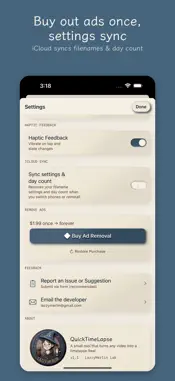
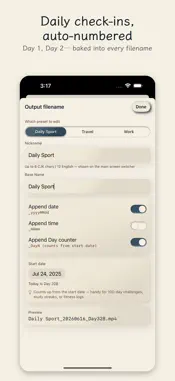
Turn long videos into 60-second timelapses, ready for Reels, TikTok, and YouTube Shorts. Pick 1 to 5 videos. QuickTimeLapse auto-calculates the speed and crunches them into a single 60-second clip. No sign-up, no uploads — your videos never leave your iPhone. — Features — • Up to 5 videos at once, auto-stitched into 60 seconds • Day Counter auto-numbering for daily check-ins (workouts, yoga, cooking, travel) — filenames carry Day 1 / Day 2 … • Custom filename templates — mix date, sequence, and your own text • PHPicker-based selection — no full Photos library access required • Fully on-device — nothing uploaded — Who it's for — Anyone tracking daily workouts, yoga, cooking, or travel vlogs as a timelapse series. Anyone who wants to crunch long footage into Reels, TikTok, or YouTube Shorts. — Pricing — Free to download. The first conversion each day is ad-free; from the second conversion on, you'll see one ad before processing. "Remove Ads" is a one-time purchase that removes all ads forever (no subscription). — Story — I film my workouts every day and wanted to compress them into 60-second timelapses for Instagram. I used to airdrop every clip to my Mac just to make a timelapse in iMovie — the back-and-forth was a hassle. I couldn't find a tool that felt right, so I vibe-coded one myself. Hope it helps if you're in the same boat. — Feedback — Tap Settings → Report a Problem inside the app to write to me directly. I'll do my best to reply.
What's New
Version 1.2.1 2026-07-12
v1.2.1 — Stability update: • Source videos are kept after conversion, so you can tweak settings and re-convert without picking again • Very short clips convert... Technical Analysis
Package Overview Basic metadata
Bundle ID
com.lazzymerlin.QuickTimeLapse2026 Current Version 1.2.1
Minimum iOS 18.0
Package Size App Store Size
Package Metadata 1 / 4 version records
Detailed binary, privacy manifest, framework, and Info.plist results have not been indexed for this package yet. The verified App Store and archive metadata above remains available.
Developer Information
Known Version Records
1 version record with stored package metadata • 4 known version records
Stored metadata does not guarantee a package is currently available to download.
| Details | Version / IDs | Version date | Action |
|---|---|---|---|
| 8.58 MB | v1.2.1 App Store ID: 888157178Build: 1.2.1 | 2026-07-12 21:13:00 | Get Version |
| Not archived | App Store ID: 887662688 | Unknown | Request Version |
| Not archived | App Store ID: 886909424 | Unknown | Request Version |
| Not archived | App Store ID: 885950800 | Unknown | Request Version |