
Preview






Description
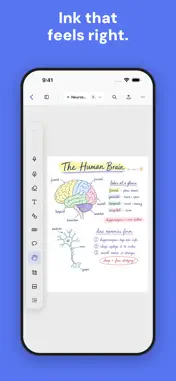
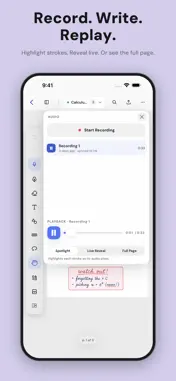
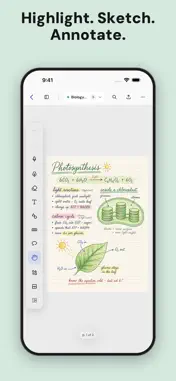
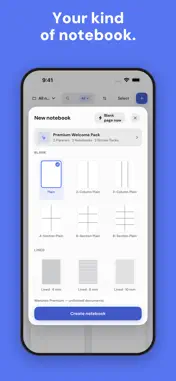
Wenotes is a notebook for iPad and Apple Pencil. Not a workspace, not an assistant. A notebook. Most of the work went into the part you actually feel: the ink. Wenotes has its own stroke engine, so a fast line comes out thin, a pressed one goes dark, and a stroke ends where you lifted the pen instead of trailing off into a tail you never drew. The ball pen, the fountain pen, the brush and the pencil behave like four different instruments, not one line in four colors. Then we built a notebook around it. WRITING • Ball, fountain and brush pens, a graphite pencil, a highlighter. Pressure, width, stabilization and tip shape are set per tool and stay where you put them. • Three erasers — standard, precision, stroke — and an option that hands your pen back after every erase. • Lasso picks up handwriting and objects together. Move them, resize them, duplicate them, delete them. • A shape tool for lines, arrows, curves, rectangles, ellipses and triangles. Or draw a line or a circle freehand, pause at the end, and let it snap itself straight. • Tape, for holding things down the way you would on paper. Solid, striped, dotted or grid, in straight strips or freehand runs. • Text boxes with real typography: fonts, sizes, bold and italic, lists, indentation, line height, fill, border, corner radius. • Photos, stickers and GIFs you can rotate, resize and layer. • Put the toolbar on any edge of the screen. Your tools keep the same order wherever it lands. PAPER • 36 papers built in: plain, lined at 6, 8 and 10 mm, dotted, grid, hexagon, Cornell in four variants, column and section layouts, music staves, and daily, weekly, monthly and yearly planners. • A3 through A7, Letter, Tabloid, or a size you type in yourself. Portrait or landscape. • White, warm or dark paper. On dark paper your ink turns white. • 20 notebook covers, from matte solids to a speckled composition book. DOCUMENTS • Import a PDF and write on it. Scan paper with the camera. Turn a pile of photos into a notebook. • Read Mode puts the pen away, so links and page jumps work and nothing you touch leaves a mark. • Search covers titles, typed text and PDF text, and tells you which page matched. • Bookmarks, an outline you write yourself, and a thumbnail sidebar for moving pages around. • Several notebooks stay open at once, as tabs. AUDIO • Record while you write, and the recording stays tied to the handwriting. On playback the page can rewrite itself exactly as it happened, spotlight each stroke as it was said, or simply hold still. KEEPING IT • Export to PDF two ways: flattened, which looks identical everywhere, or editable, which keeps handwriting and text live in other PDF apps. Export images, or a .wenotes file that comes back whole — ink, text, photos, stickers, GIFs, audio. • Print straight from the notebook. • iCloud backup runs on its own. Restore one notebook without disturbing the rest. • Collections, favorites, and a Trash you can change your mind about. You can use Wenotes without an account. Your first three documents are free — a new notebook, a PDF import or a scan each count as one — and Wenotes Premium lifts the limit. Whatever you have already made stays fully editable and exportable either way. Privacy Policy: https://guide.webudding.com/wenotes/privacy Terms of Use: https://guide.webudding.com/wenotes/termsofuse
What's New
Version 1.0.1 2026-09-03
SIX LANGUAGES Wenotes now speaks English, Korean, Japanese, Simplified Chinese, Traditional Chinese and Thai, each with a typeface picked for its script rather ...SIX LANGUAGES Wenotes now speaks English, Korean, Japanese, Simplified Chinese, Traditional Chinese and Thai, each with a typeface picked for its script rather than whatever the system had lying around. GETTING WORK BACK OUT • Export one page, a selection of pages, or a whole notebook — as PDF, as images, or as a .wenotes file. • PDF export now comes two ways: flattened, which looks identical everywhere, or editable, which keeps handwriting and text live in other PDF apps. • Print from inside the notebook. • .wenotes files open straight from Files, Mail, or anywhere else that can share them. ICLOUD BACKUP AND RESTORE Backups run quietly in the background. Restore is per notebook, so bringing one thing back doesn't touch anything else — and restoring never alters the backup itself. NEW PAPER The paper library was rebuilt: 36 templates across blank, lined, dotted, grid, Cornell, boards, music and planners, all drawn from one geometry, so the preview you tap is exactly the page you get. INK The stroke engine was rewritten around a single handwriting geometry. The fountain pen now renders a real oriented nib instead of a round dot wearing a filter, the brush ends in a clean stop rather than a taper you never asked for, and the pencil has actual graphite tooth. The slow-writing bounce is gone. AROUND THE APP • The editor and the shelf got a full design pass: tool menus, the pages panel, audio, share, find, the notebook creator, the card badges. • Help & Support moved into the app. • Optional sign-in with Apple, Google or a Webudding account, for purchases and account features. Deleting your account is one row in Settings. • Wenotes Premium: your first three documents are free, and Premium makes it unlimited. Everything you have already made stays fully editable and exportable regardless. FIXES Audio plays back correctly for every pen type in reopened notebooks. Printing no longer stalls at 0%. iCloud restore finds backups it used to miss. The lasso menu stopped hiding under tape. Rotating an object commits when you let go. Sign in with Apple stopped dismissing itself. Technical Analysis
Package Overview Basic metadata
Bundle ID
com.yeony.WeNote--Cursor- Current Version 1.0.1
Minimum iOS 17.6
Package Size App Store Size
Package Metadata 0 / 0 version records
Detailed binary, privacy manifest, framework, and Info.plist results have not been indexed for this package yet. The verified App Store and archive metadata above remains available.
Known Version Records
0 version records with stored package metadata
Stored metadata does not guarantee a package is currently available to download.
| Details | Version / IDs | Version date | Action |
|---|