Preview



Description
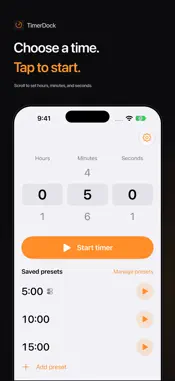
Start a saved timer right from your Lock Screen. TimerDock is a simple countdown timer for cooking, breaks, and everyday tasks. Choose a duration and start timing. Save the durations you use often as presets, ready for next time. Choose your time with clear, readable numbers Scroll to set hours, minutes, and seconds. TimerDock automatically remembers your last selected duration. Start from Control Center or the Lock Screen Add TimerDock controls to start a saved preset without opening the app. When you want to choose a different duration, open the time selection screen directly. Manage multiple timers together See your running timers in one list. Pause, resume, or cancel each timer separately, with remaining time and finish times easy to check. Get an alert when time is up iPhone system alerts notify you when a timer ends, even when the app is in the background or your iPhone is locked. Follow the countdown on your Lock Screen with Live Activities, or in Dynamic Island on supported iPhones. Included for free • Run up to 2 timers at once • Save up to 3 presets • Use Control Center and Lock Screen controls • Assign one shared preset to your preset controls • Timer alerts and Live Activities TimerDock Pro Unlock these features with a one-time in-app purchase: • Run more timers at once • Remove the limit on saved presets • Reorder presets • Assign a different preset to each control The number of scheduled timers and simultaneous system displays is subject to iOS limits. No ads. No sign-up required. Supports light and dark modes. Requires iOS 26.0 or later. Alarm permission is required for timer alerts.
Technical Analysis
Package Overview Basic metadata
Bundle ID
net.webdia.TimerDock Current Version 1.0.0
Minimum iOS 26.0
Package Size App Store Size
Package Metadata 0 / 0 version records
Detailed binary, privacy manifest, framework, and Info.plist results have not been indexed for this package yet. The verified App Store and archive metadata above remains available.
Developer Information
Known Version Records
0 version records with stored package metadata
Stored metadata does not guarantee a package is currently available to download.
| Details | Version / IDs | Version date | Action |
|---|