
Preview




Description
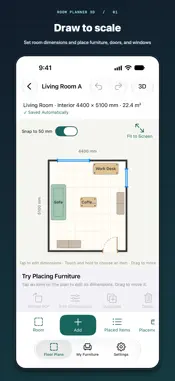
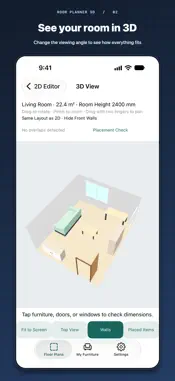
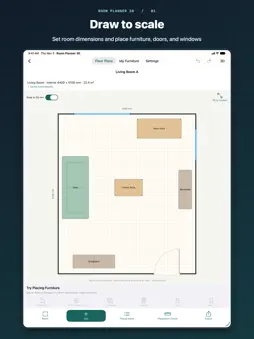
Plan your room before you buy or move furniture. Create a floor plan from the measurements you enter, arrange furniture in 2D, and explore the same layout in 3D. Room Planner 3D helps you compare furniture arrangements, check gaps, and consider door swing space before making changes at home. Use it to plan a move, furnish a studio apartment, or rearrange a bedroom or living room. Each plan contains one room, so you can save separate plans for different rooms and layout ideas. • Create a measured floor plan Enter room width, depth, and height. Create a rectangular room or draw an outline, including an L-shaped room. Add doors and windows with custom dimensions and positions. • Add furniture at the size you need Choose beds, sofas, desks, storage, appliances, and more. Set each item's name, width, depth, and height. Specify its height above the floor to plan wall-mounted storage as well as floor-standing furniture. • Move, rotate, and refine Drag furniture into place, adjust dimensions and rotation, duplicate items, or lock them in position. Use grid snapping, zoom, pan, and undo and redo to refine your layout. • Check gaps and door swing space View distances between furniture and walls or between furniture items. Check passage width at a selected position and height, and see highlighted furniture overlaps and door swing conflicts. • Explore the same layout in 3D Switch from your 2D plan to a matching 3D view. Rotate the view and zoom in to check furniture heights and get a feel for the space. • Reuse your own furniture Save frequently used furniture with custom dimensions and add it to other plans. Try different arrangements using the same items. • Compare layout ideas Duplicate a plan to explore another arrangement while keeping the original. Compare plans side by side at the same scale to review furniture placement and open space. • Save and share Changes are saved automatically on your device. Export dimensioned PNG images and PDFs to share your plans. Export and import backup files to keep editable copies of your work. Designed for iPhone and iPad. No account is required. Basic editing and saving work offline. The app includes ads, and ad delivery and related services use an internet connection. The app interface is currently available in Japanese. Dimensions are entered in millimeters (mm). Dimension, overlap, and passage checks are planning aids based on the values you enter. They do not guarantee safety or that furniture can be delivered through your building. Confirm actual measurements and delivery routes before purchasing.
What's New
Version 1.0.1 2026-11-07
Added usage analytics and crash reporting to help improve usability and stability. Technical Analysis
Package Overview Basic metadata
Bundle ID
net.webdia.roomplanner Current Version 1.0.1
Minimum iOS 17.0
Package Size App Store Size
Package Metadata 0 / 0 version records
Detailed binary, privacy manifest, framework, and Info.plist results have not been indexed for this package yet. The verified App Store and archive metadata above remains available.
Developer Information
Known Version Records
0 version records with stored package metadata
Stored metadata does not guarantee a package is currently available to download.
| Details | Version / IDs | Version date | Action |
|---|