Preview









Description
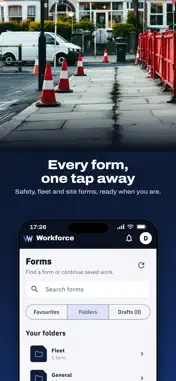
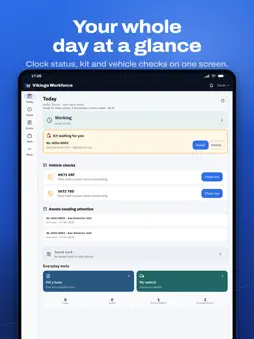
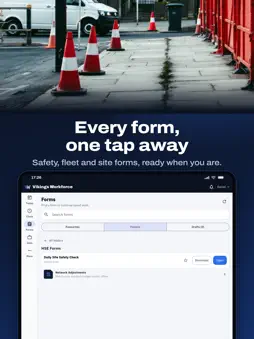
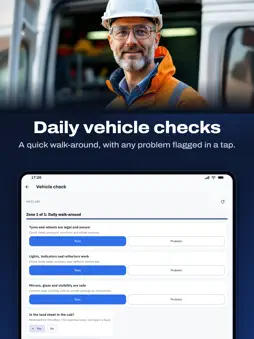
Vikings Workforce is the field companion app for the Vikings Workforce Operations System (VWOS). Your login is provided by your employer. Once you're signed in, the app puts your day's work in one place: • Complete and submit site forms, audits and toolbox talks — working offline and syncing when you're back in coverage • Vehicle checks and defect reporting for your assigned fleet • Your assigned assets, documents and training records, with your company ID card available in Apple Wallet • Lone working protection: start a monitored session, check in on a timer, and know that a missed check-in alerts your supervisor • Push notifications for the things that need you — sign-offs, defects, expiring certificates Vikings Workforce is used by field teams whose employers run on VWOS. If your company doesn't use it yet, learn more at vikingsworkforce.com.
What's New
Version 2.3.1 2026-11-16
Smoother screens - Today waits for what is already saved on your phone and then appears once, instead of cards popping in one at a time. - Moving between tabs i...Smoother screens - Today waits for what is already saved on your phone and then appears once, instead of cards popping in one at a time. - Moving between tabs is instant: a tab you have already opened stays ready and refreshes quietly. - Lists no longer empty and refill while they refresh. If nothing has changed, nothing moves. - Job card photos, My Card and company logos no longer blink. - The Offline bar waits a few seconds before it appears or goes, so it stops jumping on patchy signal. - Applies to Today, Jobs, Vehicle, Clock, Forms, Saved work, Documents, Toolbox, Notifications, Assets, My Card, Licence, PPE, Stock, Submissions and Messages. Risk assessments - An answer on a risk assessment no longer stops you sending the form. A note shows and your line manager and supervisors are alerted. - Supervisors: a submitted risk assessment has a Sign-on list showing who has signed. Sign on from the phone, or show a code for someone else to scan on their own phone. - Supervisors: Update opens the earlier answers so you can change what is different. Mark a hazard "No longer present" with a reason, say what changed and whether it is significant. People who signed before a significant change are asked to sign again. - These need the company to have risk assessment sign-on and update switched on. Forms - "Not in the list? Type it" on the vehicle, asset and people pickers, including inside repeating groups. Typed answers show as (typed) in Saved work. Sending your work - On iPhone, photos are handed to the phone itself to upload, so they can carry on after you lock the phone or leave the app. - Job card photos upload one at a time, so one weak moment no longer re-sends them all. - Closing the app while a form is sending no longer leaves it stuck. - With no signal, the app stops trying and waits, so your work is not marked as failed. - A server problem no longer parks a form for hours. It keeps trying by itself. - "Edit and resend" on a form no longer risks a duplicate at your office. - Submitting a form shows "Saved" straight away and carries on sending in the background. Plain words - One set of words everywhere: Waiting to send, Sent, and Needs attention. - "Sync now" tells you what happened, for example "Sent 3. 2 still waiting to send - no signal." - Saved work shows when the phone last sent anything. - Home, Saved work and Today now show the same numbers. - Dismissing refused work asks you first and says what will be deleted. - Signing out tells you what is kept and what is deleted. - Actions that need signal say so before you fill anything in. Working with no signal - The Vehicle tab shows your saved vehicles. - Check questions for your vehicles are downloaded ahead. - Job cards for the next few days are downloaded ahead. - Company documents and RAMS are downloaded ahead on Wi-Fi. - Your own reports and asset actions show on the vehicle or asset while they wait to send. - The forms list says how old the saved copy is. - Saved PDFs are kept when the app updates. - "Ready for today" finishes even when a document is too large to save. - The app opens faster on weak signal. - If your login times out, your saved jobs and forms are still there when you sign back in. Clock - The Clock screen waits for your day to load before it shows Start work, so an end-of-day tap can no longer start a second shift. Technical Analysis
Package Overview Basic metadata
Bundle ID
com.vikingsworkforce.public Current Version 2.3.1
Minimum iOS 15.0
Package Size App Store Size
Package Metadata 0 / 0 version records
Detailed binary, privacy manifest, framework, and Info.plist results have not been indexed for this package yet. The verified App Store and archive metadata above remains available.
Developer Information
Known Version Records
0 version records with stored package metadata
Stored metadata does not guarantee a package is currently available to download.
| Details | Version / IDs | Version date | Action |
|---|