Preview




Description
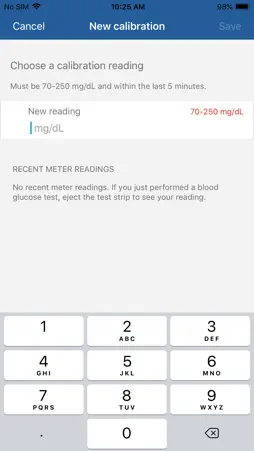
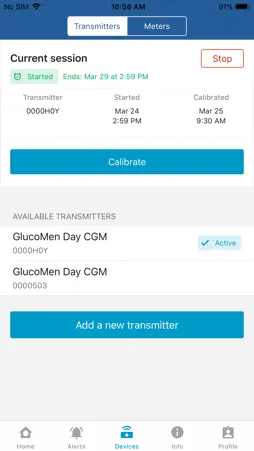
The GlucoMen Day CGM App serves as the display for the GlucoMen Day Continuous Glucose Monitor (CGM). Contact your healthcare professional for information about the GlucoMen Day CGM System. -- Real-time glucose -- • Real-time glucose readings displayed every minute. • Glucose values are color-coded to highlight high and low values based on user-defined limits. • Drag your finger on the Home screen trend chart to view individual glucose readings. -- Trends -- • A trend arrow indicates whether glucose is currently increasing, decreasing, or steady. • Home screen trend chart shows glucose readings for the last 1, 3, 6, 12, or 24 hours. -- Alerts -- • Customizable alerts warn when glucose is urgently low, low, high, rapidly increasing, or rapidly decreasing. • Predictive alerts warn when glucose will be high or low within 15 minutes. • Additional alerts indicate when it's time to calibrate, when the transmitter battery is low, when the sensor signal is lost, and when the smartphone is almost out of space. -- Calibration -- • Calibrate by manually entering a blood glucose reading taken on a blood glucose meter or selecting a reading taken on a connected GlucoMen Day METER or GlucoMen Day METER 2K. • Calibration required once a day after initial setup. -- Reports -- • Review your CGM session with a glucose overview report (PDF) covering the past 3, 7, 14, or 28 days. • Export your glucose and trend data to a CSV file that can be analyzed in various software applications. -- GlucoMen Day METER compatibility -- • Connect your GlucoMen Day METER or GlucoMen Day METER 2K to the app to simplify calibration. • Readings taken on the GlucoMen Day METER or GlucoMen Day METER 2K appear on the calibration screen and can be selected when calibrating the system. -- Connected Partners -- • Connect to GlucoLog web to automatically sync data from the app. -- Device compatibility -- • The GlucoMen Day CGM App is compatible with select iOS devices. Visit https://www.menarinidiagnostics.com/Portals/20/pdf/PHONE%20COMPATIBILITY%20LIST.pdf for a list of compatible devices. CAUTION: You should work with your healthcare professional to determine how to use the GlucoMen Day CGM to manage your diabetes.
What's New
Version 1.7.3 2024-11-01
Improved translations for Hungarian language. Minor UI Fix. Prepare for Distribution in Poland. Technical Analysis
Package Overview Basic metadata
Bundle ID
com.agamatrix.cicero.glucomendaycgm Current Version 1.7.3
Minimum iOS 12.2
Package Size App Store Size
Package Metadata 1 / 1 version records
0.0 / 5.0 (0 ratings)
Detailed binary, privacy manifest, framework, and Info.plist results have not been indexed for this package yet. The verified App Store and archive metadata above remains available.
Developer Information
Known Version Records
1 version record with stored package metadata
Stored metadata does not guarantee a package is currently available to download.
| Details | Version / IDs | Version date | Action |
|---|---|---|---|
 9.35 MB | v1.7.3 App Store ID: 854962737Build: 4103 | 2023-02-11 09:50:12 | Get Version |