
Preview




Description
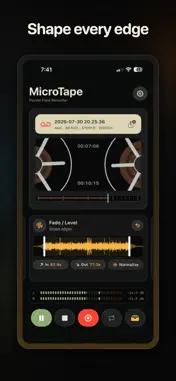
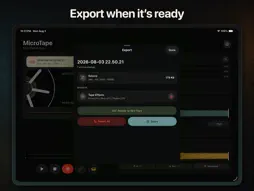
Use MicroTape as a voice recorder, field recorder, music recorder, sample recorder, or audio looper. MicroTape is for musicians, sound designers, journalists, podcasters, and other users who record audio. Recording, playback, library controls, input controls, and original-file sharing do not require a subscription. Some edit, loop, effect, and export features require a MicroTape Premium subscription. RECORD AUDIO • Select AAC, Apple Lossless, or WAV format. • Select a sample rate of 44.1, 48, or 96 kHz. • Record mono or stereo audio. • Set the input gain before you record. • Level meters show the input and playback levels. • MicroTape adds the date and time to each new tape. EDIT AND PLAY TAPES • Use the waveform to select a position or audio range. • Trim the start and end of a tape. • Loop a complete tape or a selected range. • Add a crossfade to the loop point. • Use varispeed to play audio in reverse, at low speed, or at double speed. • Add a fade-in or fade-out. • Normalize the audio and set the output gain. • Adjust the low, middle, and high frequencies with the equalizer. • Add tape drive, wow, and flutter effects. ORGANIZE YOUR TAPES • Rename each tape in the tape library. • Save a location with a tape when you enable this option. • MicroTape can identify sounds and speech topics on your device. • Use sound tags to filter the tape library. • Each rendered tape keeps a link to its source tape. EXPORT AUDIO • Share the original audio file without changes. • Export edits and tape effects as a new audio file. • Select AAC for a small file. • Select WAV for a full-quality file. • Select the sample rate and channel format for each export. Terms of Use: https://wavefoldlabs.com/products/micro-tape/terms Privacy Policy: https://wavefoldlabs.com/products/micro-tape/privacy
What's New
Version 1.1.0 2026-10-23
- UI improvements for iPhone Duo Technical Analysis
Package Overview Basic metadata
Bundle ID
com.wavefoldlabs.Niagara Current Version 1.1.0
Minimum iOS 26.6
Package Size App Store Size
Package Metadata 0 / 0 version records
Detailed binary, privacy manifest, framework, and Info.plist results have not been indexed for this package yet. The verified App Store and archive metadata above remains available.
Known Version Records
0 version records with stored package metadata
Stored metadata does not guarantee a package is currently available to download.
| Details | Version / IDs | Version date | Action |
|---|