Preview









Description
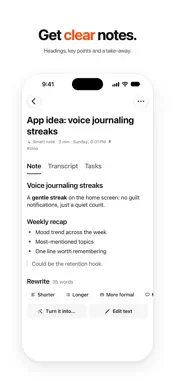
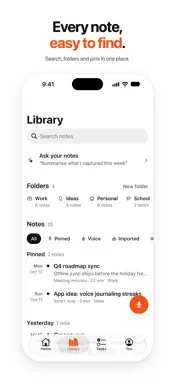
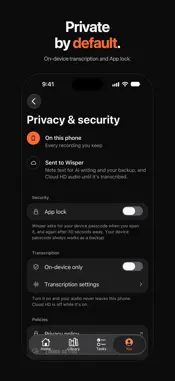
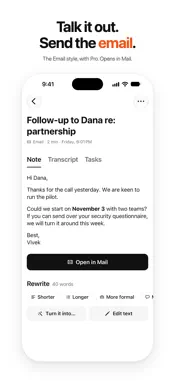
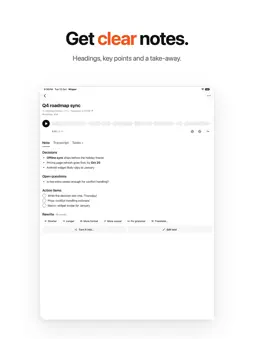
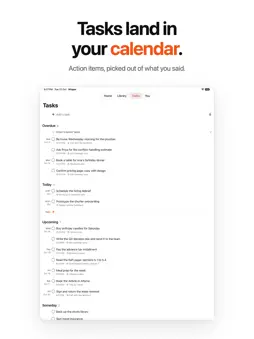
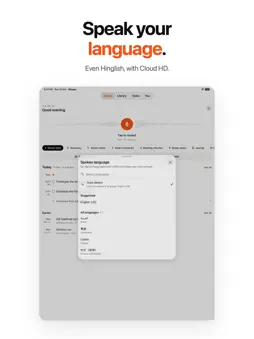
Speak messy. Get clear notes. Wisper turns your voice into notes you can use. Tap once and talk, and your words appear on screen as you speak. Then AI writes it up as a clean note, a summary or a to-do list. With Pro, it can be meeting minutes, an email and more. Made for meetings, lectures, interviews, voice journals and the ideas you'd otherwise forget. Capture in one tap • The record button sits in the middle of Home. Tap it and Wisper is listening. • Choose what the recording becomes before you start: Smart note, Summary, Action items and more. • Pause and resume. Recording keeps going when your screen locks. • Import audio files, like voice memos or a recorded lecture, or type a note. • Start from a widget or a quick action on the app icon. Speech to text on your iPhone • Live transcription runs on your device whenever it supports your language offline. It's free and unlimited. • Choose your language, or let Auto pick it. • Cloud HD adds accuracy for accents, long recordings and mixed-language speech such as Hinglish. It recognizes 90+ languages. One recording, many formats • Free styles: Smart note, Summary, Action items and Clean transcript. • Wisper Pro adds Meeting minutes, Study notes, Journal, Email, Message, Social post and Blog draft, plus up to 20 styles of your own. • Rewrite any result: shorter, longer, more formal, more casual, or grammar fixed. Translate with Pro. • Every version is kept. From notes to done • Wisper picks out the tasks and dates in what you said. • Add them to Calendar, or get a reminder when a task is due. • Email drafts open in Mail, ready to send. • Home shows today's notes and tasks on one timeline. The Tasks tab sorts every to-do into Overdue, Today and Upcoming. Find anything • Full-text search across titles, transcripts and notes. • Folders, pins and filters. • Ask Wisper (Pro): ask a question about one note or all of them, typed or spoken. Answers link back to their notes. Private by default • Turn on On-device only and your audio never leaves your iPhone. • Wisper's servers get your audio only when you use Cloud HD, and delete it after transcription. • App lock with Face ID or Touch ID. No ads. And more • Play back audio with a synced transcript. Tap a line to jump to it. • Add more to any note by recording again, and edit any note. • Back up and sync with Sign in with Apple or Google. • Export to PDF, Markdown or a zip of all notes (Pro). • Light and dark mode. Pro adds 5 more accent colors and 6 app icons. • A Live Activity shows your recording on the Lock Screen. Free and Pro Free: unlimited on-device transcription, 3 AI notes a day (30 a month), recordings and imports up to 15 minutes, and 10 Cloud HD minutes a month. Wisper Pro: up to 100 AI notes a day (fair use), every style plus your own, translation, Ask Wisper, 20 hours of Cloud HD a month, recordings and imports up to 4 hours, and full export. Plans and subscription terms • Wisper Pro Monthly: a 1-month auto-renewing subscription, $7.99 a month. • Wisper Pro Yearly: a 1-year auto-renewing subscription, $49.99 a year, with a 3-day free trial for eligible new subscribers. • Wisper Pro Lifetime: a one-time purchase of $99.99 that never renews. Prices are in US dollars. In other countries the App Store sets the local price, and Wisper shows it before you buy. Payment is charged to your Apple Account when you confirm the purchase, or when the free trial ends. A subscription renews automatically unless auto-renew is turned off at least 24 hours before the end of the current period, and your account is charged for the renewal within the 24 hours before the period ends. Manage or cancel your subscription any time in your Apple Account settings. If you buy a subscription during a free trial, the rest of the trial ends. Terms of Use (EULA): https://whispernotes-support-site.vercel.app/terms Privacy Policy: https://whispernotes-support-site.vercel.app/privacy-policy
What's New
Version 2.0.0 2026-10-15
Wisper 2 is rebuilt from the ground up. • A calm new design. Record from Home in one tap, and see today's notes and tasks on one timeline. • A new recording sc...Wisper 2 is rebuilt from the ground up. • A calm new design. Record from Home in one tap, and see today's notes and tasks on one timeline. • A new recording screen: a large live transcript, a waveform that follows your voice, and pause and resume. • On-device speech to text in your language, with Auto. • Cloud HD for long recordings and mixed-language speech. • 11 styles turn one recording into a note, summary, action items, minutes, an email, a journal entry or a post. 4 are free, and the rest come with Pro. • Rewrite any result, translate it with Pro, and keep every version. • Add tasks and events to Calendar, and get a reminder when a task is due. • Full-text search, folders, and Ask Wisper (Pro) across your notes. • Import audio files, and add more to any note. • Home Screen and Lock Screen widgets, and a Live Activity while you record. • Sync, App lock and export. • Wisper Pro now comes monthly, yearly with a 3-day free trial, or as a one-time Lifetime purchase. Technical Analysis
Package Overview Basic metadata
Bundle ID
com.vivekgowdas.whispernotes Current Version 2.0.0
Minimum iOS 17.0
Package Size App Store Size
Package Metadata 0 / 0 version records
Detailed binary, privacy manifest, framework, and Info.plist results have not been indexed for this package yet. The verified App Store and archive metadata above remains available.
Known Version Records
0 version records with stored package metadata
Stored metadata does not guarantee a package is currently available to download.
| Details | Version / IDs | Version date | Action |
|---|