
Preview



Description
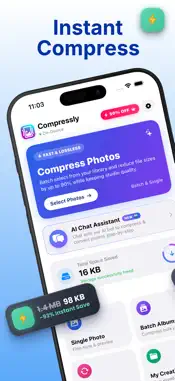
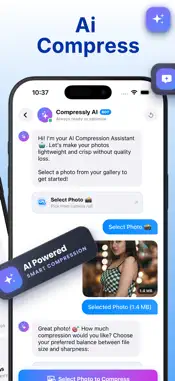
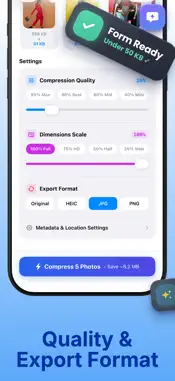
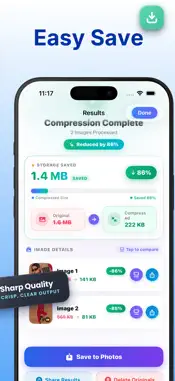
Just chat to compress photos. Tell the AI the size you need, like 50KB or 100KB, and your photo is ready in seconds. Getting "file too large" on a form, an email or WhatsApp? Image Compressor now has an AI assistant. Add your photo, type what you want in plain words and the AI compresses it for you. You can also use one-tap compression with simple controls. NEW: AI COMPRESS CHAT • Type "Compress this to 50KB" and get the result in the chat • Ask in your own words, no settings to learn • Say what the photo is for, like a form, email or WhatsApp, and get help picking the right size • Ask for a smaller or sharper version and the AI adjusts it WHY PEOPLE USE IT • Upload photos and signatures to exam forms, job applications, passport and government portals • Send pictures by email or WhatsApp without upload errors • Free up storage on your iPhone or iPad • Resize pictures for social media, websites and online profiles • Make photos load and share faster on slow networks COMPRESS TO THE EXACT SIZE YOU NEED Many websites accept only small files, such as 20KB, 50KB or 200KB. Set a target size, or ask the AI, and the app compresses your photo to fit. You can also choose a custom size or use the quality slider to balance file size and sharpness. A live preview shows the new file size before you save, so you know it will work before you upload. FEATURES • AI chat assistant for compressing photos • One-tap photo compression • Target size: 20KB, 50KB, 100KB, 200KB or custom • Batch mode: compress many photos at once and save time • Resize images by width and height • Quality slider for full control • Works with common formats such as JPG, PNG and HEIC • Before and after file size comparison • Share directly to WhatsApp, email and social apps, or save to Photos • Clean, easy design that anyone can use HOW IT WORKS 1. Choose a photo from your gallery 2. Tell the AI the size you need, or pick a target size yourself 3. Check the preview 4. Save to Photos or share anywhere PERFECT FOR • Students filling in exam forms and applications • Job seekers uploading resume photos and signatures • Families sharing photos on WhatsApp • Professionals sending images by email • Creators posting to social media • Anyone whose phone storage is full QUICK ANSWERS How do I compress a photo to 50KB? Open the AI chat, add the photo and type "compress to 50KB". You can also choose 50KB as the target size and tap Compress. Will my photo look worse? The app reduces file size while keeping your picture clear. The smaller the target size, the more compression is applied, so check the preview to find the right balance. Can I compress many photos at once? Yes. Select several photos and compress them together with batch mode. What if my photo is still too big for a form? Ask the AI for a smaller size, or lower the quality slider a little, then compress again. TIPS FOR BEST RESULTS • Start with the original photo, not a screenshot of it • Tell the AI the size your form asks for, such as 100KB or 200KB • Check the preview for sharpness before you upload • Compress signatures and ID photos separately, since each form may have different limits FREE AND PREMIUM Compress photos for free with ads. Upgrade to Premium to remove ads and unlock [add what Premium includes, for example: AI chat, batch mode, higher limits]. Premium plans: • Monthly: ₹99 • Yearly: ₹499 • Lifetime: ₹999 (one-time purchase) Payment is charged to your Apple ID at confirmation of purchase. Subscriptions renew automatically unless cancelled at least 24 hours before the end of the current period. You can manage or cancel your subscription anytime in your Apple ID account settings. Privacy Policy: https://sites.google.com/view/kalkani-privacy-policy/home Terms of Use (EULA): https://www.apple.com/legal/internet-services/itunes/dev/stdeula/
What's New
Version v1.3 2026-11-14
**NEW: AI-Powered Photo Compression** Compress photos simply by chatting with AI! Add an image and type your desired file size, such as "Compress to 50KB." Get...**NEW: AI-Powered Photo Compression** Compress photos simply by chatting with AI! Add an image and type your desired file size, such as "Compress to 50KB." Get a compressed image in seconds without adjusting complicated settings. **What's New:** - AI Chat Compression: Compress photos using simple text instructions. - Target File Size: Choose 20KB, 50KB, 100KB, 200KB or enter a custom size. - Faster Photo Compression: Reduce image file sizes more quickly. - Improved Compression Quality: Better results when compressing images to very small file sizes. - Smoother Experience: Enjoy a cleaner design and easier navigation. - Bug Fixes: Performance improvements for a more reliable experience. Update now and make photo compression faster and easier! Enjoying the app? Please take a moment to rate us. Your feedback helps us improve. Technical Analysis
Package Overview Basic metadata
Bundle ID
com.radhyainfotech.Image-compressor Current Version v1.3
Minimum iOS 16.0
Package Size App Store Size
Package Metadata 0 / 3 version records
Detailed binary, privacy manifest, framework, and Info.plist results have not been indexed for this package yet. The verified App Store and archive metadata above remains available.
Developer Information
Known Version Records
0 version records with stored package metadata • 3 known version records
Stored metadata does not guarantee a package is currently available to download.
| Details | Version / IDs | Version date | Action |
|---|---|---|---|
| Not archived | App Store ID: 895196225 | Unknown | Request Version |
| Not archived | App Store ID: 893499474 | Unknown | Request Version |
| Not archived | App Store ID: 885290882 | Unknown | Request Version |