
Preview


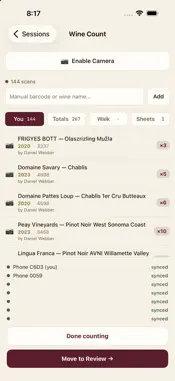


Description
Binterra turns the dreaded wine count into a fast, accurate, team-friendly routine. Built for restaurants, bars, and hotels, Binterra lets your staff scan bottles with a Bluetooth barcode gun or the phone camera and see the count add up as they go. No more clipboards, no more late-night spreadsheet reconciliation. WHY TEAMS USE BINTERRA • Fast scanning — pair a Socket Mobile Bluetooth scanner for rapid-fire counting of dense bins, or use your phone camera when you don't have a gun handy. • Team counts — multiple staff can count the same session at once, so a full cellar gets done in one pass. • Service Lookup — search any wine by name, barcode, or voice and see where it lives and how many are on hand, instantly, during service. • Siri — "Hey Siri, look up a wine in Binterra" answers with the count and the bin, even with your phone in your pocket. • Apple Watch — the same lookup from your wrist: say a producer or browse a bin, no phone in hand. • Order from the phone — build a purchase order in the cellar, send it to each rep as a numbered PDF, and receive deliveries against it. • Scan sheets — edit a rack's sheet where you stand: add a wine, drag to reorder, and every phone and printout follows. • Scan supplier invoices — photograph an invoice at the receiving door and it lands in your Binterra inbox on the web, read and itemized. • 86 list — see every wine you're out of, with its shelf code, before service starts. • Works offline — the cellar is a dead zone in every restaurant. Lookups and counts keep working, then sync the moment you're back online. • Built for the floor — a focused interface, in light or dark, designed for fast, repetitive scanning in low light. Binterra is for hospitality teams already set up with a Binterra account. Access is invite-only. Questions? Email [email protected]
What's New
Version 1.3.0 2026-10-07
Scanner reliability. Bluetooth LE scanners (S721) now reconnect on their own after you switch apps or lock the phone — no more force-quitting Binterra to get th... Technical Analysis
Package Overview Basic metadata
Bundle ID
com.binterra.mobile Current Version 1.3.0
Minimum iOS 15.1
Package Size App Store Size
Package Metadata 0 / 0 version records
Detailed binary, privacy manifest, framework, and Info.plist results have not been indexed for this package yet. The verified App Store and archive metadata above remains available.
Known Version Records
0 version records with stored package metadata
Stored metadata does not guarantee a package is currently available to download.
| Details | Version / IDs | Version date | Action |
|---|