Preview







Description
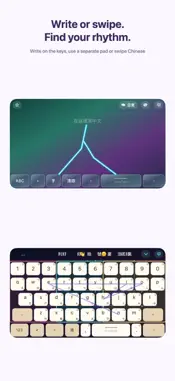
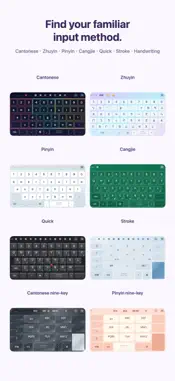
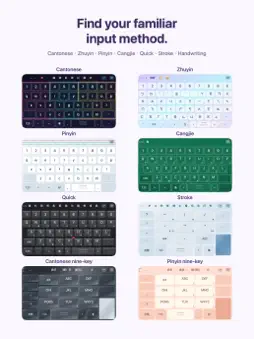
Ready to switch keyboards, or give KongType another try? Keep the Chinese input methods you know and make the keyboard your own—with handwriting on the keys, Chinese swipe, Chinese–English mixed typing, Cangjie and Quick dictionaries, and learning games. A flexible Chinese keyboard for Hong Kong, Taiwan and anyone who types in Traditional or Simplified Chinese. Choose Cantonese, Zhuyin, Mandarin Pinyin, Cangjie, Quick, Stroke or handwriting, then customize how your keyboard looks and feels. CHINESE INPUT FOR DIFFERENT REGIONS • Cantonese and Chinese–English mixed typing, with Yale and Guangzhou romanization. • Zhuyin and Mandarin Pinyin for friends in Taiwan. • Cangjie, Quick, Stroke and handwriting. • Cantonese and Mandarin nine-key or full-keyboard layouts. • Choose Traditional or Simplified Chinese input. • Japanese and Korean input with Pro for multilingual conversations. • Arrange input methods and quick-input candidates in your preferred order. HANDWRITE DIRECTLY ON THE KEYS Choose handwriting over the keycaps or a separate writing area. Switch between writing, tapping and Chinese swipe input, with one-handed layouts when you need them. CANGJIE & QUICK DICTIONARIES Look up roots and character codes, then practise with interactive typing games. Game Center leaderboards and achievements help you track your progress. MAKE YOUR KEYBOARD YOUR OWN Combine appearance, layout and typing controls to suit your habits. • Switch styles: animated cats and dogs, Hong Kong designs and different materials, with light or dark appearances. • Place your photos: adjust position and zoom, fit the whole image or fill the background. Add a photo showcase with its own size, blur and dimming controls. • Adjust the key labels: set primary and secondary text sizes separately, adjust secondary-label opacity, prioritize letters or character roots and show or hide the number row. • Find your layout: choose keyboard height, left- or right-handed layouts or a split keyboard for larger screens and landscape use. • Arrange your suggestions: adjust candidate size, density and source order, and choose how theme and mode shortcuts appear. • Set your handwriting rhythm: write over the keys or in a separate area; adjust activation sensitivity, stroke waiting time, result duration, automatic selection and key visibility while writing. • Make it sound like you: mechanical-switch, piano or recorded key sounds, with volume and haptic-strength controls. • Add personal touches: custom words, saved phrases, Daily/Work modes and your own text engraved on the space key. Some advanced personalization features are included with Pro. EVERYDAY SHORTCUTS • English-to-Chinese suggestions: preview Traditional Chinese translations and choose when to replace the English text. • Save, edit and reorder phrases and clipboard items for quick reuse. • Daily and Work modes with custom vocabulary. • Cursor control, key previews, predictions and smart punctuation. • Cute Font styles and a Traditional/Simplified switching shortcut. AI REWRITING, TRANSLATION AND REPLIES Choose a scene and tone in your keyboard, preview the AI result, then insert it. Infinite AI includes Pro features and a larger AI allowance, plus custom scenes and phrase generation. AI and Infinite AI are available only in selected App Store regions. Available features, plans and usage allowances are shown in the app. Made for iPhone and iPad, with Traditional Chinese, Simplified Chinese and English interfaces. Some personalization features require in-app purchases. Subscriptions renew automatically and can be managed or cancelled in your Apple Account. Prices, trials and usage allowances are shown in the app. Lifetime is a one-time purchase. Support: [email protected] Privacy: https://appricolt.com/kongtype-app-privacy-policy/ Terms: https://appricolt.com/kongtype-eula/
What's New
Version 1.11 2026-11-05
• Fixed quick handwriting issues in some keyboard themes. • Improved typing responsiveness and rapid input handling to reduce dropped characters. • Simplified s...• Fixed quick handwriting issues in some keyboard themes. • Improved typing responsiveness and rapid input handling to reduce dropped characters. • Simplified settings and removed the Hong Kong/Taiwan wording selection. • Customize input method and quick-input candidate order. • Improved AI tools and usability (available only in selected regions). • Updated feature information and the App Store description. Technical Analysis
Package Overview Basic metadata
Bundle ID
com.appricolt.kongtype Current Version 1.11
Minimum iOS 17.0
Package Size App Store Size
Package Metadata 0 / 0 version records
Detailed binary, privacy manifest, framework, and Info.plist results have not been indexed for this package yet. The verified App Store and archive metadata above remains available.
Developer Information
Known Version Records
0 version records with stored package metadata
Stored metadata does not guarantee a package is currently available to download.
| Details | Version / IDs | Version date | Action |
|---|