
Preview





Description
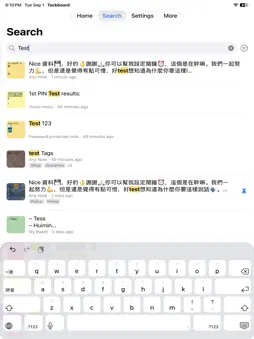
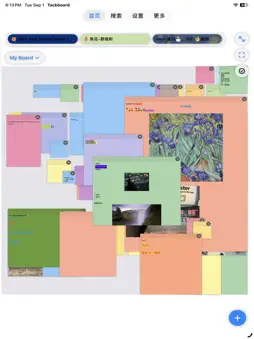
Tackboard turns your ideas into colorful sticky notes on a huge, zoomable canvas. • Quick Capture — jot text, photos, and voice memos onto notes in seconds • Organize Your Way — group notes into boards, duplicate notes across boards, add tags, and pin your favorites • Never Miss a Thing — set a time alarm (one-time on any date, or repeating weekly, monthly, or yearly) or a location reminder so nothing slips by • Rich Formatting — bulleted, numbered, and checklist lists, with Undo & Redo for every change • Links & Paste — add links as rich preview cards, and paste from the web with fonts, colors, and links kept • Sketch & Draw — freehand drawings plus clean lines, rectangles, circles, and arrows right on any note • Personalize — choose a solid color or a background photo/illustration for every note • Stay in Sync — notes, boards, tags, and settings sync automatically across iPhone, iPad, and Mac via iCloud • Full History — every edit is saved, so you can always look back and restore an earlier version • Backup & Restore — export all your notes and boards to one file and restore them anytime • Search Instantly — find any note by content, tag, or board — even text inside your photos • Attach Anything — add photos, documents, and voice memos, and merge voice clips into one • Lock Private Notes — protect sensitive notes with Face ID or a passcode Tackboard is free to use on iPhone and iPad, with an optional ad-free upgrade. One purchase removes ads everywhere, including Mac. Terms of Use: https://vincentchiu.com/tackboard/terms.html Privacy Policy: https://vincentchiu.com/tackboard/privacy.html
What's New
Version 1.6 2026-11-13
• Custom alarm repeats — repeat daily or every N days, weeks, months, or years (quarterly, every other week…), pick the months for a yearly alarm (like June 1 a...• Custom alarm repeats — repeat daily or every N days, weeks, months, or years (quarterly, every other week…), pick the months for a yearly alarm (like June 1 and September 1), and stop after a number of alarms or on a date. The Alarms list now shows which note it belongs to. • Add to… — from a note's menu, add a whole note to another note, even on another board, with its pictures, files, and voice memos. • Storage, explained — see what's using space (including Trash), jump straight to your biggest notes, set the size of new photos, shrink photos you already added, and remove leftover data. • History under control — Trim History… keeps only the newest earlier versions of each note. • Safer backups — a backup is checked in full before restoring, and Replace All only removes your old data after the restore succeeds. • Clearer iCloud messages — plain-language banners for storage full, offline, not signed in, and more. • Smarter Share sheet — when adding to a note, see each note's preview (touch and hold for the whole note), and sort boards and notes by Recent Activity or A–Z. Plus a cleanup for boards that share a name, a fix for a rare crash, and other improvements. Technical Analysis
Package Overview Basic metadata
Bundle ID
com.vincechiu.Tackboard Current Version 1.6
Minimum iOS 17.0
Package Size App Store Size
Package Metadata 0 / 0 version records
Detailed binary, privacy manifest, framework, and Info.plist results have not been indexed for this package yet. The verified App Store and archive metadata above remains available.
Developer Information
Known Version Records
0 version records with stored package metadata
Stored metadata does not guarantee a package is currently available to download.
| Details | Version / IDs | Version date | Action |
|---|