Preview

Description
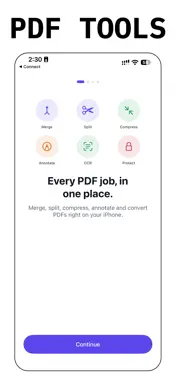
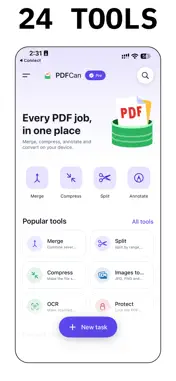
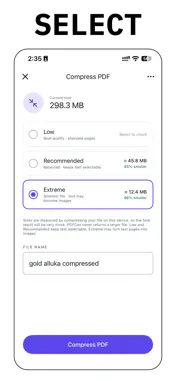
PDFCan (formerly PDFPX) is an all-in-one PDF toolkit. Merge, split, compress, annotate, fill, protect and convert PDFs on your iPhone. Your files are processed on your device. ABOUT THE NAME CHANGE (VERSION 2.0) PDFPX has been renamed PDFCan. It is the same app and the same App Store listing, updated to version 2.0. PDFPX focused on converting PDF pages to images. PDFCan keeps that and adds the tools listed below. HOW IT WORKS 1. Pick a tool on the Home screen. 2. Choose your PDFs from Files, or your photos from the photo picker. A protected PDF asks for its password. 3. Set the options, such as the compression level or the page range, and review them. 4. PDFCan processes the file on your device. You see the progress and can cancel at any time. Your original file is never changed; the result is a new file. 5. The result is saved to History automatically and you can preview it. Sharing, saving to Files and printing need PDFCan Pro. WHAT YOU CAN DO • Merge several PDFs into one, or split a PDF by page range, size or number of pages • Compress a PDF and see the size each level will give before you start • Turn photos into a PDF • Fill in PDF forms and annotate with pen, text, shapes and highlights • Rotate, reorder, extract, remove and crop pages • Add page numbers and text watermarks • Make scanned PDFs searchable with on-device text recognition (OCR) • Redact words you enter, plus emails, phone numbers and long numbers, so they are permanently removed • Protect a PDF with a password, or unlock a PDF you have the password for • Convert PDF pages to images or text, and images, text or web pages to PDF • Compare two PDFs and see what changed • Repair a damaged PDF, or save a flattened archival copy GOOD TO KNOW • PDFCan does not set a limit on file size, page count or number of photos. Very large files depend on your iPhone's memory and storage and can take longer. • OCR reads printed text, and the result depends on how clear the scan is. Compare checks the text of two PDFs, so scanned pages need OCR first. • Redaction removes the matches PDFCan finds. Check the result before you share it. • The archival copy is a flattened, archive-style PDF. It is not a certified PDF/A file. • Web page to PDF needs an internet connection to load the page. All other tools work offline. YOUR FILES STAY WITH YOU There is no account and no sign-in. PDFs are processed on your device with Apple's PDF, Vision and PencilKit frameworks, and no document is uploaded. Web page to PDF only loads the address you type. Lock PDFCan with Face ID or your passcode if you want. Open PDFs straight from Files, Mail or Safari. FREE AND PRO Processing, preview and History are free. Run any tool and preview the result; every result is saved in History automatically. Sharing, saving to Files and printing require PDFCan Pro, an auto-renewing subscription, weekly or yearly. Prices are shown in the app before you subscribe. SUBSCRIPTION TERMS Payment is charged to your Apple ID account at confirmation of purchase. The subscription renews automatically unless it is canceled at least 24 hours before the end of the current period. Your account is charged for renewal within 24 hours before the end of the current period. Manage or cancel any time in Settings > your name > Subscriptions on your iPhone. Terms of Use (Apple Standard EULA): https://www.apple.com/legal/internet-services/itunes/dev/stdeula/ Privacy Policy and Support: https://1kbapps.com/pdfcan/ Questions: [email protected]
What's New
Version 2.0 2026-11-12
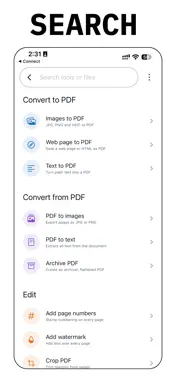
Version 2.0: PDFPX is now PDFCan. It is the same app and the same App Store listing. PDFPX converted PDF pages to images; PDFCan keeps that and is now an all-i...Version 2.0: PDFPX is now PDFCan. It is the same app and the same App Store listing. PDFPX converted PDF pages to images; PDFCan keeps that and is now an all-in-one PDF toolkit. How it works: pick a tool, choose your file, set the options, and PDFCan processes it on your device. The result is saved to History and you can preview it. New in 2.0 • Merge, split, extract, remove, reorder, rotate and crop PDF pages • Compress with the size of each level shown before you start; repair and protect PDFs, or unlock one you have the password for • Turn photos into a PDF, with no app limit on the number of photos • Fill forms and annotate • Add page numbers and watermarks, redact text, compare two PDFs • Make scans searchable with on-device OCR • Convert PDF to images or text, and images, text or web pages to PDF • Preview a protected PDF by entering its password • Results are saved to History automatically • Search tools and files from the Home screen • A short welcome tour with a live sample merge • Optional Face ID lock, and Open in PDFCan from Files, Mail and Safari • Processing, preview and History are free; sharing, saving to Files and printing require an active subscription (PDFCan Pro, weekly or yearly) Technical Analysis
Package Overview Basic metadata
Bundle ID
com.1kbapps.pdfpx Current Version 2.0
Minimum iOS 18.0
Package Size App Store Size
Package Metadata 1 / 1 version records
Detailed binary, privacy manifest, framework, and Info.plist results have not been indexed for this package yet. The verified App Store and archive metadata above remains available.
Developer Information
Known Version Records
1 version record with stored package metadata
Stored metadata does not guarantee a package is currently available to download.
| Details | Version / IDs | Version date | Action |
|---|---|---|---|
| 6.88 MB | v1.0 App Store ID: 884017996Build: 1.0 | 2026-04-03 21:16:45 | Get Version |